pctechguide.com

  • Home
  • Guides
  • Tutorials
  • Articles
  • Reviews
  • Glossary
  • Contact

Pentium 4 Fan

A boxed Pentium 4 processor includes a high quality unattached fan heatsink specifically designed to provide sufficient cooling to the Pentium 4 processor when used in a suitable chassis environment.
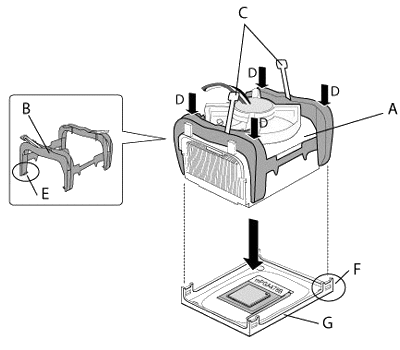
Fan/Heatsink

The fan heatsink and clip assembly (A) comprises:

  • B: Clip frame
  • C: Clip levers
  • D: Clip frame corners
  • E: Clip frame latch
  • F: Retention mechanism hook.

and attaches to the motherboard-mounted retention mechanism (G).


Normally, there will be thermal interface material attached to the bottom of the processor’s fan heatsink. Take care not to damage this. Alternatively, use the enclosed syringe to apply all of the thermal interface material provided to the IHS surface of the processor.
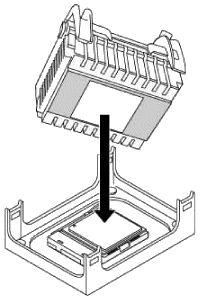
Align

Align the heatsink and clip assembly with the retention mechanism (the fan heatsink is symmetrical) and place it on the processor. Allow the heatsink base to compress (without rotating or twisting) the thermal interface material over the surface of the processor’s integrated heat spreader.
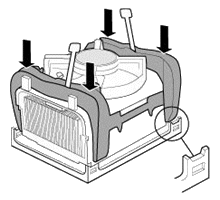
Secure

With the clip levers in the upward position, push down on all four clip frame corners to secure the clip frame latches to the retention mechanism hooks, making sure the processor fan cable is free from any obstruction and is not trapped under clip frame.


It is important to not allow the heatsink to rotate or twist on the processor’s integrated heat spreader. Securing the fan heatsink while closing the clip levers will ensure the thermal interface material is not damaged and the processor will operate correctly.
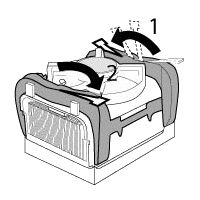
Close

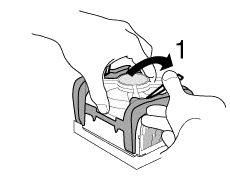
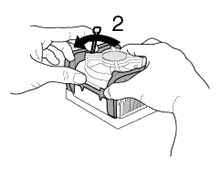
Close the clips levers in opposing directions, one at a time. The levers require some force to be completely closed.
Close

First, close clip lever 1 while holding the topside of the fan heatsink with your hand.
Close

Then, close clip lever 2 while holding the topside of the fan heatsink with your other hand.

Once the clip levers are closed, verify that the heatsink is securely retained and that the clip frame latches are properly engaged with the retention mechanism hooks.
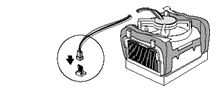
Fan

Finally, connect the processor fan cable to the motherboard fan power header. Consult the motherboard manual to determine the correct fan header to use.
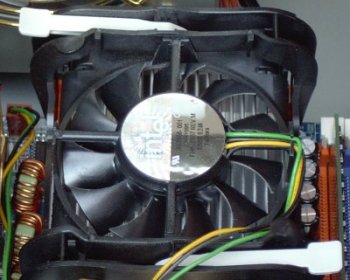
Installed

When installed, the fan heatsink and clip assembly may cause the motherboard to slightly bend or flex. This is nothing to be concerned about, and provides the proper mechanical support for the processor (with attached fan heatsink and clip assembly) and helps prevent against damage during system shipment.

  • Pentium 4 CPU
  • Pentium 4 Fan
  • Pentium 4 PSU
  • Pentium 4 Memory
  • Pentium 4 Removal

Filed Under: How to Install a Pentium 4 CPU

Latest Articles

IStartSurf.com Virus Removal

iStartSurf is another bothersome browser hijacker that is promoted by free download. Like many other hijackers, it will change your browser homepage when it installs itself. It will change it to iStartSurf.com and it will change the default serch engine to Yahoo. This may not seem like a big deal … [Read More...]

How to Turn on Firewall in Windows 7

Keeping your computer secure is important if connected to the Internet. One of the best forms of protection you can implement is a firewall. If you already have a firewall device between you and your modem, then you are in good shape. However, if you have a computer directly connected to a network … [Read More...]

DVDs – digital versatile disks – how they’re made and how they work

At first glance, a DVD disc can easily be mistaken for a CD: both are plastic discs 120mm in diameter and 1.2mm thick and both rely on lasers to read data stored in pits in a spiral track. And whilst it can be said that the similarities end there, it's also true that DVD's seven-fold increase … [Read More...]

Importance of Inbound Marketing in the Digital Age

A couple of months ago, Zacks reported that Hubspot was starting to make some major changes to its inbound marketing strategy. They talk a lot about … [Read More...]

Damage Control Strategies for Resolving Online PR Crises

Last July, Astrologer faced a major crisis after its CEO went viral at a ColdPlay concert when having an affair. This was just one of the many times a … [Read More...]

AI is Not Killing Computer Jobs Like Doomers Projected

There is no denying the reality that AI technology has played a massive role in disrupting our lives. A growing number of people claim that AI … [Read More...]

Everything You Need to Know About Sourcing Circuit Boards From U.S. Suppliers

In This Article This article includes: Why Source PCBs From the United States?How to Get a Quote From a U.S.-Based PCB ManufacturerThe Top U.S. … [Read More...]

Top Taplio Alternatives in 2025 : Why MagicPost Leads for LinkedIn Posting ?

LinkedIn has become a strong platform for professionals, creators, and businesses to establish authority, grow networks, and elicit engagement. Simple … [Read More...]

Shocking Cybercrime Statistics for 2025

People all over the world are becoming more concerned about cybercrime than ever. We have recently collected some statistics on this topic and … [Read More...]

Guides

  • Computer Communications
  • Mobile Computing
  • PC Components
  • PC Data Storage
  • PC Input-Output
  • PC Multimedia
  • Processors (CPUs)

Recent Posts

MSI 890GXM-G65 Review

Price: $127. The MSI 890GXM-G65 motherboard packs a lot of power in a very small space. Bang for buck you are getting a lot for your money.is an Intel … [Read More...]

Super DLT Tape Storage

One of the most significant of the new formats is the next generation of Digital Linear Tape (DLT), otherwise known as … [Read More...]

Website Technical Audit: What Should Be Checked on the Website?

If you want your company’s website to perform effectively, you need to do a website technical audit. It will improve the customer's experience and … [Read More...]

[footer_backtotop]

Copyright © 2026 About | Privacy | Contact Information | Wrtie For Us | Disclaimer | Copyright License | Authors