The disc platters are mounted on a single spindle that spins at a typical 10,000rpm. On EIDE and SCSI drives the disk controller is part of the drive itself. It controls the drive’s servo-motors and translates the fluctuating voltages from the head into digital data for the CPU.
Data is recorded onto the magnetic surface of a platter in exactly the same way as it is on floppies or digital tapes. Essentially, the surface is treated as an array of dot positions, with each domain’ of magnetic polarisation being set to a binary 1 or 0. The position of each array element is not identifiable in an absolute sense, and so a scheme of guidance marks helps the read/write head find positions on the disk. The need for these guidance markings explains why disks must be formatted before they can be used.
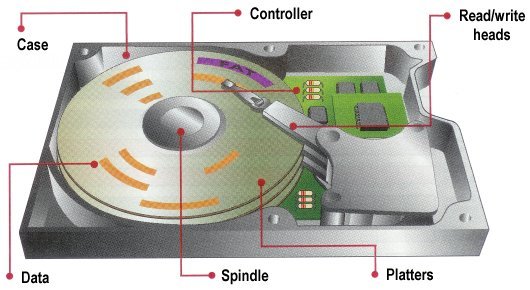
When it comes to accessing data already stored, the disk spins round very fast so that any part of its circumference can be quickly identified. The drive translates a read request from the computer into reality. There was a time when the cylinder/head/sector location that the computer worked out really was the data’s location, but today’s drives are more complicated than the BIOS can handle, and they translate BIOS requests by using their own mapping.
Interleave Factor
In the past it was also the case that a disk’s controller did not have sufficient processing capacity to be able to read physically adjacent sectors quickly enough, thus requiring that the platter complete another full revolution before the next logical sector could be read. To combat this problem, older drives would stagger the way in which sectors were physically arranged, so as to reduce this waiting time. With an interleave factor of 3, for instance, two sectors would be skipped after each sector read. An interleave factor was expressed as a ratio, N:1, where N represented the distance between one logical sector and the next. The speed of a modern hard disk drive with an integrated controller and its own data buffer renders the technique obsolete.
The rate at which hard disk capacities have increased over the years has given rise to a situation in which allocating and tracking individual data sectors on even a typical drive would require a huge amount of overhead, causing file handling efficiency to plummet. Therefore, to improve performance, data sectors have for some time been allocated in groups called clusters. The number of sectors in a cluster depends on the cluster size, which in turn depends on the partition size.
Reading Data
When the computer wants to read data, the operating system works out where the data is on the disk. To do this it first reads the FAT (File Allocation Table) at the beginning of the partition. This tells the operating system in which sector on which track to find the data. With this information, the head can then read the requested data. The disk controller controls the drive’s servo-motors and translates the fluctuating voltages from the head into digital data for the CPU.
More often than not, the next set of data to be read is sequentially located on the disk. For this reason, hard drives contain between 256KB and 8MB of cache buffer in which to store all the information in a sector or cylinder in case it’s needed. This is very effective in speeding up both throughput and access times. A hard drive also requires servo information, which provides a continuous update on the location of the heads. This can be stored on a separate platter, or it can be intermingled with the actual data on all the platters. A separate servo platter is more expensive, but it speeds up access times, since the data heads won’t need to waste any time sending servo information.
However, the servo and data platters can get out of alignment due to changes in temperature. To prevent this, the drive constantly rechecks itself in a process called thermal recalibration. During multimedia playback this can cause sudden pauses in data transfer, resulting in stuttered audio and dropped video frames. Where the servo information is stored on the data platters, thermal recalibration isn’t required. For this reason the majority of drives embed the servo information with the data.
- Hard disk (hard drive) construction
- Hard Disk (hard drive) Operation
- Hard disk (hard drive) format – the tracks and sectors of the hard disk
- File systems (FAT, FAT8, FAT16, FAT32 and NTFS) explained
- Hard Disk (Hard Drive) Performance – transfer rates, latency and seek times
- Hard Disk AV Capability
- Hard Disk Capacity
- Hard Disk Capacity Barriers
- Hard Disk MR Technology
- Hard Disk GMR Technology
- Hard Disk Pixie Dust
- Hard Disk Longitudinal Recording
- Hard Disk Perpendicular Recording
- RAID – Redundant Arrays of Inexpensive Disks
- Hard Disk SMART Drives
- Hard Disk MicroDrives
- Hard Disk OAW Technology
- Hard Disk PLEDM
- Hard Disk Millipede
- Guide to Western Digital’s GreenPower hard drive technology
- Solid state hard drive (SSD) technology guide
thanks a lot for sharing this…
that’s very important for me
really it is worth reading,thank u very much
Man, thanks for your sharing! I learn a lot from you.
ho
please list some of the common input output buses that could be used in disk drives
I can’t off the top of my head. I think we have an article on the site covering this already but I don’t have the time at the moment to look for it.