Nearly 99 percent of all video displays sold in 1998 were connected using an analogue VGA interface, an ageing technology that represents the minimum standard for a PC display. In fact, today VGA represents an impediment to the adoption of new flat panel display technologies, largely because of the added cost for these systems to support the analogue interface. Another fundamental is the degradation of image quality that occurs when a digital signal is converted to analogue, and then back to digital before driving an analogue input LCD display.
The autumn of 1998 saw the formation of Digital Display Working Group (DDWG) – including computer industry leaders Intel, Compaq, Fujitsu, Hewlett-Packard, IBM, NEC and Silicon Image – with the objective of delivering a robust, comprehensive and extensible specification of the interface between digital displays and high-performance PCs. In the spring of 1999 the DDWG approved the first version of the Digital Visual Interface (DVI) specification based on Silicon Image’s PanelLink technology, using a Transition Minimised Differential Signaling (TMDS) digital signal protocol.
Whilst primarily of benefit to flat panel displays – which can now operate in an standardised all-digital environment without the need to perform an analogue-to-digital conversion on the signals from the graphics card driving the display device – the DVI specification potentially has ramifications for conventional CRT monitors too.
Most complaints of poor image quality on CRTs can be traced to incompatible graphics controllers on the motherboard or graphics card. In today’s cost-driven market, marginal signal quality is not all that uncommon. The incorporation of DVI with a traditional analogue CRT monitor will allow monitors to be designed to receive digital signals, with the necessary digital-to-analogue conversion being carried out within the monitor itself. This will give manufacturers added control over final image quality, making differentiation based on image quality much more of a factor than it has been hitherto. However, the application of DVI with CRT monitors is not all plain sailing.
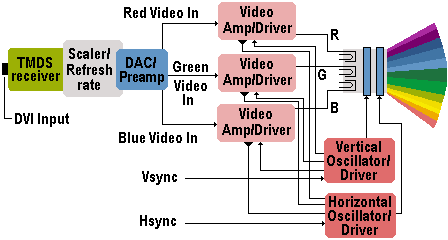
One of the drawbacks is that since it was originally designed for use with digital flat panels, DVI has a comparatively low bandwidth of 165MHz. This means that a working resolution of 1280×1024 could be supported at up to an 85Hz refresh rate. Although this isn’t a problem for LCD monitors, it’s a serious issue for CRT displays. The DVI specification supports a maximum resolution of 1600×1200 at a refresh rate of only 60Hz – totally unrealistic in a world of ever increasing graphics card performance and ever bigger and cheaper CRT monitors.
The solution is the provision of additional bandwidth overhead for horizontal and vertical retrace intervals – facilitated through the use of two TMDS links. With such an arrangement digital CRTs compliant with VESA’s Generalised Timing Formula (GTF) would be capable of easily supporting resolutions exceeding 2.75 million pixels at an 85Hz refresh rate. However, implementation was to prove to be difficult, with noise, reflections, skew and drive limitations within DVI chips making it difficult to achieve the theoretical potential of a dual DVI link. In the event it was not until 2002 that the first dual-link DVI graphics cards began to emerge.
Another problem is that it’s more expensive to digitally scale the refresh rate of a monitor than using a traditional analogue multisync design. This could lead to digital CRTs being more costly than their analogue counterparts. An alternative is for digital CRTs to have a fixed frequency and resolution like a LCD display and thereby eliminate the need for multisync technology.
DVI anticipates that in the future screen refresh functionality will become part of the display itself. New data will need to be sent to the display only when changes to the data need to be displayed. With a selective refresh interface, DVI can maintain the high refresh rates required to keep a CRT display ergonomically pleasing while avoiding an artificially high data rate between the graphics controller and the display. Of course, a monitor would have to employ frame buffer memory to enable this feature.
The first DVI-compliant controller designed specifically for implementation in digital CRT monitors came to market during 2001, and by the end of that year DVI had become firmly and the sales of flat panels had surged to such an extent that prices fell dramatically. However, it remained unclear as to how relevant DVI was going to be for conventional monitors, with some convinced that DVI was the future of CRT technology and others remaining sceptical.
- The Anatomy of a CRT Monitor (and CRT TVs)
- CRT Monitor Resolution and Refresh Rates (VSF)
- Monitor Interlacing
- What is the Dot Pitch of a Computer Monitor
- Dot Trio Monitors
- Grill Aperture Monitors
- Monitor Technologies: Slotted Mask
- Enhanced Dot Pitch Monitors
- Electron Beam Monitors
- Monitor Controls
- The Different Types of CRT Monitors – From ShortNeck to FST
- What is a Digital CRT Monitor and How Does It Work
- What is LightFrame Technology?
- Safety Standards For Computer Monitors
- TCO Monitor Standards
- Monitor Ergonomics
cathode rays tube, nd nothing
Hello,
i should design a picture on crt
and then impelement
i cant find flowchart for design