pctechguide.com

  • Home
  • Guides
  • Tutorials
  • Articles
  • Reviews
  • Glossary
  • Contact

ADR Tape Technology

Advanced Digital Recording technology is the product of seven years of research on the part of electronics industry giant Philips. To provide the focus needed to successfully bring ADR to market, Philips created a spin-off company – OnStream. The first ADR products were launched in the spring of 1999, in the shape of an IDE drive capable of delivering 15GB native/30GB compressed capacity per tape cartridge.

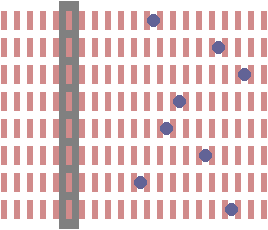
Full tape servo refers to the drives ability to continuously monitor the tape so as to be able to precisely re-position the in the event of the tape moving up or down even the slightest amount. The result is a high track density of 192 on ADR’s 8mm tape.
ADR

ADR’s unique ability to read or write all eight tracks of data simultaneously enables it to deliver impressive transfer rates at relatively low speeds, which confers other benefits. Tape wear is minimal and it is possible to distribute error correction code both horizontally and vertically. The result is an ECC which is significantly stronger than that produced by more conventional systems when the error correction code is distributed in one dimension only, along the data track. In fact, ADR’s ECC is so robust it is possible for up to 24 of its 192 tracks to be scratched off the entire length of the tape and still provide 100% >data recovery for the missing tracks.

Together, ADR’s full tape servo and multi-channel recording features are responsible for the drive’s outstanding data reliability specification of only one unreadable bit in every 1019 bits recorded. This is 10,000 times better than the PC’s primary data storage device, the hard disk drive.

ADR also uses an advanced media defect mapping technique which results in data being recorded twice as efficiently as with a traditional desktop PC tape drive. The technique is commonly used in tape systems to overcome the limitations in the process of producing recording media by allowing a tape drive to map areas of the media that are defective and thereby avoid writing data to these locations. Typical desktop tape drives require two passes to ensure data is not written over a media defect. First, a pass to write the data; second, a pass to verify the data and then re-write it elsewhere if a defect is encountered. With ADR, media defects are handled in a single pass. As the head travels down the tape it is constantly reading the embedded servo signals located on both sides of the data tracks. When the system stops detecting the servo signals, it knows there is a media defect and maps that region as defective. Once the head detects the correct servo signals again, it knows the media is good and starts writing data again.

Significantly, while competing technologies such as DAT and Travan have reached the end of their product roadmaps, year 2000 sees ADR at the beginning of its product development life cycle with room to grow for several generations, both in terms of capacity and data transfer rate:

Capacity improvement potential DTR improvement potential
Current native/compressed capacity 25/50GB Current native/compressed DTR 2/4MBps
Longer tape x2 Tape speed x3.6
Wider tape x3 Increased channels x3
Greater track density x4 Greater bit density x3
Greater bit density x3 PRML compression x2
PRML x2
Future native/compressed capacity 3600/7200GB Future native/compressed DTR 130/260MBps
  • QIC Mammoth
  • Travan Tape Storage
  • DAT Tape Storage
  • 8mm Tape Storage
  • AIT – Advanced Intelligent Tape – family of tape storage
  • DLT Tape Storage
  • Super DLT Tape Storage
  • ADR Tape Technology
  • Tape Storage Linear Tape Open
  • VXA Tape Storage technology
  • Robotic Tape Storage Applications
  • Tape Storage Mammoth

Filed Under: Tape Storage

Latest Articles

Hard Disk Capacity Barriers

Whilst Bill Gates' assertion that 640KB ought to be enough for anyone is the most famous example of lack of foresight when it comes to predicting capacity requirements, it is merely symptomatic of a trait that has afflicted the PC industry … [Read More...]

Testing the External DV Converter

To open Movie Maker, click Start > Programs > Accessories > Windows Movie Maker. Select Capture from video device to launch the Video Capture Wizard. Enter a name for the file you're about to capture and a location where you wish to store it. Select the DV-AVI format … [Read More...]

Capturing Digital Video

The digitisation of the analogue TV signal is performed by a video capture card which converts each frame into a series of bitmapped images to be displayed and manipulated on the PC. This takes one horizontal line at a time and, for the PAL … [Read More...]

Everything You Need to Know About Sourcing Circuit Boards From U.S. Suppliers

In This Article This article includes: Why Source PCBs From the United States?How to Get a Quote From a U.S.-Based PCB ManufacturerThe Top U.S. … [Read More...]

Top Taplio Alternatives in 2025 : Why MagicPost Leads for LinkedIn Posting ?

LinkedIn has become a strong platform for professionals, creators, and businesses to establish authority, grow networks, and elicit engagement. Simple … [Read More...]

Shocking Cybercrime Statistics for 2025

People all over the world are becoming more concerned about cybercrime than ever. We have recently collected some statistics on this topic and … [Read More...]

Gaming Laptop Security Guide: Protecting Your High-End Hardware Investment in 2025

Since Jacob took over PC Tech Guide, we’ve looked at how tech intersects with personal well-being and digital safety. Gaming laptops are now … [Read More...]

20 Cool Creative Commons Photographs About the Future of AI

AI technology is starting to have a huge impact on our lives. The market value for AI is estimated to have been worth $279.22 billion in 2024 and it … [Read More...]

13 Impressive Stats on the Future of AI

AI technology is starting to become much more important in our everyday lives. Many businesses are using it as well. While he has created a lot of … [Read More...]

Guides

  • Computer Communications
  • Mobile Computing
  • PC Components
  • PC Data Storage
  • PC Input-Output
  • PC Multimedia
  • Processors (CPUs)

Recent Posts

Get around Facebook Quick With These Shortcuts

Keyboard shortcuts help you get around much faster than using the mouse. The mouse is a useful gadget, but there is nothing like being able to cruise … [Read More...]

LP to CD Connection Checks

You can check that you've successfully connected your hi-fi to your PC using a couple of utilities that are provided with Windows. Click Start … [Read More...]

WHAT IS CLOUD COMPUTING AND WHAT ARE ITS MAIN BENEFITS?

Users are Increasingly using cloud computing to store their information, which is replacing local storage. The business digitization process goes … [Read More...]

[footer_backtotop]

Copyright © 2026 About | Privacy | Contact Information | Wrtie For Us | Disclaimer | Copyright License | Authors