pctechguide.com

  • Home
  • Guides
  • Tutorials
  • Articles
  • Reviews
  • Glossary
  • Contact

How To Do a Clean Installation of Windows XP – Phase 1

Tools

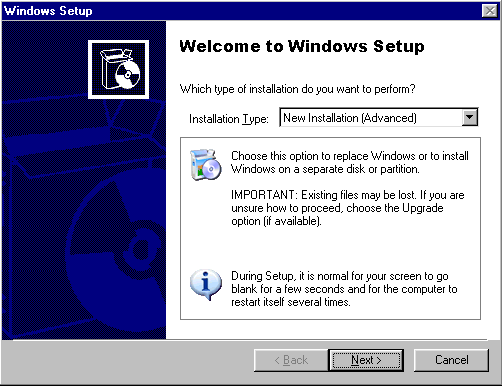
Select New Installation (Advanced) and click Next.
Tools

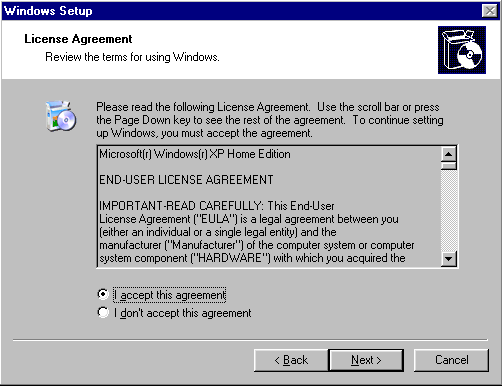
Indicate your acceptance and click Next.
Tools

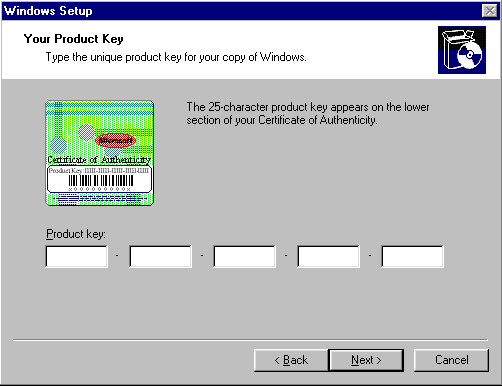
Setup prompts you to enter the Product Key.

Type the Product Key in the spaces provided. The Product Key is located either on the Certificate of Authenticity (COA) or on the backliner of your Windows XP CD. If the number you type is not accepted, check the following:

  • Make sure the Caps Lock key is not on.
  • If you are using the keypad to the right of your keyboard, make sure the Num Lock key is on.
Tools

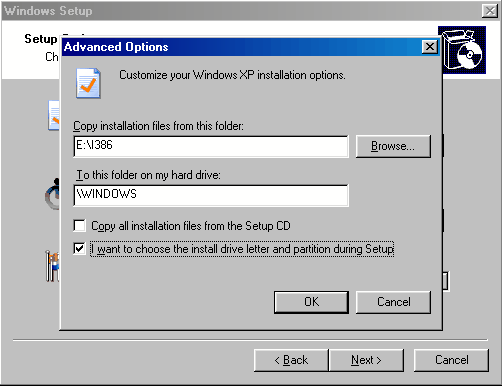
Since we want to create a dual-boot system, click Advanced Options.
Tools

Since we want to ensure Windows XP is installed to the second hard disk drive, check the I want to choose the install drive letter and partition during Setup option and click OK.

Tools

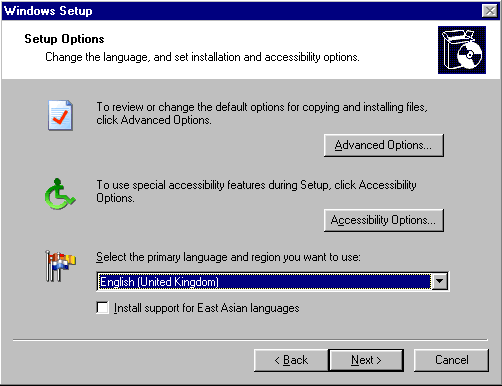
When presented with the Setup Options screen again, make sure you Select the primary language and region you want to use, and click Next.

  • WinXP Installation Planning
  • Windows XP Upgrade Advisor
  • WinXP Installation Information Collection
  • WinXP Installation
  • How To Do a Clean Installation of Windows XP – Phase 1
  • Dynamic Update – How to do a clean installation of Windows XP
  • Preparing Installation – How to do a clean installation of Windows XP
  • WinXP Installation Phase 4
  • WinXP Installation Phase 5
  • WinXP Windows Update
  • WinXP Driver Installation
  • WinXP Installation Tuning
  • Files and Settings Transfer – How to do a clean installation of Windows XP

Filed Under: How To Do a Clean Installation of WinXP Tagged With: guide to installing WinXP, Windows XP installation, WinXP installation, WinXP installation guide

Latest Articles

Spyware Doctor with Antivirus

Spyware Doctor with Antivirus Review

PROS: Active anti-virus and anti-spyware protection as well as e-mail protection and protection against malware, rootkits and the like. CONS: It's hard to think of one. Post us a comment if you can find something wrong with Spyware Doctor with Antivirus. OVERVIEW: Spyware Doctor with … [Read More...]

Easiest Wat to Transfer Data From a Failing Computer to a New Computer

I really wish there was such a thing as easy but having done hundreds of data transfers I can tell you that many situations require different techniques.  With that said we tackle the most common ways of getting data from an old or failing computer to a new system. Deciding on What to … [Read More...]

AMD 3DNow

With the launch of K6-2, in May 1998, AMD stole something of a march on Intel, whose similar Katmai technology was not due for release until up to a year later, in the first half of 1999. By the end of March 1999 the installed base of 3DNow! technology-enhanced PCs was estimated to have reached … [Read More...]

Everything You Need to Know About Sourcing Circuit Boards From U.S. Suppliers

In This Article This article includes: Why Source PCBs From the United States?How to Get a Quote From a U.S.-Based PCB ManufacturerThe Top U.S. … [Read More...]

Top Taplio Alternatives in 2025 : Why MagicPost Leads for LinkedIn Posting ?

LinkedIn has become a strong platform for professionals, creators, and businesses to establish authority, grow networks, and elicit engagement. Simple … [Read More...]

Shocking Cybercrime Statistics for 2025

People all over the world are becoming more concerned about cybercrime than ever. We have recently collected some statistics on this topic and … [Read More...]

Gaming Laptop Security Guide: Protecting Your High-End Hardware Investment in 2025

Since Jacob took over PC Tech Guide, we’ve looked at how tech intersects with personal well-being and digital safety. Gaming laptops are now … [Read More...]

20 Cool Creative Commons Photographs About the Future of AI

AI technology is starting to have a huge impact on our lives. The market value for AI is estimated to have been worth $279.22 billion in 2024 and it … [Read More...]

13 Impressive Stats on the Future of AI

AI technology is starting to become much more important in our everyday lives. Many businesses are using it as well. While he has created a lot of … [Read More...]

Guides

  • Computer Communications
  • Mobile Computing
  • PC Components
  • PC Data Storage
  • PC Input-Output
  • PC Multimedia
  • Processors (CPUs)

Recent Posts

CD-RW Installation Optimization

To achieve top speeds for reading and writing with your CD-ReWriter drive, direct memory access (DMA) must be enabled for the drive. To enable DMA … [Read More...]

Correct the 401 Unauthorized Error

The 401 Error is a common HTML Error Code you may encounter while surfing on the Internet. The error is usually shown because the page you are trying … [Read More...]

Cut Energy Costs in Data Center

If you have a data center, there is a good chance that it is eating up energy and costing you a pretty penny. The costs of maintaining a data center … [Read More...]

[footer_backtotop]

Copyright © 2026 About | Privacy | Contact Information | Wrtie For Us | Disclaimer | Copyright License | Authors