 HDD Regenerator
HDD Regenerator is a program that is needed by all data recovery professionals. It’s not really meant to recover files, but it is great for repairing bad sectors on hard drives. Once this is accomplished, then running a data recovery program on your drive should produce most, if not all of your lost data.
I personally have a lot of experience with HDD regenerator. Time and again I was contacted by other repair shops and companies as well as end users came my way after a repair shop was unable to recover the persons data. Data recovery is an art. There is no 1 single right way. HDD regenerator is a great first step for checking and repairing bad sectors on drives. It does take a LONG time to scan and repair drives. With hard drives getting bigger and bigger this only seems to take longer and longer so patience is a must when using this tool.

Program: HDD Regenerator
Company: Abstradrome
Supported OS: Windows XP, Vista, 7
Price: $59.95 USD (30-Day Money Back Guarantee)
Overall Rating: 10 out of 10
What It Does:
HDD Regenerator scans and attempts to repair any bad sectors on a given hard drive.
Installation:
HDD Regenerator needs under 15MB of space and took less than 20 seconds to install.
Details:
The user will have three options once this program is installed. I chose the first one, which is supposed to fix a hard drive by repairing any bad sectors. You will not need the other options, unless the drive is so corrupted you can’t even load Windows. I suggest you run this program in DOS mode, with the bootable cd/dvd option.
Let me give you some REAL Life Examples of how this product has worked for me!
Family Photos Fixed
I once had a family contact my because their hdd had crashed on them. All of their baby’s pictures were on that drive. They were desperate to recover these pictures, so I went to work straight away.
I took there hard drive and used an adaptor to mount it onto my own computer at my store. I could hear the platter being scratched. Windows and my Recover My Files program were not seeing the drive, so I booted the the HDD Regenerator disc and ran the repair program. It did take the program 2 days to run, but I managed to repair over 100K sectors. Then I booted into Windows and used Recover My Files to get back appr. 97% of their pictures. Some pictures had lines on them, so I know that the repair wasn’t completely done, but I was able to fix it almost completely.
The family was excited to get back so many of the pictures; they had thought them gone for sure. I wouldn’t have been able to do this if not for HDD Regenerator and I have yet to find another program that comes even close in comparison.
Crashed Business Data Base
One night I was called into a restaurant by an overly anxious owner. His business computer had taken a dive, and the support person that worked for the company that ran the restaurant software had just told him that the computer was done, the date unrecoverable. There was no backup to his system and he had everything on this computer, including all the sales and employee hours. He was in a fix!
After looking over the computer for a minute, I realized he needed to recover the corrupted ntfs partition. Mechanically speaking, the hard drive was failing, but it could still spin up. Once again, I had to use the HDD regenerator to repair bad sectors found on the hard drive. It took a few hours to complete, then I used Recover My Files and repaired the NTFS drive and managed to recover the partition. I had to clone this drive onto another one that wasn’t damaged. I was able to recover all the the information held on the computer. I installed the new hard drive and then sold the owner a data backup product, so they need not ever worry about this problem again.
While I have many other stories to tell, I’m sure you get the point: when you need this product, you really need this product! Now, let’s continue with the installation process. I scanned a 4GB drive for any bad sectors. (Yes, I know this an old drive).
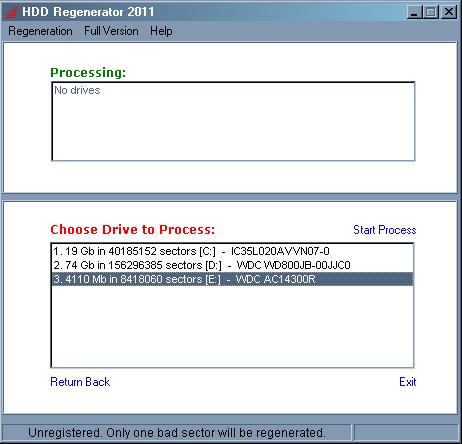
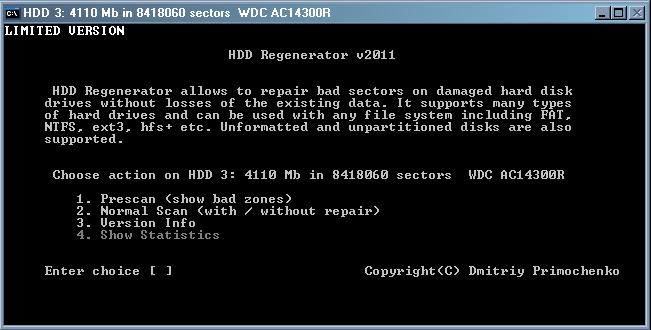
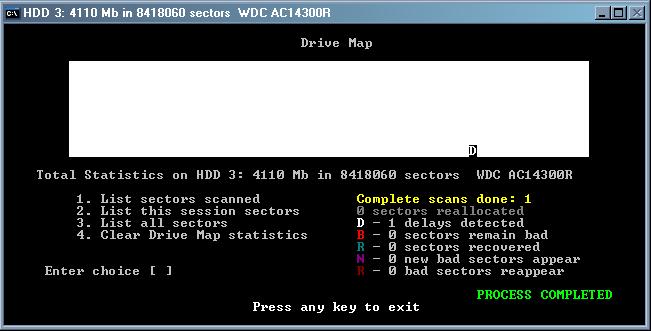
There were four options to choose from after the drive was selected and a DOS based subsystem came up on the screen. Doing a prescan will only detect bad and/or delayed sectors; this takes almost as long as just doing a normal scan, which will then also allow for recovery of the sectors, while that prescan option will not. When finished, all the info with statistics and the like will show up, so you know what has already been done on your computer.
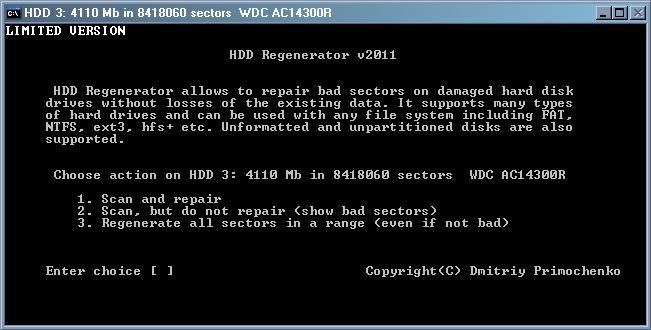
If you choose to perform a normal scan, you will have a few options available to you. The choice is all yours, just choose from the options below:
While in scan/repair cycle, this is what you will see on your computer:
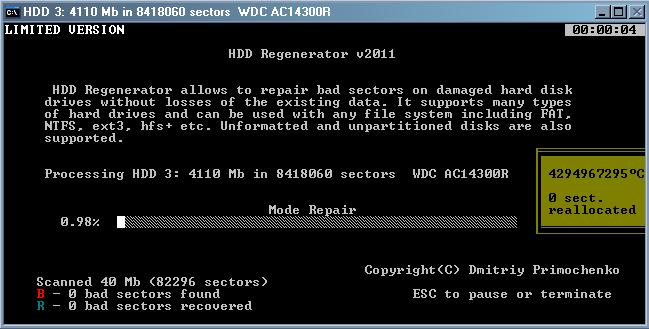
You can also choose to do multiple scans together. They will all be shown in the processing box.

When done, you can then view the generated data from HDD Regenerator.
Ease Of Use:
HDD Regenerator has a super easy interface andshould be sufficient for novice use.
Summary:
Repairing and recovering bad sectors is a breeze with HDD Regenerator. It installs quickly, and generally is pretty quick in performing its tasks. It’s easy to use and I would definitely recommend this product to anyone who needs it.
PROS:
Installs in moments, takes up hardly any space and is very accurate in its performance.
CONS:
It will slow down considerably if you have a very large drive (like 1 TB), or if there are a lot of bad sectors on the drive.
What to Do Next?