pctechguide.com

  • Home
  • Guides
  • Tutorials
  • Articles
  • Reviews
  • Glossary
  • Contact

Trackballs

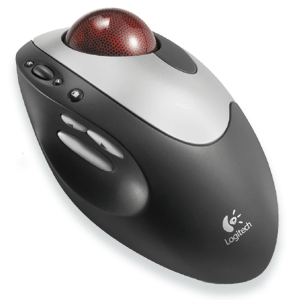
A trackball is a pointing device consisting of a ball housed in a socket containing sensors to detect rotation of the ball about two axes – like a mouse lying on its back. The cursor is moved about the screen by a user rolling the ball with their thumb, fingers, or the palm of their hand. There are usually one to three buttons next to the ball, which are in the same way as mouse buttons.

The principal advantages of trackballs over mice is that since it is stationary, it requires less space to use, and it can be operated on any type of surface, including the user’s lap. These attributes make a trackball particularly suitable for use with portable computers, and they were widely used on laptop PCs before the advent of the touchpad. A further benefit is that because there is no need to physically move the device around, they offer ergonomic relief from Repetitive Strain Injury (RSI) and Carpal Tunnel Syndrome (CTS).

Like traditional mice, trackballs can be communicate with a PC through serial or USB connections, or in the case of wireless mice, via infrared or radio frequency.

The result of more than four years’ research in the 1990s, the principle of Logitech’s Marble Optical Technology is based on the optical measurement of movement, whereby a camera assesses the degree of shift between successive snapshots. Like Microsoft’s IntelliEye technology, the system essentially functions in a similar way to the eye, with the entire evaluation taking place within the sensor.

When the user rotates the patterned ball of a Marble trackball, an image of the ball, illuminated by a pair of LEDs, passes through a lens focused on the Marble sensor, where it is sampled 1000 times per second. The sensor is composed of 93 small cells working independently as a neural network. Each of them can detect a unitary motion by sharing information with its direct neighbours, similar to the way a human eye operates. The sensor then computes the average of the displacement returned by all these individual cells for successive samples and passes this information to a microprocessor in the trackball. This transmits this information to the host computer, either via a cable or a wireless communications protocol in the case of a cordless device. The trackball driver software then renders the cursor on the screen.
Logitech

This system of collective computation makes for a highly reliable system. If any part of the sensor is obstructed because of dirt on the window, a scratch, or any other reason, the impact on the result of the collective calculation will be negligible. The system is also very independent of the light quantity or uniformity reaching the sensor ball, further increasing its robustness.

  • Keyboards
  • Ergonomic Keyboards
  • Opto-Mechanical mice
  • Optical Mice
  • Cordless Input Devices
  • Laser Mice
  • Trackballs
  • Joysticks
  • Input Device Interfaces
  • Touchscreens

Filed Under: Input Devices

Latest Articles

UI Regression Testing as a Tool to Build a User-Friendly Product

Developing a new product, whether it is an application or an online website, is a quite challenging task, which requires a well-planned and structured approach and in-depth preparation from the entire team. You can invest a lot of money in a new project but get negative reviews and sales decline. … [Read More...]

Updating Your Creative Soundcard Drivers

It's wise to check periodically to see if updated drives have been released for your sound card. For the Creative Audigy card, this means going to the appropriate Support page for your country or region, and clicking on DOWNLOAD DRIVERS. Make the appropriate selections and click … [Read More...]

Fakealert | Fake Alert Trojan

FakeAlert and other Security Client warnings like Fake Alert, FakeAlert/Renos, Fake Alert Trojan ect...  You get the point. This is a generic security warning normally shown when a FALSE SECURITY product is installed on the end users computer.  If your security client has shown a warning … [Read More...]

Top Taplio Alternatives in 2025 : Why MagicPost Leads for LinkedIn Posting ?

LinkedIn has become a strong platform for professionals, creators, and businesses to establish authority, grow networks, and elicit engagement. Simple … [Read More...]

Shocking Cybercrime Statistics for 2025

People all over the world are becoming more concerned about cybercrime than ever. We have recently collected some statistics on this topic and … [Read More...]

Gaming Laptop Security Guide: Protecting Your High-End Hardware Investment in 2025

Since Jacob took over PC Tech Guide, we’ve looked at how tech intersects with personal well-being and digital safety. Gaming laptops are now … [Read More...]

20 Cool Creative Commons Photographs About the Future of AI

AI technology is starting to have a huge impact on our lives. The market value for AI is estimated to have been worth $279.22 billion in 2024 and it … [Read More...]

13 Impressive Stats on the Future of AI

AI technology is starting to become much more important in our everyday lives. Many businesses are using it as well. While he has created a lot of … [Read More...]

Graphic Designers on Reddit Share their Views of AI

There are clearly a lot of positive things about AI. However, it is not a good thing for everyone. One of the things that many people are worried … [Read More...]

Guides

  • Computer Communications
  • Mobile Computing
  • PC Components
  • PC Data Storage
  • PC Input-Output
  • PC Multimedia
  • Processors (CPUs)

Recent Posts

JV16 PowerTools Review

PROS: Our experts rated JV16 PowerTools as one of the best registry cleaners available on the market. CONS: While there are options available for … [Read More...]

Dual Independent Bus (DIB) – frontside and backside data bus CPU architecture

The Dual Independent Bus (DIB) architecture - first implemented in the Pentium Pro processor - was created to aid processor bus bandwidth. Having … [Read More...]

Getting Started With Resizing Images in Photoshop

Our most recent article delved into some of the nuances of Photoshop. We gave you a basic primer on some of the core features, such as using layers. … [Read More...]

[footer_backtotop]

Copyright © 2026 About | Privacy | Contact Information | Wrtie For Us | Disclaimer | Copyright License | Authors