pctechguide.com

  • Home
  • Guides
  • Tutorials
  • Articles
  • Reviews
  • Glossary
  • Contact

WinXP Installation

Unlike with earlier versions, provided your BIOS allows it, Windows XP Setup can be initiated by booting from the Windows XP CD-ROM. However, since in this tutorial we’re installing Windows XP onto a second hard drive, we’re going to initiate the installation procedure from the existing Windows 98 environment.

To set up your system to boot from the Windows XP C-ROM, you’ll probably need to access your system’s BIOS/CMOS settings and alter the boot sequence to try the CD-ROM drive before your C: drive.

If you’ve an older system it may be that you can’t set your BIOS to boot from the CD-ROM drive. If this is the case, don’t despair, Microsoft provide a download from which you can produce a six floppy Startup disk set which’ll allow you to initiate the installation from your floppy disk drive. Click here if you’re installing the Home Edition and here for the Professional Edition.

The Setup procedure will be much the same as described in this tutorial, albeit with the initial steps being run from an MS-DOS environment rather than Windows 98. The floppy-based Startup disk set will automatically load the necessary drivers to gain access to the CD-ROM drive for subsequent stages of Setup.

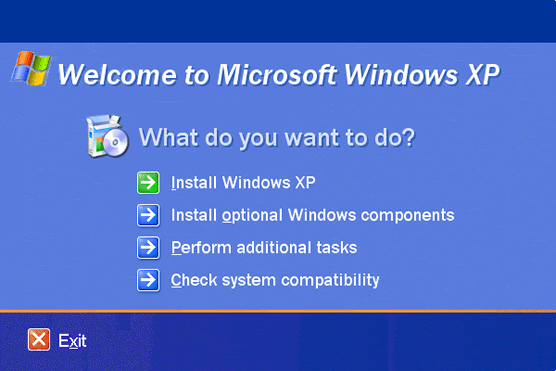
To do this, simply load the Windows XP CD-ROM into your CD-ROM drive, when the following screen will be displayed:
Welcome

Select Install Windows XP.

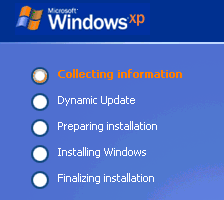
Collecting

The Windows XP Setup now proceeds to the first step in its five phase installation process.

  • WinXP Installation Planning
  • Windows XP Upgrade Advisor
  • WinXP Installation Information Collection
  • WinXP Installation
  • How To Do a Clean Installation of Windows XP – Phase 1
  • Dynamic Update – How to do a clean installation of Windows XP
  • Preparing Installation – How to do a clean installation of Windows XP
  • WinXP Installation Phase 4
  • WinXP Installation Phase 5
  • WinXP Windows Update
  • WinXP Driver Installation
  • WinXP Installation Tuning
  • Files and Settings Transfer – How to do a clean installation of Windows XP

Filed Under: How To Do a Clean Installation of WinXP

Latest Articles

Five Tips to Convert Servers to Virtualization

Virtualization has become a popular topic in the business world. It makes sense on so many levels, and, therefore, it has been on the mind of many people in the IT industry. Servers are perhaps the most popular piece of the IT puzzle to virtualize. Furthermore, they usually make the most sense to … [Read More...]

ISA Bus – Industry Standard Architecture

When it appeared on the first PC the 8-bit ISA bus ran at a modest 4.77MHz - the same speed as the processor. It was improved over the years, eventually becoming the Industry Standard Architecture (EISA), developed by a consortium made up of IBM's major competitors. Although these systems … [Read More...]

Top Benefits of Using an AI Detector as a Blogger

The blogging profession is changing more rapidly than ever, especially as bloggers face more pressure to change they way they create content. Bloggers are struggling to keep up with growing demands to create original, quality content. One of the ways that bloggers are trying to stay ahead of the … [Read More...]

Top Taplio Alternatives in 2025 : Why MagicPost Leads for LinkedIn Posting ?

LinkedIn has become a strong platform for professionals, creators, and businesses to establish authority, grow networks, and elicit engagement. Simple … [Read More...]

Shocking Cybercrime Statistics for 2025

People all over the world are becoming more concerned about cybercrime than ever. We have recently collected some statistics on this topic and … [Read More...]

Gaming Laptop Security Guide: Protecting Your High-End Hardware Investment in 2025

Since Jacob took over PC Tech Guide, we’ve looked at how tech intersects with personal well-being and digital safety. Gaming laptops are now … [Read More...]

20 Cool Creative Commons Photographs About the Future of AI

AI technology is starting to have a huge impact on our lives. The market value for AI is estimated to have been worth $279.22 billion in 2024 and it … [Read More...]

13 Impressive Stats on the Future of AI

AI technology is starting to become much more important in our everyday lives. Many businesses are using it as well. While he has created a lot of … [Read More...]

Graphic Designers on Reddit Share their Views of AI

There are clearly a lot of positive things about AI. However, it is not a good thing for everyone. One of the things that many people are worried … [Read More...]

Guides

  • Computer Communications
  • Mobile Computing
  • PC Components
  • PC Data Storage
  • PC Input-Output
  • PC Multimedia
  • Processors (CPUs)

Recent Posts

PicExa Viewer Removal Guide

Picexa Viewer is a program that can be downloaded from its own website or some of the free download sites found online. It is touted as being an image … [Read More...]

PC Lock Review

[starreviewmulti id=3 tpl=20] PROS: The Data Encyption program worked well on the XP computer we tested and was very easy to use. CONS: As with … [Read More...]

CD-ROM Yellow Book

The Yellow Book was written in 1984 to describe the extension of CD to store computer data, i.e. CD-ROM (Read Only … [Read More...]

[footer_backtotop]

Copyright © 2026 About | Privacy | Contact Information | Wrtie For Us | Disclaimer | Copyright License | Authors