pctechguide.com

  • Home
  • Guides
  • Tutorials
  • Articles
  • Reviews
  • Glossary
  • Contact

BTX – Balanced Technology eXtended – Motherboard Form Factor

Intel has been promoting its Balanced Technology Extended specification for a while before the company began, in late 2004, to push in earnest to establish the BTX form factor as the replacement for the aging ATX motherboard and chassis specification.

The BTX form factor is a scalable form factor that allows for a wide range of system sizes and profiles. There are several benefits associated with a properly designed BTX system over designs from previous form factor specification generations. These benefits include scalability in system design, improvements to system power delivery and power dissipation, acoustics, board layout and routing, high volume manufacturing costs, and structural integrity.
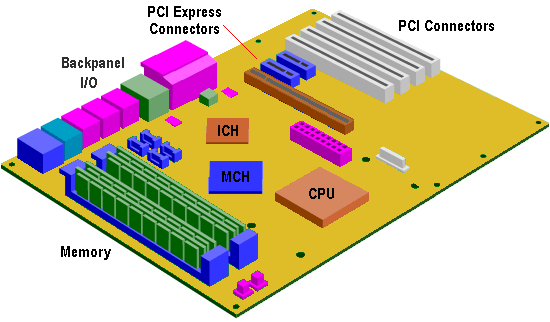
BTX

A BTX motherboard positions its internal components in such a way as to as to allow the CPU heat sink and other hot-running chips to be cooled by a single airflow stream. The idea is that, in addition to the power supply’s internal fan, it should be possible to cool an entire system with just a single chassis fan. BTX refers to this new heat-sink-and-fan combination as a Thermal Module. A typical thermal module includes a heatsink for the processor, an air mover such as an axial fan and a duct to isolate and direct airflow through the system.

Since the required direction of airflow is from front to back, the design required that particular attention be paid to acoustic management strategies so as to compensate for the fan now being a noise source that is generally directly in front of the system user.

The BTX specification is designed to encompass a family of board sizes for a range of system sizes. It’s like having ATX, microATX, and FlexATX form factors all being covered by a single specification. A standard BTX design measures 325mm x 266mm and supports up to seven add-in card slots. For sizing down to smaller form factors, Intel is providing two different designs: a microBTX, measuring 264mm x 266mm with up to 4 add-in card slots and a picoBTX measuring 203mm x 266mm with up to 1 add-in card slot.

In fact, the BTX specification offers even greater flexibility than ATX family of form factors, supporting not only different board sizes, but also different system heights. The standard height is similar to the height defined in the ATX-family form factor. An additional, lower profile height is defined for use where it is important to reduce the overall size of the system.

  • Evolution of the motherboard
  • BIOS – What motherboard BIOS does for a PC
  • CMOS – complementary metal oxide silicon – RAM chips on motherboards
  • EFI – Extensible Firmware Interface – explained
  • Motherboard form factors
  • Baby AT (BAT) Motherboard Form Factor
  • LPX – Low Profile eXtension motherboard form factor
  • ATX form factor
  • NLX – New Low profile eXtended – form factor for motherboards
  • Micro ATX motherboard form factor
  • FlexATX motherboard form factor
  • BTX – Balanced Technology eXtended – Motherboard Form Factor
  • Riser architectures for motherboards
  • CPU interfaces – motherboard slots and sockets for AMD and Intel processors

Filed Under: Motherboards Tagged With: balanced technology extended form factor, BTX form factor, BTX motherboard

Latest Articles

DSTN LCD monitors

A normal passive matrix LCD comprises a number of layers. The first is a sheet of glass coated with metal oxide. The material used is highly transparent material so as not to interfere with the quality of the image's integrity. This operates as a grid of row and column electrodes which passes the … [Read More...]

Ads by CrossBrowser Virus Removal Guide

CrossBrowser is another annoying virus that invades our computers through our online activities. It primarily prays on Chromium based browsers. Not surprisingly it is designed to deliver ads through the browser and it will alter your search results to promote advertisers. Like many others, it … [Read More...]

PC Speed Maximizer Review

PC Speed Maximizer Review

PROS: As a stand alone registry cleaner, PC Speed Maximizer is easy to you and gives accurate registry repairs that can be counted on. CONS: PC Speed Maximizer is easy to use and results are easily viewed and read. Auto-start features makes this program easy to run for all levels of computer … [Read More...]

Comments

  1. John says

    June 8, 2015 at 3:05 pm

    What is the date of this article?

Why Internet Bundles Are the Next Battleground for Gamers

A weak internet connection can turn seamless gaming sessions into frustrating experiences filled with lag, buffering or sudden disconnects. For … [Read More...]

Importance of Inbound Marketing in the Digital Age

A couple of months ago, Zacks reported that Hubspot was starting to make some major changes to its inbound marketing strategy. They talk a lot about … [Read More...]

Damage Control Strategies for Resolving Online PR Crises

Last July, Astrologer faced a major crisis after its CEO went viral at a ColdPlay concert when having an affair. This was just one of the many times a … [Read More...]

AI is Not Killing Computer Jobs Like Doomers Projected

There is no denying the reality that AI technology has played a massive role in disrupting our lives. A growing number of people claim that AI … [Read More...]

Everything You Need to Know About Sourcing Circuit Boards From U.S. Suppliers

In This Article This article includes: Why Source PCBs From the United States?How to Get a Quote From a U.S.-Based PCB ManufacturerThe Top U.S. … [Read More...]

Top Taplio Alternatives in 2025 : Why MagicPost Leads for LinkedIn Posting ?

LinkedIn has become a strong platform for professionals, creators, and businesses to establish authority, grow networks, and elicit engagement. Simple … [Read More...]

Guides

  • Computer Communications
  • Mobile Computing
  • PC Components
  • PC Data Storage
  • PC Input-Output
  • PC Multimedia
  • Processors (CPUs)

Recent Posts

Keep Your PC Cool

Computers need to stay as cool as possible in order to work properly. This becomes increasingly difficult as more people are trying to squeeze more … [Read More...]

Spyware Doctor with Antivirus Review

PROS: Active anti-virus and anti-spyware protection as well as e-mail protection and protection against malware, rootkits and the like. CONS: It's … [Read More...]

I/O Interface Standards

Nearly two decades on, many peripheral devices are still connected into the same serial ports and parallel ports that … [Read More...]

[footer_backtotop]

Copyright © 2026 About | Privacy | Contact Information | Wrtie For Us | Disclaimer | Copyright License | Authors