In 1993 Western Digital brought EIDE (Enhanced IDE) onto the market. EIDE is a standard designed to overcome the constraints of ATA while at the same time maintaining backward compatibility. EIDE supports faster data transfer rates – with Fast ATA capable of burst rates up to a 16.6 MBps – and higher disk capacities, up to 137GB since mid-1998, when the previous 8.4GB limit was raised.
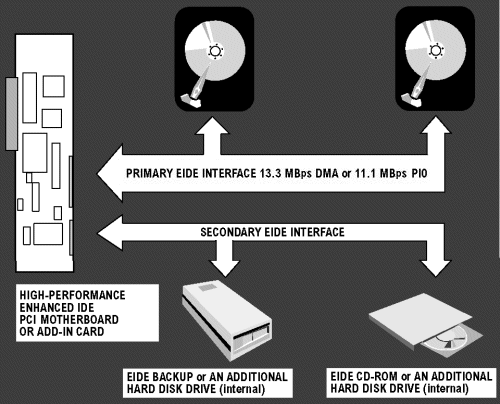
The four possible devices on an EIDE system are handled by two channels. Each channel supports two devices in a master/slave configuration. The primary port is generally connected to a local bus (for example, PCI), and this is set to the same address and IRQ setting as it was on the standard IDE system. This ensures backward compatibility with IDE systems and prevents conflicts which would otherwise crop up with operating system software, or other software which communicates with an IDE device. The old IDE system must be set up to cope with the enhancements in EIDE (higher performance and increased hard disk capacity) and this is enabled by additional software.
When the host needs data to be either read or written, the operating system first determines where the data is located on the hard drive – the head number, cylinder, and sector identification. The operating system then passes the command and address information to the disk controller, which positions the read/write heads over the right track. As the disk rotates, the appropriate head reads the address of each sector on the track. When the desired sector appears under the read/write head, the necessary data is read into the cache buffer, usually in 4K blocks. Finally, the hard drive interface chip sends the data to the host.
The ability to support non-disk peripherals such as CD-ROM drives and tape drives was made possible by the ATAPI (AT Attachment Packet Interface) specification, defined by Western Digital. The ATAPI extension of the ATA protocol defines a single command set and single register set allowing other devices to share the ATA bus with traditional ATA HDDs. It includes several commands which are specific to CD-ROM devices, including the Read CD command group as well as a CD speed-select command.
In addition to ATAPI, EIDE supports transfer standards developed by the ATA Committee. The Programmed Input/Output (PIO) modes are a range of protocols for a drive and IDE controller to exchange data at different rates which define specifications for the CPU’s involvement in data transfer between the hard drive and memory. Many drives also support Direct Memory Access (DMA) operation as an alternative protocol to PIO modes. This is where the drive takes over the bus (bus mastering) and transfers data directly to system memory. This is better for multitasking PCs as the CPU can do other things while data transfer occurs, although its only in systems using Triton HX/VX or later chipsets that the CPU can use the memory or ISA buses while the PCI bus is in use. An OS device driver is needed for DMA, and a system’s BIOS must also support these specifications to take advantage of them.
The hard drive industry subsequently adopted a number of approaches to enhance performance further. The first was to enlarge drive capacity. This was accomplished by making the tracks on the disk closer together (track density) and the data written on each track more dense (linear density). By making more data available during each rotation internal data transfer rates were effectively increased. There then followed number of vendor-specific measures to improve data transfer rates further, such as producing higher rpm drives, or modifying the cache buffer algorithms. The ultimate step was to modify the ATA/IDE protocol itself.
The original ATA specification was for connecting drives to the ISA bus and host transfers were limited to 2-3 MBps. The newer ATA-2 or Fast ATA interface connect to a local bus instead and the higher bandwidths available on local bus architectures meant massively improved data throughput. Since systems and drive vendors are allowed to label their products as EIDE even when supporting only a subset of its specifications, several vendors use the term Fast ATA (AT Attachment) for their EIDE hard drives that support PIO Mode 3 and Multiword Mode 1 DMA, and Fast ATA-2 for drives that support PIO Mode 4 and Multiword Mode 2 DMA.
- What Is The System Bus?
- ISA Bus – Industry Standard Architecture
- Local Bus Interfaces
- PCI Bus Interfaces
- What is AGP and AGP Pro?
- Internal Interfaces Summary
- PCI-X Interfaces
- PCI Express Interfaces
- IDE Interfaces
- EIDE Interfaces
- Hard Disks – What IS ATA and Ultra ATA?
- Serial ATA (SATA) interface guide
- SCSI Explained – With Pictures
- SCSI Interface Evolution
- Fibre Channel Interfaces
- Hard Disks – What is Serial Storage Architecture?
- I/O Interface Standards
- How It Works: The Idea and Technology Behind USB
- IEEE 1394 Interfaces
- USB 2.0 Intefaces
- FireWire 800 Interfaces