In December of 2002, the Camera & Imaging Products Association (CIPA) started an initiative which had the goal of a global standard to enable direct printing from digital cameras on appropriately equipped photo printers, independent of the model or manufacturer of the camera or the printer. The standard was christened the Direct Print Standard (DPS) and the commercial products that resulted from the initiative are referred to as being PictBridge compliant.
In PictBridge, USB is used as a physical layer, and Picture Transfer Protocol (PTP) is used as the transport layer protocol. The newly defined DPS layer is located between PTP and the DPS application layer. The DPS layer translates DPS operations and events into PTP operations and events, and vice versa. PictBridge defines the interface between the DPS layer and the DPS application layer. PictBridge does not make any changes or additions to the standard transport layer and below.
PictBridge defines several software components, which include a print Server/Client and a storage Server/Client at the DPS application layer, and DPS discovery at the DPS layer. In PictBridge the storage client is indirectly initiated by user operations and therefore is not visible to the user. The storage client requests image data to the storage server when the printer executes a print job upon the request of the digital camera. The operations and events of the DPS applications are executed based on a Server/Client model. A DPS operation consists of a request from a client to a server and followed by a response from the server to the client. A DPS event consists of a request from a server to the client followed by a response from the client to the server.
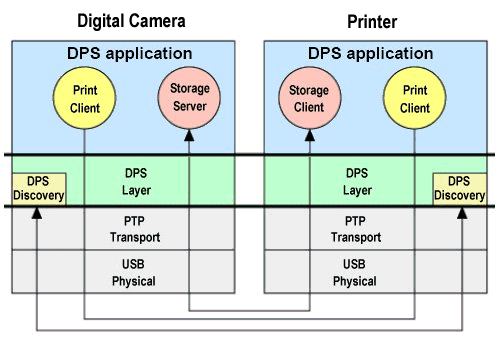
The DPS discovery function confirms if each device supports PictBridge. If PictBridge is available in each device then control is transferred to the DPS applications. In PictBridge, after the USB cable is connected, DPS discovery is initiated after PTP communication is established.
After DPS applications start, an operation to configure the print service is issued. This elicits information about which services each device provides. The digital camera notifies the printer that it has the storage server function and the print client function. The printer notifies the digital camera that it has the print server function and the storage client function. Using this negotiation, connection is established between the server and the client for print and storage respectively. All DPS operations and events are executed between these client and server combinations.
The most basic PictBridge function is the printing of the image currently displayed on a digital camera LCD screen. The standard covers many other functions, invoked using a camera’s button controls. These include:
- printing multiple images
- specifying the number of print copies
- printing trimmed images
- specifying print size
- printing an index of all images
- printing part of image by specifying a clip area
- printing images with a particular date stamp
- displaying print status
The availability of these functions is, of course, device dependent.
- What is CCD in the Context of Digital Cameras?
- CMOS Digital Cameras
- What Controls The Picture Quality of a Digital Camera
- Features and Parts of a Digital Camera
- PIM Technology
- Digital Camera Batteries: Types and How They Work
- Memory Storage
- Storage of Photos and Videos on Digital Cameras
- Digital Camera Connectivity
- Digital Cameras vs. Film
- X3 Technology
- What is PictBridge and PTP?