pctechguide.com

  • Home
  • Guides
  • Tutorials
  • Articles
  • Reviews
  • Glossary
  • Contact

Hot-Finder.com Virus Removal Guide

Hot Finder is another browser hijacker that can make your browsing experience annoying and cause issues for your PC. Installing this hijacker will change your browser homepage to hot-finder.com and will change your default search engine to Yahoo.

Like many other hijackers, the software is not malicious in nature. But, it will add the hot-finder url to the end of everyone of your shortcuts. This can be annoying and can be confused with virus-like behavior. Not only will it change the shortcuts on your desktop, it will also change them in your Windows Start menu.
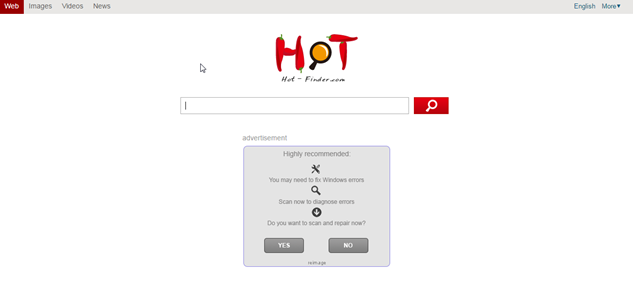
 

This hijacker is similar to many others in that it will use their homepage which is full of ads. It will show banner ads and sponsored links in your search results. These ads help make money for the people who create the hijacker. They get paid from people clicking on the ads that are shown as banners, popups, and inpage links.

Again, this is not a virus, but it does have some traits of a virus. The main one is that it can reach into the operating system and make changes. This can open doors for other issues later on.

The changes can be made to all popular browsers on the machine. This includes Google Chrome, Internet Explorer and FireFox. It will also attempt to lock down the browsers to prevent changes from the user and other competing software.

The most likely source of infection was from the installation of another piece of software. It was most likely bundled with free software that you found on a download site like Download.com or Snapfiles. Removing these programs will not remove the Hot-Finder virus from your machine.

The best thing to do when installing software from these free sites is to use the custom installation. This will give you the ability to deny installation of extra programs like the Hot-Finder.com BHO. If you choose the default install it will assume you want it installed and proceed to do so.


If you need an easy way to remove the malware from your system, we recommend SpyHunter. It is an easy, automated way to remove these types of issues from your computer.

iStartSurf is typically installed in bundled software. Many times it is bundled in video recording software, download manager and PDF creators. Unfortunately, even if you find out what it was bundled with and uninstall it, it will not remove the iStartSurf malware. Therefore, it is best to follow the directions below to help remove the program from your system.

Uninstall iStartSurf from Windows.

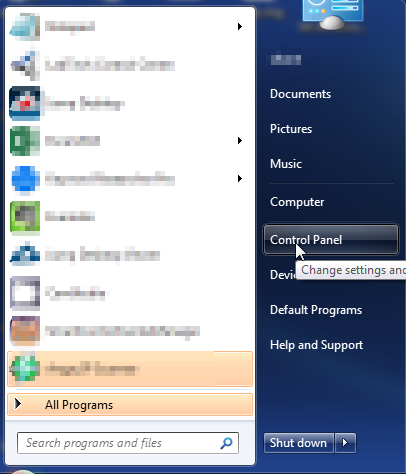
  1. Open up control panel by clicking on the start button in the lower left corner of your computer, and then going to Control Panel
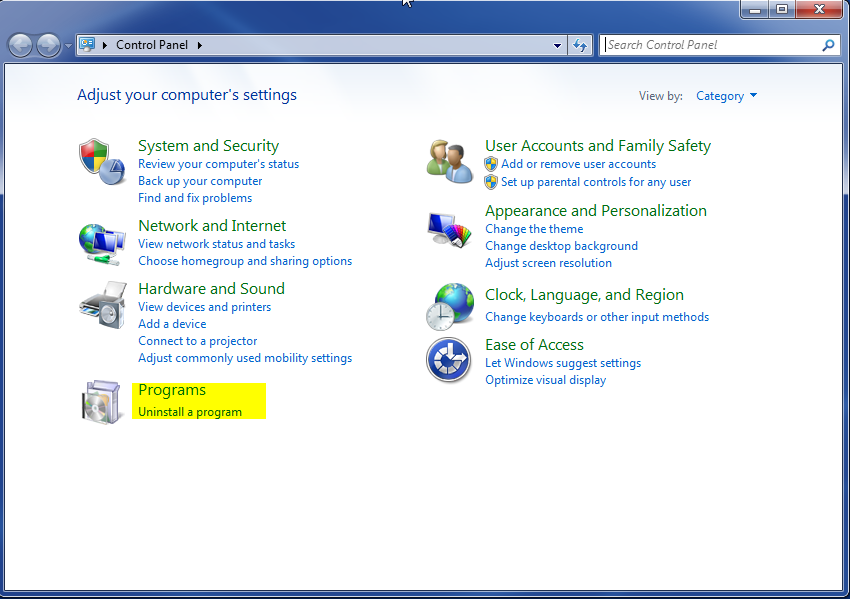
  1. Once, you are in Control Panel, go to the link labeled “Uninstall a Program”. If your computer does not look like the view below, you may have to sort by categories at the top right.
  1. Once in the uninstall programs section, look for the offending program. You can scroll by date installed to find programs that were installed recently. This may be a clue as to what the offending program is. Once you have found the program, highlight it and select “Uninstall” to remove
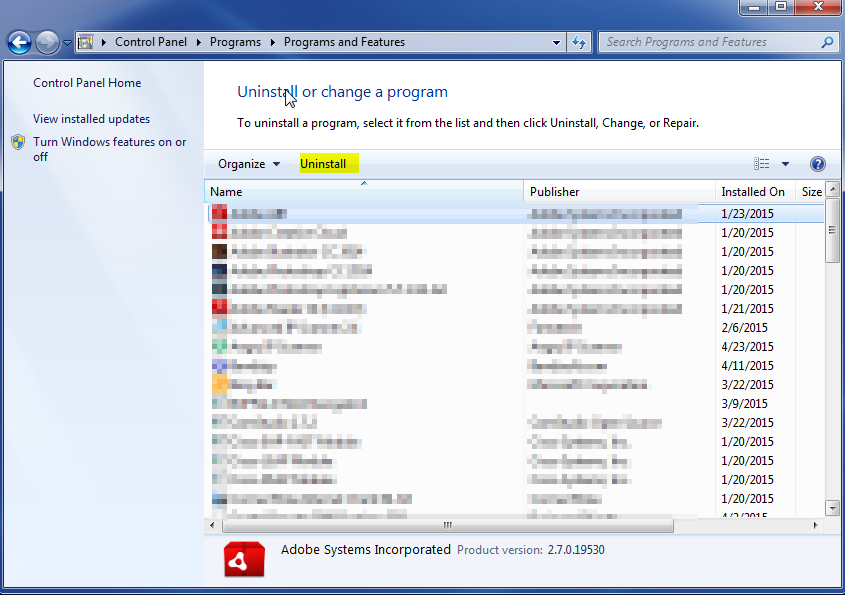
 

Once you have done this, you will need to go into your browser and set it to its default settings to remove the other changes it made. You will also want to scan your computer to make sure no new issues were introduced by the vulnerability. A good tool to use for this is MalwareBytes. If you already have a virus scanner, you should run this as well.

Filed Under: Virus Removal

Latest Articles

5 Must Have Products to Survive an Apocalypse (or Zombie Take Over)

Ok.  Maybe zombies won't take over the world and perhaps End Times will never come but these 5 must have products will surely help to save your life in case of emergency.   Product Number 5: WATERPROOF FIRESTARTER With out fire most people won't survive in the wild.  It's not starvation … [Read More...]

kaspersky anti-virus software

Kaspersky Anti-Virus 2015 Review

Pros : Easy to use interface. Scores high in independent labs in the area of detection and anti-virus protection. Comes with a rescue disk feature that allows you to scan under the worst circumstances. 14 day money back guarantee Cons : Has a lot of overhead with few features. Overview: … [Read More...]

Hard Disk AV Capability

Audio-visual applications require different performance characteristics than are required of a hard disk drive used for regular, everyday computer use. Typical computer usage involves many requests for relatively small amounts of data. By … [Read More...]

Top Taplio Alternatives in 2025 : Why MagicPost Leads for LinkedIn Posting ?

LinkedIn has become a strong platform for professionals, creators, and businesses to establish authority, grow networks, and elicit engagement. Simple … [Read More...]

Shocking Cybercrime Statistics for 2025

People all over the world are becoming more concerned about cybercrime than ever. We have recently collected some statistics on this topic and … [Read More...]

Gaming Laptop Security Guide: Protecting Your High-End Hardware Investment in 2025

Since Jacob took over PC Tech Guide, we’ve looked at how tech intersects with personal well-being and digital safety. Gaming laptops are now … [Read More...]

20 Cool Creative Commons Photographs About the Future of AI

AI technology is starting to have a huge impact on our lives. The market value for AI is estimated to have been worth $279.22 billion in 2024 and it … [Read More...]

13 Impressive Stats on the Future of AI

AI technology is starting to become much more important in our everyday lives. Many businesses are using it as well. While he has created a lot of … [Read More...]

Graphic Designers on Reddit Share their Views of AI

There are clearly a lot of positive things about AI. However, it is not a good thing for everyone. One of the things that many people are worried … [Read More...]

Guides

  • Computer Communications
  • Mobile Computing
  • PC Components
  • PC Data Storage
  • PC Input-Output
  • PC Multimedia
  • Processors (CPUs)

Recent Posts

5 Tips to Improve Your Data Security

In this day and age, data breaches are a major concern for many businesses across the globe. In the first six months of 2019, 4.1 billion records were … [Read More...]

Windows Virtual Security

Windows Virtual Security Welcome to another of our virus removal guides. This article will go over how to remove Windows Virtual Security. … [Read More...]

How to Remove Windows Private Shield

Windows Private Shield Windows Private Shield is part of a multi rogue malware set. It goes by several different names. The purpose of this kind of … [Read More...]

[footer_backtotop]

Copyright © 2026 About | Privacy | Contact Information | Wrtie For Us | Disclaimer | Copyright License | Authors