Easiest Removal Option:
Remote Repair: Paying an expert to remove this threat is always the easiest option. It’s also the most expensive. PCTechGuide.com has reviewed several remote computer repair companies and we recommend http://www.pcninja.com This is a small computer repair company (Two brick and motar stores in California ). Small companies like this tend to deliver better customer service. With a fully trained and experienced staff all based in California doing the repairs, you can’t go wrong. The cost for most virus removal services is around $99 USD.
Software Option:
Antivirus Clients: Anti-Virus software was developed to remove these exact kind of threats. Most people who get infected with malware get infected from having no protection or from using a free client that offered no real up front protection. It’s important to secure your computer so know one gains access to it and to protect your identity online.
PCTechGuide.com has reviewed hundreds of software vendors over the years. See our Antivirus Reviews and Internet security reviews for full in-depth reviews.
To Remove this virus we recommend Spyware Doctor with Antivirus or Malwarebytes. All three offer good results in most cases.
Do It Yourself Removal Guide
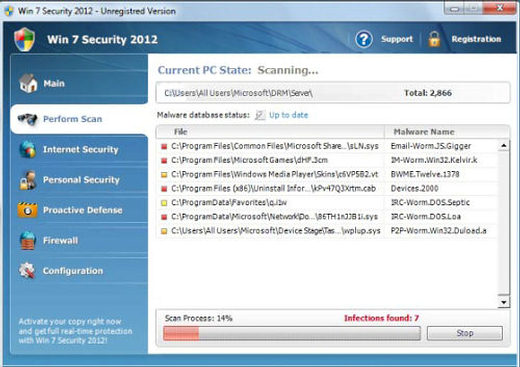
How to remove Win 7 Security 2012 DIY Steps
Proceed with Caution. PCTechGuide.com offers this information free of charge. We can not be held liable for any actions you take regarding the below information. Before conducting the necessary steps to remove Win 7 Security 2012, it is recommended to backup all personal data stored on your system in order to avoid any unexpected losses.
Installing and running a legitimate antivirus client such as Spyware Doctor with Antivirus or requesting the support of an online computer repair service such as http://www.pcninja.com can help by providing an automatic, safe removal of this malicious software.
Step 1. The first important step that has to be taken in order to remove Win 7 Security 2012 is to stop its main running process. As soon as the main executable has been stopped from running it will be possible to simply delete the file from disk. Here are some methods that can be applied in order to achieve this objective:
A. Reboot your PC and choose to boot Windows into Safe Mode with Networking. While in safe mode the malware will no longer be running automatically, reason why it will be possible to simply delete its main executable file from disk. Here are the main executable file paths that should be taken as reference when wondering how to remove Win 7 Security 2012:
XP: Win 7 Security 2012 executable path:
C:Documents and SettingsAll UsersApplication DataLocal[random].exe
Win 7 / Vista: Win 7 Security 2012 executable path:
C:Users%User Name%AppDataRoaming[random].exe
According to our research, Win 7 Security 2012 is equipped with a random file name generator. For this reason its main running process will be named randomly based on an alpha-numeric character set.
B. Browse to the file path indicated above, identify the file apart from others that may be already present in the same location and rename it. Once renamed, restart your PC and browse to the same location with the objective of deleting the respective file. This will be possible after a reboot since once renamed the file will no longer run automatically at the operating system startup.
C. If for some reason you did not manage to identify the file because of its random name it is recommended to simply sort the folder contents by last modified date. In this way Win 7 Security 2012 executable file will be listed close to the top of the list as one of the most recently modified files.
D. Open up the Task Manager to locate the name of the virus. Once identified, browse to one of the locations indicated above (depending on your operating system version) and delete the file. Please note that you will have to stop the file from execution before you will be able to remove it from disk.
Step 2. After the Win 7 Security 2012 executable name has been identified and located it is highly recommended to delete it from disk so that it will no longer affect your operating system settings and functionality.
Step 3. After all the above steps have been taken into consideratio it is anyway necessary to run a full antivirus scan of your operating system as well as all files and partitions included. We recommend the usage of one of the following legitimate antivirus clients: Spyware Doctor with Antivirus or Malwarebytes. Once installed, update your antivirus definitions and scan the entire system in order to identify any additional malware that may be still present. If you like any of these products we recommend that you purchase a license and keep their detection engine update in order to protect your PC from any future similar incidents. In case that the removal process has proven to be a difficult one we recommend avoiding any risks and requesting the support of an expert remote computer repair service such as http://www.pcninja.com.
How not to Get Infected Again
In most cases users get infected with viruses and malware from not having propper up-front protection. Computer security experts recommend that you use an anti-virus client that offers up front protection to block viruses from installing and a security client that keeps up to date with the latest virus defenitions. The paid versions of Spyware Doctor with Antivirus and Malwarebytes fit this criteria. Going with one of these clients is a step in the right direction to protecting your computer.
Need More Help? Want to Say Thanks?
Ask questions or post your comments below. Thank You.
Discalimer: PCTechGuide.com does make money from users who make a purchase of many of the products and services featured on this website.