
pctechguide.com

  • Home
  • Guides
  • Tutorials
  • Articles
  • Reviews
  • Glossary
  • Contact

Connecting External DV Converter Hardware to VCR and PC for VHS Video to DVD Transfer

Connecting up the ADVC-55 external DV converter to your PC and VCR is fairly straightforward.
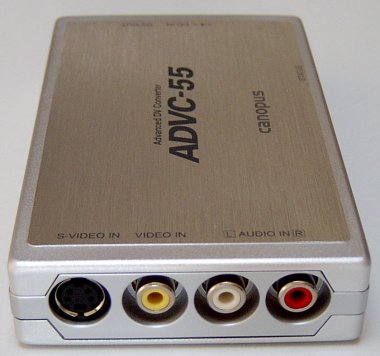
ADVC-55

First, connect up either composite video RCA Phono or S-Video socket, and twin RCA Phono audio connectors …

… at one end of the Canpous device …
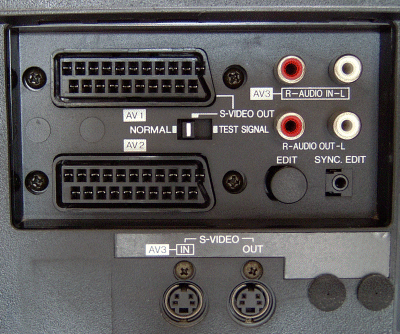
VCR

to your VCR.

Video capture devices generally always provide composite video and S-video connectors. If your VCR provides both, use the latter, since this will give a higher level of video quality.

Both types of connector have the same bandwidth. The sole difference between S-video (also known as Y/C Separated video) and composite video is that the former carries the chroma separate from the luminance, while the latter mixes them together. S-video’s superior performance stems from the elimination for the need for a chroma separator at the destination and the avoidance of any signal degradation that this can cause.
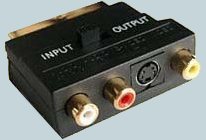
SCART

In Europe, it’s common for VCR players to have a only a SCART (aka Peritel or Euroconnector) connector.

In this case, you’ll need to use a suitable SCART-to-phono adapter set. Such adapters are generally available wherever video recorders are being sold.

Then connect the unit to your PC …
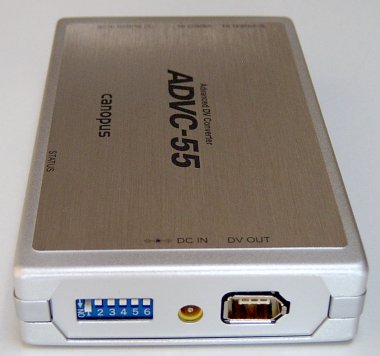
FireWire

… by plugging in the FireWire cable to the other end of the unit.

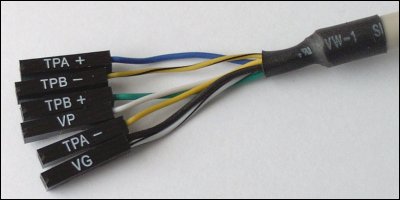
Many modern-day motherboards provide a pin header that allows connection to a front-mounted IEEE-1394 port.
FireWire

Typically, there are six wires coming from the system case’s front-mounted IEEE-1394 port, consisting of two sets of twisted pair cables (TPA and TPB), a power cable (VP) and a ground cable (VG).

IFPCG

The Intel Front Panel Connectivity Guide recommends the following design for a front-mounted IEEE-1394 connectors. If your motherboard is a recent design, it’s likely it will be identical, or at least similar.

Pin Signal name Pin Signal name
1 TPA+ 2 TPA-
3 Ground 4 Ground
5 TPB+ 6 TPB-
7 +12V (Fused) 8 +12V (Fused)
9 Key 10 Ground

Connecting the wires to the pin header can be tricky. Where not all the pins are going to be used, it’s easy to inadvertently connect a wire to a wrong pin.

Take great care to avoid this, if you don’t want to risk seeing the external device disappear in a cloud of blue smoke!

The DIP switches are used to specify the appropriate video format (PAL, NTSC or SECAM) and to boost the audio level if you subsequently feel the volume converted sound is insufficient.

The ADVC-55 doesn’t require any driver installation, so as soon as you’ve done so …

Found

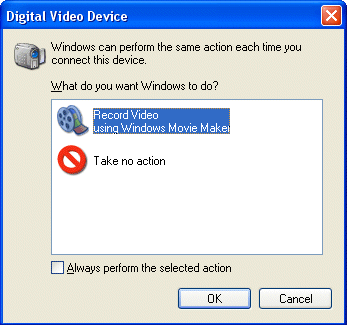
… Windows should recognise the presence of the device …

… and ask you what you want it to do next.
Trial

At this point it’s wise to run a trial video capture, to conform that the hardware is properly connected and working correctly. The native Windows XP Movie Maker application can be used for this purpose.

  • Transfer VHS to DVD Method
  • VCR to DVD – Video Digitisation and Compression Codecs
  • VCR to DVD Conversion – Video Capture Cards and PC Hardware
  • How to Transfer VCR Video to DVD – Preparation
  • Converting VCR Video to DVD Using Canopus ADVC-55
  • Connecting External DV Converter Hardware to VCR and PC for VHS Video to DVD Transfer
  • Testing the External DV Converter
  • Installing the Software for the ADVC-55 DV Converter – including NERO
  • One-Click Operation of VHS Video to DVD Transfer Using ADVC-55
  • Rip / Import / Copy VCR VHS Video and Burn to DVD with Nero
  • Labelling your DVDs – tutorial on how to transfer your VCR tapes to DVD

Filed Under: How to Transfer Your VCR Tapes to DVD

Latest Articles

Remove System Tool 2011

System Tool 2011, also known as just System Tool is a FALSE security client. This client appears to be very similar to past fake security clients like Security Tool. We installed this virus on a test computer to see what this threat does and to create working manual removal guide. We are … [Read More...]

Using Antivirus Reviews to Protect Your System

If you type the word “antivirus” into a web browser, you'll see a nearly limitless list of products asking for your money in exchange for antivirus protection. Now, we all know that having an antivirus program is one of the most important steps for any PC owner, but it isn't as cut and dry … [Read More...]

ADSL Connect

Type the Gateway address - effectively the IP address of your modem/router - in the address bar of your browser. You'll see a Connection Status screen, which will indicate whether or not a connection has already been set up. If the current status is IDLE, click Change Login. If the … [Read More...]

Everything You Need to Know About Sourcing Circuit Boards From U.S. Suppliers

In This Article This article includes: Why Source PCBs From the United States?How to Get a Quote From a U.S.-Based PCB ManufacturerThe Top U.S. … [Read More...]

Top Taplio Alternatives in 2025 : Why MagicPost Leads for LinkedIn Posting ?

LinkedIn has become a strong platform for professionals, creators, and businesses to establish authority, grow networks, and elicit engagement. Simple … [Read More...]

Shocking Cybercrime Statistics for 2025

People all over the world are becoming more concerned about cybercrime than ever. We have recently collected some statistics on this topic and … [Read More...]

Gaming Laptop Security Guide: Protecting Your High-End Hardware Investment in 2025

Since Jacob took over PC Tech Guide, we’ve looked at how tech intersects with personal well-being and digital safety. Gaming laptops are now … [Read More...]

20 Cool Creative Commons Photographs About the Future of AI

AI technology is starting to have a huge impact on our lives. The market value for AI is estimated to have been worth $279.22 billion in 2024 and it … [Read More...]

13 Impressive Stats on the Future of AI

AI technology is starting to become much more important in our everyday lives. Many businesses are using it as well. While he has created a lot of … [Read More...]

Guides

  • Computer Communications
  • Mobile Computing
  • PC Components
  • PC Data Storage
  • PC Input-Output
  • PC Multimedia
  • Processors (CPUs)

Recent Posts

Trackballs

A trackball is a pointing device consisting of a ball housed in a socket containing sensors to detect rotation of the … [Read More...]

How To Determine if You Have Find Fast Indexer Installed?

You can confirm that the Find Fast Indexer is installed by checking for its associated file set, located in the folder in the topmost level in the … [Read More...]

Replacing your BIOS chip – how to update your system BIOS

Modern-day motherboards have EEPROM BIOS chips that can be reprogrammed by software. These are also referred to as flash PROM or flash ROM, the … [Read More...]

[footer_backtotop]

Copyright © 2026 About | Privacy | Contact Information | Wrtie For Us | Disclaimer | Copyright License | Authors