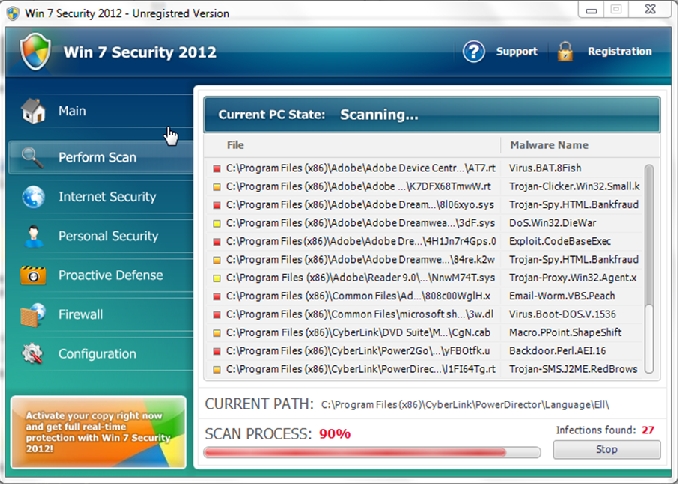
Win 7 Security 2012
Win 7 Security 2012 is part of a multi rogue malware set. It goes by several different names. The purpose of this kind of malware client is to trick or force the user into making a purchase of the program. It does this by blocking normal programs from running and not letting users surf the web to learn how they can remove this client. It may also highjacks your browser search settings. This client is a clone of Anti-Spyware, XP Home Security 2012, XP Anti-Virus 2012 and XP Security 2012 as well as Win 7 Anti-Spyware, Win 7 Home Security 2012
How Did I get infected with Win 7 Security 2012?
In our testing’s of this client we found a live sample by just surfing the web. We did not have to install anything. However in most cases of malware infection the user normally is tricked into install a video update or another program that is really the malware / virus client.
How Much Damage is Win 7 Security 2012 Doing?
The biggest issue this client creates is disassociating the .exe file extention in the registry. We found that the threat does not always do this but most of the time it will. Basically it stops you from opening programs. This can make things very difficult. We do have a fix for this in the guide below.
Win 7 Security 2012
» Download Win 7 Security 2012 Removal Software
How to Remove Win 7 Security 2012?
This article covers three main way to remove this threat.
1. Use Anti-virus software (Note you may need to follow the manual guide to start so you can install a client.)
2. Hire an expert ( We Recommend http://www.pcninja.com. This is a remote computer repair company)
3. Remove this threat yourself following our manual removal guide.
Automatic Win 7 Security 2012 Removal

Online Win 7 Security 2012 Removal Service

Win 7 Security Removal Video
Win 7 Security 2012 Manual Removal Procedures
Step 1. If you are unable to run any executable programs at all this may be from the virus changing your registry settings. If this is the case you may need to use this patch. It is only for Windows 7 computers. Download Win 7 Fix exe Issue here.
Step 2. You need to stop and delete the main .exe file that is running Win 7 Security 2012.
You should be able to locate this file at
- c:users[username]AppDatalocal
Keep in mind that the USERNAME will be your user name
The file is called sdw.exe. Expect this name to change over time. however if you watch the above video it shows you a few tips for recognizing the file.
Once you locate the file you will need to re-name the file. To do this you can right click on the file named and select “Re-name”. Name it whatever you want. Once done re-start your computer. Next time you boot up the virus should not be running. Now you should be able to delete the file name.
At this time you should run a full virus scan. We Recommend Spyware Doctor with Antivirus. However you can use any client you trust the most. To see a list of other clients we recommend check out our Anti-virus Reviews section.
Win 7 Security 2012 Registry Removal Procedures
I do not recommend users go into the registry to try to sort out issues there. It’s too easy to make a mistake. Besides the .exe file extentions being disassociated I did not see any thing the user needs to do. A good antivirus client should be able to repair any damage that was done so you can just run a scan and see. You may also want to use a registry cleaner like PC Health Advisor Here to clean out the registry and scan for other malware. You can also read all or registry cleaner reviews
Win 7 Security 2012 Directories:
Windows 7 / Windows Vista
- c:users[username]AppDatalocal
If you require advanced help or just want an expert to remove the virus than use this computer repair service. The charge is under a hundred bucks and they can often get started right away. These are real experts when it comes to malware and virus removal.
Related Article Keywords: Win 7 Security 2012, Remove Win 7 Security 2012, Win 7 Security 2012 Removal, How to Remove Win 7 Security 2012