AV Secure 2012
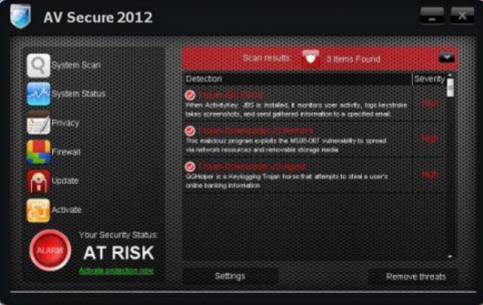
AV Secure 2012 is a malware client. These kinds of viruses pretend to be legit programs but they are far from it. AV Secure 2012 will scan you computer and show you false virus infections. Users will get constant warnings that they are infected and they need to purchase the AV Secure 2012 software. These warnings are all false. The virus is the AV Secure 2012 program.
The goal of this malware client is similar to all others. They want to scare you into making a purchase. To do this they show all the virus warnings. It will also block other programs from running on your computer like real antivirus clients. It then highjacks your browser settings so you can not surf the web. Basically they are trying to back you into a corner and extort money from you.
How Did I get infected with AV Secure 2012?
Most malware infection like AV Secure 2012 are actually caused with the end users help. The person thinks they are installing a video update or video package, only to find out after the install that they just installed a virus. Basically they were tricked into installing the virus. In other cases users may of gotten infected from opening an e-mail attachment or visiting a malicious website that then injected code onto your computer.
How Much Damage is AV Secure 2012 Doing?
Short answer is not a lot. Just looks that way. It will block many other programs from running and will highjack the end users web browser but that is about all. It’s not deleting files or stealing information. Nor is your computer being controlled or part of a bot network. I should state that if you are infected with one virus you may have many more that are actually doing these things but that is rare for malware. Most cases it’s just a fake program like AV Secure 2012.
AV Secure 2012 (Picture below is from a clone of this threat)
av secure 2012
» Download AV Secure 2012 Removal Software
How to Remove AV Secure 2012?
You have three main options to remove AV Secure 2012. Antivirus software, a computer repair expert or doing it yourself. All three have their pros and cons. The best option I find for most users is to purchase antivrus software. This way you can remove the virus and protect your computer so you do not get infected again. Let’s face it, you got infected because you did not have a good anti-virus client. Free clients don’t offer the kind of protection end users need and they do not come with support.
Automatic AV Secure 2012 Removal
Online AV Secure 2012 Removal Service

AV Secure 2012 Manual Removal Procedures
Step 1. You need to take back your web browser so you can do searches again and the like. Learn how to re-set your proxy setting here
Step 2. You need to stop and delete the main .exe file that is running AV Secure 2012. This is the hardest step. We have included several ways to help you find the executable file and remove it.
A. Boot into safemode with networking and install an anti-virus client like Spyware Doctor with Antivirus. Run a full scan and remove the virus threats. The free trial of Spyware doctor with Antivirus will not remove threats. You will need to make a purchase of the program for it to do that. however it will tell you were all the viruses are located and you can remove them manually.
B. You can try doing a system restore. This sends your computer back in time to before you go infected with a virus. Easy to try and works sometimes.
C1. Browse to one of the below file paths and try to locate the virus threat.
- AV Secure 2012.exe ( It will not be called this. This is an example) You are basically looking for a file that is shown in the path laid out below. If you boot into safe mode you should be able to just delete this file. It will be a random file like 4536f942.exe. The file name will make no logical sense.
Know File Path Locations
XP
- C:Documents and Settings[Username]Application Data
C:Documents and SettingsYOUR USER NAMEApplicationDataLocalTemp
Vista / Windows 7: One of the below
- c:users[username]AppDatalocal
- C:UsersYOUR USER NAMEAppDataLocalTemp
- C:Users[Username]AppData
C2. Browse to each of the file location above and locate the .exe file. you may need to show hidden files and folders. Once you are in the folder you can sort the files by date. You may need to change the view in order to have this option. Sorting files by date will eliminate all but a small handful of files. From there it should be rather easy to determine which file is the virus. You can now right click on the file and re-name it. After that you will have to re-boot your computer. You can not delete a file while it is in use. After you re-boot the virus threat should not be loading.
D: Log-into another users account and see if you can delete the file. If no other admin account exists you may be able to create one and log in that way. HINT: You can also download and install Spyware Doctor with Antivirus from another account and run the full virus scan to help you locate the virus threat.
E: Start the Task Manager the very second you login and terminate the process that way then delete the file
At this time you should run a full virus scan after removing the main executable. All programs should be working just fine so you should have no issues running a full virus scan. We need to ensure you are not infected with anything else.I personally use Spyware Doctor with Antivirus
If you find this threat too hard to remove yourself and need an expert we recommend this computer repair company.
AV Secure 2012 Registry Removal Procedures
You will have left over traces of AV Secure 2012 in the registry and most likely a few registry settings have changed because of the virus. We will not cover these changes because you should not be poking around in the registry. Too much damage can be caused and it’s just not worth doing. To repair your registry you can either use and anti-virus client to remove any virus traces or just use a registry cleaner like PC Health Advisor Trial Here to clean out the registry and scan for other malware. You can also read all or registry cleaner reviews
AV Secure 2012 Directories:
XP
- C:Documents and SettingsAll UsersApplication DataAV Secure 2012
Windows 7 / Windows Vista
- %AppData%AV Secure 2012
%StartMenu%ProgramsAV Secure 2012
If you require advanced help or just want an expert to remove the virus than use this computer repair service. The charge is under a hundred bucks and they can often get started right away. These are real experts when it comes to malware and virus removal.
Related Article Keywords: AV Secure 2012, Remove AV Secure 2012, AV Secure 2012 Removal, How to Remove AV Secure 2012