pctechguide.com

  • Home
  • Guides
  • Tutorials
  • Articles
  • Reviews
  • Glossary
  • Contact

ADSL Configuration

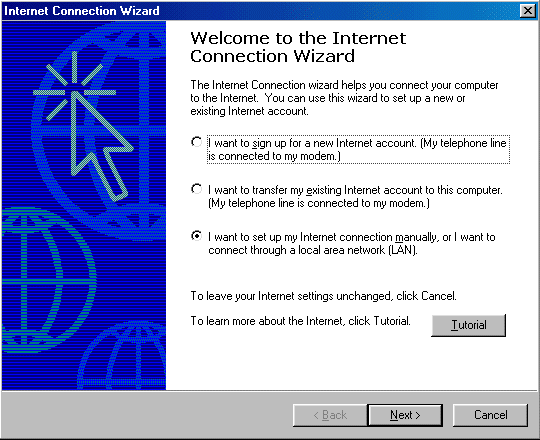
One way to configure your browser is via the Internet Connection Wizard. This is like to start automatically when you first invoke your browser. If it doesn’t, then you can launch it via the Start button by clicking Programs, Accessories, Internet Tools and finally Internet Connection Wizard.

The procedure under Windows 98 is then as follows:
Internet

Since you’re going to be setting up a broadband connection, select the third option.
Connection

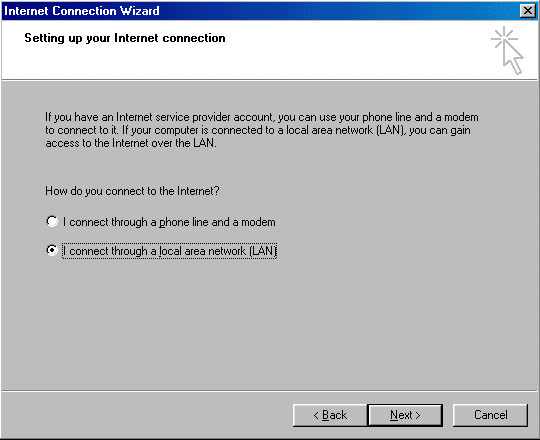
Select the I connect through a local area network (LAN) option.
Proxy

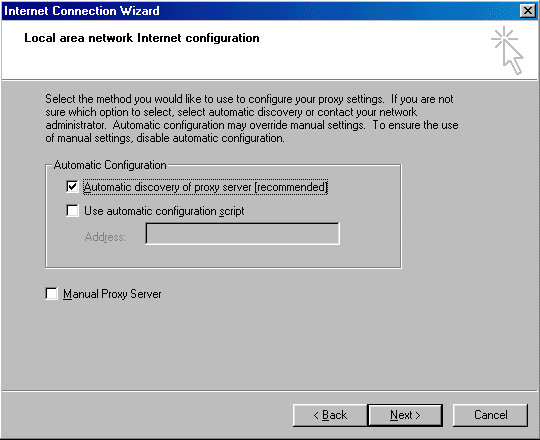
Select the method you want to use to configure your proxy settings. If you’re unsure, choose the Automatic discovery of proxy server option.
Email

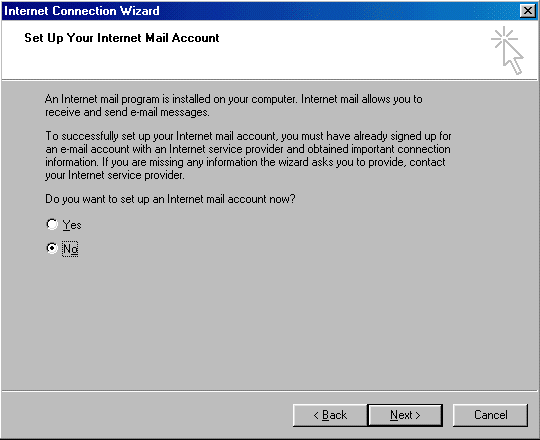
If an Internet mail program is detected on your PC, you’re invited to set-up an email account.
Email

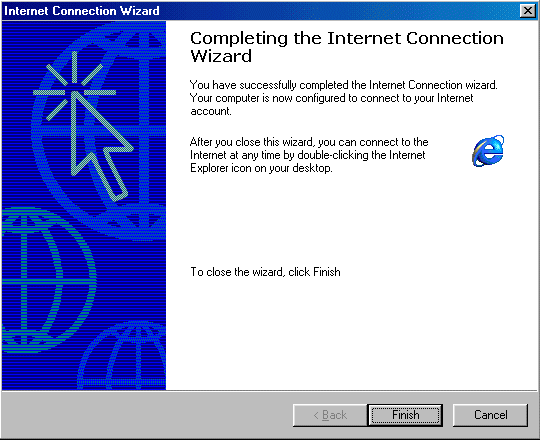
Close the Internet Connection Wizard by clicking Finish.

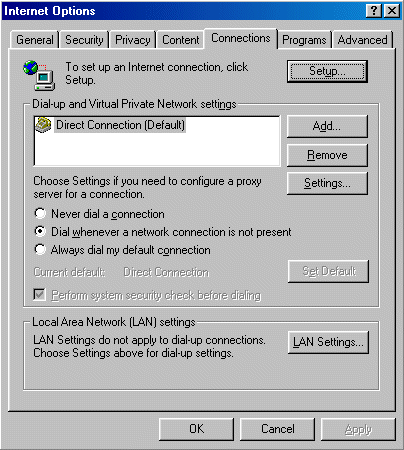
Alternatively, you set the necessary browser setting directly by clicking strong>Tools, Internet Options and Connections from your browser window.

If your PC also has a dial-up Internet connection, you need to configure this tab in accordance with your connection preferences.
IP

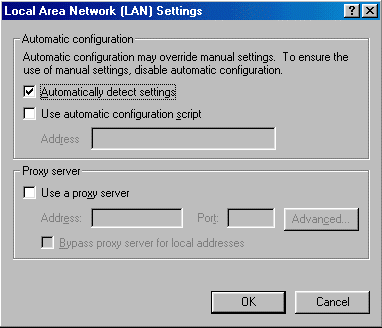
Click LAN Settings to configure your Proxy preferences.
IP

  • ADSL network
  • ADSL Setup
  • Testing the IP configuration – how to share a broadband Internet connection
  • ADSL Filters
  • How to connect an ADSL modem/router
  • ADSL Connect
  • ADSL Configuration
  • ADSL Sharing

Filed Under: Sharing ADSL broadband Internet

Latest Articles

Reasons for Deleting Groups and Users on WhatsApp

WhatsApp is one of the most widely used applications globally and one of its main claims, beyond its democratization, is the end-to-end encryption with which it protects conversations. However, the fact that, on paper, the platform does not know what the user writes does not mean that it does not … [Read More...]

Tips & Tricks to Guide Your EA Sports FC 24 to Glory

EA Sports FC 24 is the 31st overall installment of EA Sports' football simulation games and the first not bearing the world-famous FIFA name. Although EA Sports FC 24 was released in September 2023, many gamers are only just picking up the game because heavy discounts are available, thanks to the … [Read More...]

Stellar Phoenix Photo Recovery Review

Stellar Photo Recovery Stellar Photo Recovery basically covers it all, for photos and media options, that is. This product, like the title says, is for photo recovery and media recovery only. While it is cheaper than the Stellar Phoenix Windows Data Recovery, it is only cheaper by about $10, so … [Read More...]

Everything You Need to Know About Sourcing Circuit Boards From U.S. Suppliers

In This Article This article includes: Why Source PCBs From the United States?How to Get a Quote From a U.S.-Based PCB ManufacturerThe Top U.S. … [Read More...]

Top Taplio Alternatives in 2025 : Why MagicPost Leads for LinkedIn Posting ?

LinkedIn has become a strong platform for professionals, creators, and businesses to establish authority, grow networks, and elicit engagement. Simple … [Read More...]

Shocking Cybercrime Statistics for 2025

People all over the world are becoming more concerned about cybercrime than ever. We have recently collected some statistics on this topic and … [Read More...]

Gaming Laptop Security Guide: Protecting Your High-End Hardware Investment in 2025

Since Jacob took over PC Tech Guide, we’ve looked at how tech intersects with personal well-being and digital safety. Gaming laptops are now … [Read More...]

20 Cool Creative Commons Photographs About the Future of AI

AI technology is starting to have a huge impact on our lives. The market value for AI is estimated to have been worth $279.22 billion in 2024 and it … [Read More...]

13 Impressive Stats on the Future of AI

AI technology is starting to become much more important in our everyday lives. Many businesses are using it as well. While he has created a lot of … [Read More...]

Guides

  • Computer Communications
  • Mobile Computing
  • PC Components
  • PC Data Storage
  • PC Input-Output
  • PC Multimedia
  • Processors (CPUs)

Recent Posts

Testing the External DV Converter

To open Movie Maker, click Start > Programs > Accessories > Windows Movie Maker. Select Capture from video device to launch the Video … [Read More...]

Motherboards and Win98

On attempting to boot to Windows 98SE the signs were good, with lots of messages about Windows having found new hardware and attempting to locate and … [Read More...]

Disclaimer

Brain Box Consultants LLC Web Site Agreement The pctechguide.com Web Site (the "Site") is an online information service provided by Brain Box … [Read More...]

[footer_backtotop]

Copyright © 2026 About | Privacy | Contact Information | Wrtie For Us | Disclaimer | Copyright License | Authors