pctechguide.com

  • Home
  • Guides
  • Tutorials
  • Articles
  • Reviews
  • Glossary
  • Contact

User Account Editing

To edit an existing account, click Start > Control Panel and double-click User Accounts.
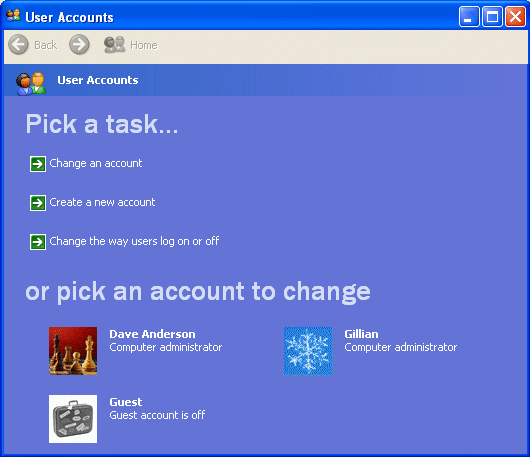
Edit

Select the account you want to edit …
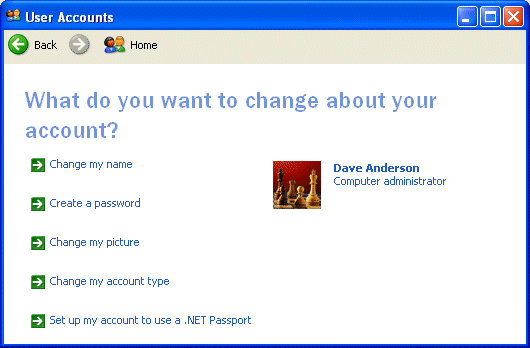
Change

… and the aspect of the account you want to change (in this case we’re going to create a password for the account).

Click Create a password and then enter and confirm the chosen password. Type a word or phrase to be used as a password hint …
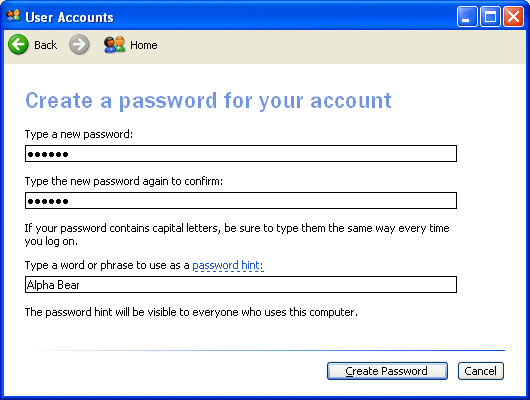
Create

… and click Create Password.

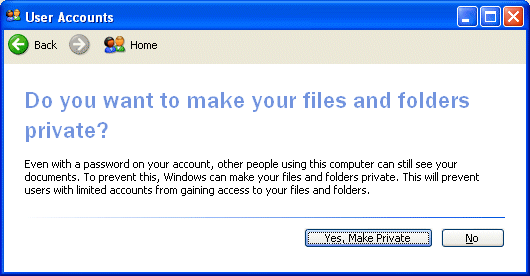
Make

Click Yes, Make Private if you want to prevent other users from being able to view your folders and files.

Relevant Microsoft Knowledge Base Articles

  • 279783: How To Create and Configure User Accounts in Windows XP
  • 281699: You Are Not Prompted to Create a Password When You Create a New User Account on a Windows XP Home Edition-Based Computer
  • 293834: User Accounts That You Create During Setup Are Administrator Account Types
  • 282866: How to automatically log on to a user account in Windows XP
  • 300489: A Description of the Guest Account
  • User Account Creation
  • User Account Editing

Filed Under: How to Create and Configure User Accounts in Windows

Latest Articles

CrossFire Graphic Cards

Launched at Computex in the summer of 2005, ATI launched their own tandem graphics card solution, branded CrossFire, and comprising the following components: Radeon CrossFire Edition graphics card with Compositing Engine Secondary PCI Express graphics card with … [Read More...]

Safe Mode Editing

Repeat the same process as used previously to make a backup copy of the current boot.ini file. This time, however, when the file has been opened in Notepad... ... locate the [Operating Systems] section. Copy the entry beneath this that relates to your default operating system, and paste … [Read More...]

P2P Networking

By early 2000 a revolution was underway in an entirely new form of peer-to-peer computing. Sparked by the phenomenal success of a number of highly publicised applications, P2P computing - as it is commonly referred to - heralded a new computing … [Read More...]

Everything You Need to Know About Sourcing Circuit Boards From U.S. Suppliers

In This Article This article includes: Why Source PCBs From the United States?How to Get a Quote From a U.S.-Based PCB ManufacturerThe Top U.S. … [Read More...]

Top Taplio Alternatives in 2025 : Why MagicPost Leads for LinkedIn Posting ?

LinkedIn has become a strong platform for professionals, creators, and businesses to establish authority, grow networks, and elicit engagement. Simple … [Read More...]

Shocking Cybercrime Statistics for 2025

People all over the world are becoming more concerned about cybercrime than ever. We have recently collected some statistics on this topic and … [Read More...]

Gaming Laptop Security Guide: Protecting Your High-End Hardware Investment in 2025

Since Jacob took over PC Tech Guide, we’ve looked at how tech intersects with personal well-being and digital safety. Gaming laptops are now … [Read More...]

20 Cool Creative Commons Photographs About the Future of AI

AI technology is starting to have a huge impact on our lives. The market value for AI is estimated to have been worth $279.22 billion in 2024 and it … [Read More...]

13 Impressive Stats on the Future of AI

AI technology is starting to become much more important in our everyday lives. Many businesses are using it as well. While he has created a lot of … [Read More...]

Guides

  • Computer Communications
  • Mobile Computing
  • PC Components
  • PC Data Storage
  • PC Input-Output
  • PC Multimedia
  • Processors (CPUs)

Recent Posts

Guide to Intel’s Mobile Celeron CPU

Co-incident with the launch of Dixon, Intel also introduced its first Mobile Celeron CPUs, at clock speeds of 266MHz and … [Read More...]

3 Methods for Remote Quickbooks Access

Quickbooks is one of the most popular accounting packages for small business. But, people who are in charge of keeping the books do not want to always … [Read More...]

ECC Memory

Unlike parity memory, which uses a single bit to provide protection to eight bits, ECC uses larger groupings. Five ECC … [Read More...]

[footer_backtotop]

Copyright © 2026 About | Privacy | Contact Information | Wrtie For Us | Disclaimer | Copyright License | Authors