pctechguide.com

  • Home
  • Guides
  • Tutorials
  • Articles
  • Reviews
  • Glossary
  • Contact

SDRAM

The more recent Synchronous DRAM memory works quite differently from other memory types. It exploits the fact that most PC memory accesses are sequential and is designed to fetch all the bits in a burst as fast as possible. With SDRAM an on-chip burst counter allows the column part of the address to be incremented very rapidly which helps speed up retrieval of information in sequential reads considerably. The memory controller provides the location and size of the block of memory required and the SDRAM chip supplies the bits as fast as the CPU can take them, using a clock to synchronise the timing of the memory chip to the CPU’s system clock.

This key feature of SDRAM gives it an important advantage over other, asynchronous memory types, enabling data to be delivered off-chip at burst rates of up to 100MHz. Once the burst has started all remaining bits of the burst length are delivered at a 10ns rate. At a bus speed of 66MHz SDRAMs can reduce burst rates to 5/1/1/1. The first figure is higher than the timings for FPM and EDO RAM because more setting up is required for the initial data transfer. Even so, there’s a theoretical improvement of 18% over EDO for the right type of data transfers.
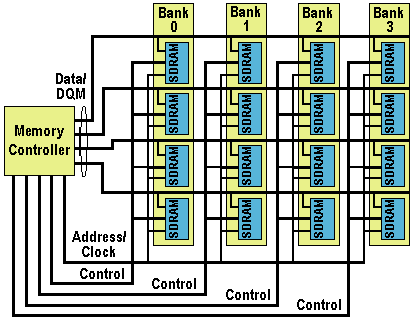
SDRAM

However, since no reduction in the initial access is gained, it was not until the release of Intel’s 440BX chipset, in early 1998, that the benefit of 100MHz page cycle time was fully exploited. However, even SDRAM cannot be considered as anything more than a stop-gap product as the matrix interconnection topology of the legacy architecture of SDRAM makes it difficult to move to frequencies much beyond 100MHz. The legacy pin function definition – separate address, control and data DQM lines – controlled by the same clock source leads to a complex board layout with difficult timing margin issues. The 100MHz layout and timing issues might be addressed by skilful design, but only through the addition of buffering registers, which increases lead-off latency and adds to power dissipation and system cost.

Beyond 100MHz SDRAM, the next step in the memory roadmap was supposed to have been Direct Rambus DRAM (DRDRAM). According to Intel, the only concession to a transition period was to have been the S-RIMM specification, which allows PC100 SDRAM chips to use Direct RDRAM memory modules. However, driven by concerns that the costly Direct RDRAM would add too much to system prices, with the approach of 1999 there was a significant level of support for a couple of transitionary memory technologies.

  • What is Level 1 (L1) Cache Memory?
  • What is L2 (Level 2) cache memory?
  • RAM or Main Memory – PC / computer memory (DIMM, DRAM, SDRAM)
  • DRAM – Dynamic Random Access Memory
  • FPM DRAM
  • EDO (Extended Data Out) and BEDO (Burst Extended Data Out) DRAM
  • SDRAM
  • PC133 SDRAM
  • DDR SDRAM explained
  • DDR2 DRAM
  • Dual Channel DDR Memory
  • 1T SRAM
  • Direct DRAM
  • SIMMs
  • DIMM Memory
  • RIMMs Memory
  • Memory Presence Detection
  • Parity Memory
  • ECC Memory
  • Memory Upgrades
  • The Evolution of Memory
  • Flash Memory
  • Magnetic RAM

Filed Under: Computer Memory

Latest Articles

Can Samsung Galaxy Alpha Contend Against The Best?

The Samsung Galaxy Alpha is still at the beginning of its sizzling days as it was only introduced in August 2014 and released in the market in September. It made some news because it’s only few months (February 2014) that its sister Samsung Galaxy S5 walked in and started to make waves among … [Read More...]

ISA Bus – Industry Standard Architecture

When it appeared on the first PC the 8-bit ISA bus ran at a modest 4.77MHz - the same speed as the processor. It was improved over the years, eventually becoming the Industry Standard Architecture (EISA), developed by a consortium made up of IBM's major competitors. Although these systems … [Read More...]

CD-ROM Yellow Book

The Yellow Book was written in 1984 to describe the extension of CD to store computer data, i.e. CD-ROM (Read Only Memory). This specification comprises the following: Disc specification which is a copy of part of the Red Book Optical stylus parameters (from Red … [Read More...]

Top Taplio Alternatives in 2025 : Why MagicPost Leads for LinkedIn Posting ?

LinkedIn has become a strong platform for professionals, creators, and businesses to establish authority, grow networks, and elicit engagement. Simple … [Read More...]

Shocking Cybercrime Statistics for 2025

People all over the world are becoming more concerned about cybercrime than ever. We have recently collected some statistics on this topic and … [Read More...]

Gaming Laptop Security Guide: Protecting Your High-End Hardware Investment in 2025

Since Jacob took over PC Tech Guide, we’ve looked at how tech intersects with personal well-being and digital safety. Gaming laptops are now … [Read More...]

20 Cool Creative Commons Photographs About the Future of AI

AI technology is starting to have a huge impact on our lives. The market value for AI is estimated to have been worth $279.22 billion in 2024 and it … [Read More...]

13 Impressive Stats on the Future of AI

AI technology is starting to become much more important in our everyday lives. Many businesses are using it as well. While he has created a lot of … [Read More...]

Graphic Designers on Reddit Share their Views of AI

There are clearly a lot of positive things about AI. However, it is not a good thing for everyone. One of the things that many people are worried … [Read More...]

Guides

  • Computer Communications
  • Mobile Computing
  • PC Components
  • PC Data Storage
  • PC Input-Output
  • PC Multimedia
  • Processors (CPUs)

Recent Posts

McAfee Antivirus Plus Review

Pros : Once again, McAfee proves that it exceeds expectations in tests by independent labs Cons : You have to buy a copy for each computer that you … [Read More...]

Hot-Finder.com Virus Removal Guide

Hot Finder is another browser hijacker that can make your browsing experience annoying and cause issues for your PC. Installing this hijacker will … [Read More...]

Apple Quicktime

Recognizing the drawback of requiring a costly playback adapter, Apple developed a video format that can be played without … [Read More...]

[footer_backtotop]

Copyright © 2026 About | Privacy | Contact Information | Wrtie For Us | Disclaimer | Copyright License | Authors