pctechguide.com

  • Home
  • Guides
  • Tutorials
  • Articles
  • Reviews
  • Glossary
  • Contact

TrendMicro Titanium Antivirus Plus 2017 Review

Trend Micro Antivirus Review

PROS: Detected virtually all threats in a wildlist scan, and didn’t cause any performance issues

CONS: Long scan times and a handful of false positives. This can cause major issues. Ensure you do a restore point before you remove any files.

OVERVIEW: TrendMicro Titanium Plus Antivirus 2017 is an antimalware scanner designed to remove and detect the latest threats that can compromise your system. During a wildlist scan, TrendMicro proved to be a valuable asset to security, but the user should be wary of false positives generated by the heuristics and slower scans if time is an issue.


TrendMicro Titanium Antivirus Plus 2017 Review

Company: TrendMicro

Supported OS: Windows XP, Vista, 7

Price: 1PC/1 Year License – $39.95 (full listing @ http://emea.trendmicro.com/emea/products/personal/titanium-antivirus-plus/)

Overall Rating: 6 out of 10


What It Does:

TrendMicro Titanium Antivirus Plus 2017 is an Anti-Malware scanner designed to detect and remove malware, and to keep your system safe from current threats.

Installation:

The installation process took about 15 minutes to complete with minimal user interaction, and required only one reboot. After the installation, there was no noticeable hit to system performance.

Details:

After TrendMicro Titanium was installed, the user is presented with the screen below. I also have an extensive archive of text-based data sitting on my primary hard drive, so I expected the scan to take a significant amount of time.
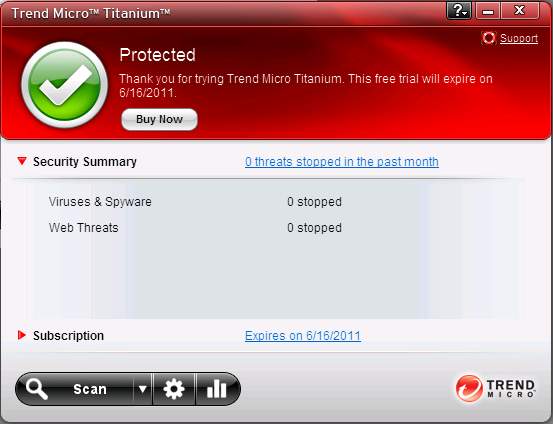
TrendMicro Titanium antivirus 2011

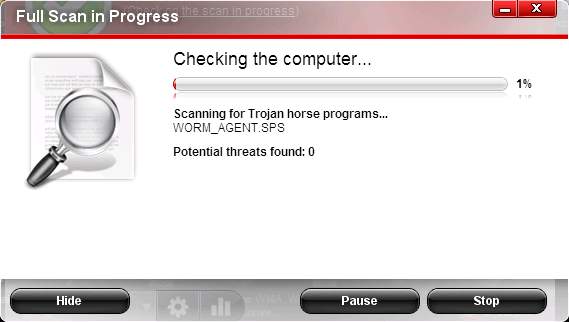
Below is a screenshot of TrendMicro Titanium’s scan module in process. Unlike the rest of the security applications that I tested, TrendMicro Titanium’s interface was probably the most aesthetically pleasing, yet the most simplistic of them. During the time that I was present for the scan, there was no noticeable degradation of system performance.
TrendMicro Titanium antivirus review

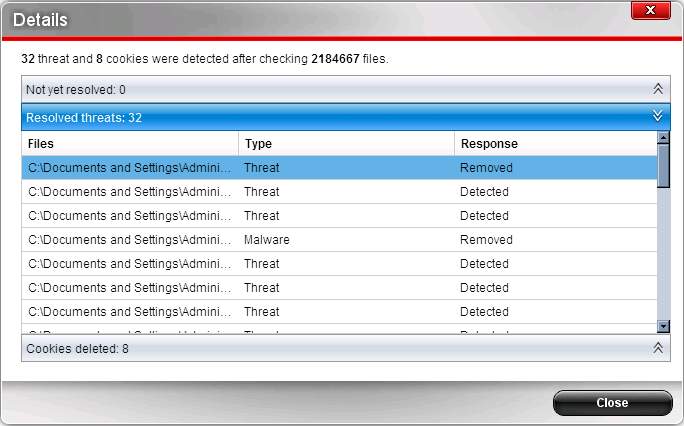
Approximately eight hours later, TrendMicro Titanium was finished scanning. I found the results to be rather disappointing, several cookies were removed and detected as threats, although the cookies in question were simply used by advertisers and can be picked up by normal internet usage. There were also numerous false positives on applications that I knew to be safe. However, most users probably won’t have these kind of false positives, unless they have the applications installed on their system.
Ease Of Use:

TrendMicro Titanium was fairly easy to use, and both the installation and uninstallation process were relatively quick and easy. The interface is designed for the novice user in mind, and can be navigated and used with ease. The interface is also very pleasing to the eyes, and the light translucence to the interface is something that can definitely be appreciated.

Summary:

While TrendMicro Titanium was easy to install, the results on a full system scan were somewhat disappointing, and the scan time was significantly longer than I expected. When I used TrendMicro Titanium to scan a small archive of a few thousand wildlist samples, virtually all of the malware samples were detected, which is a plus. The two concerns that I do have are in regards to what I assume are the heuristics throwing false positives on legit applications, and that the scanning process takes a rather long period of time as opposed to other anti-malware solutions such as AntiVir. While TrendMicro Titanium is a great solution to detect malware, the false positives and the lengthy scantimes are something to be wary of.

Filed Under: Anti-Virus Reviews Tagged With: TrendMicro Titanium Antivirus, TrendMicro Titanium Antivirus Plus 2011, TrendMicro Titanium Antivirus Plus 2011 review

Latest Articles

DirectX

Graphics technology is a particularly fast-developing area of the PC industry, with new chipsets, new revisions of chipsets and even entirely new technologies appearing at an alarming rate. This presents a problem for applications wishing … [Read More...]

(no title)

Interesting tidbit about app indexing for both Apple and Google. Google already has put into motion ways of indexing an app which may prove to be a boom for apps that have user generated content.  Providing that content can be parsed and delivered correctly to users in a way that is meaningful.  The … [Read More...]

MSTechSupport.info Scam Removal

You may be getting random popups in your browser from a company claiming to be MSTechSupport.info. These can happen inside any browser like Internet Explorer, Chrome or Firefox. This is a scam trying to trick you into thinking there is a company on the other end ready to help you. It is caused by … [Read More...]

Everything You Need to Know About Sourcing Circuit Boards From U.S. Suppliers

In This Article This article includes: Why Source PCBs From the United States?How to Get a Quote From a U.S.-Based PCB ManufacturerThe Top U.S. … [Read More...]

Top Taplio Alternatives in 2025 : Why MagicPost Leads for LinkedIn Posting ?

LinkedIn has become a strong platform for professionals, creators, and businesses to establish authority, grow networks, and elicit engagement. Simple … [Read More...]

Shocking Cybercrime Statistics for 2025

People all over the world are becoming more concerned about cybercrime than ever. We have recently collected some statistics on this topic and … [Read More...]

Gaming Laptop Security Guide: Protecting Your High-End Hardware Investment in 2025

Since Jacob took over PC Tech Guide, we’ve looked at how tech intersects with personal well-being and digital safety. Gaming laptops are now … [Read More...]

20 Cool Creative Commons Photographs About the Future of AI

AI technology is starting to have a huge impact on our lives. The market value for AI is estimated to have been worth $279.22 billion in 2024 and it … [Read More...]

13 Impressive Stats on the Future of AI

AI technology is starting to become much more important in our everyday lives. Many businesses are using it as well. While he has created a lot of … [Read More...]

Guides

  • Computer Communications
  • Mobile Computing
  • PC Components
  • PC Data Storage
  • PC Input-Output
  • PC Multimedia
  • Processors (CPUs)

Recent Posts

User Account Editing

To edit an existing account, click Start > Control Panel and double-click User Accounts. Select the account you want to edit ... ... … [Read More...]

The Harmful Ways of Mystart.uninstallmaster.com

Mystart.uninstallmaster.com is basically a browser hijacker. For the ordinary computer user, a browser hijacker can be a malware, an adware, a virus … [Read More...]

Graphic Card Colour Depth

Each pixel of a screen image is displayed using a combination of three different colour signals: red, green and blue. The … [Read More...]

[footer_backtotop]

Copyright © 2026 About | Privacy | Contact Information | Wrtie For Us | Disclaimer | Copyright License | Authors