As with the others, the technology for wireless networks has also been around for some time, achieving a measure of success during the late 1990s in a number of vertical markets, including health-care, retail and manufacturing. Home networking simply takes the technology to another level of functionality.
Wireless LANs (WLANs) can now offer the same advantages to consumers: first and foremost is mobility. Consumers have the flexibility to move inside or outside their homes and still remain connected to the Internet or to other computing devices on the network. Installation is easy because there are no wires. Wireless network components can be set up anywhere in the home. Wireless networking makes it easy to move computers and other devices without the need to reconfigure the network.
Wireless LANs use electromagnetic airwaves, either infrared IrDA) or radio frequency (RF), to communicate information from one point to another without relying on any physical connection. Radio waves are often referred to as radio carriers because they simply perform the function of delivering energy to a remote receiver. The data being transmitted is superimposed on the radio carrier so that it can be accurately extracted at the receiving end. This is generally referred to as modulation of the carrier by the information being transmitted. Once data is superimposed (modulated) onto the radio carrier, the radio signal occupies more than a single frequency, since the frequency or bit rate of the modulating information adds to the carrier.
Multiple radio carriers can exist in the same space at the same time without interfering with each other if the radio waves are transmitted on different radio frequencies. To extract data, a radio receiver or augment networks without installing or moving wires. Wireless LANs tunes in (or selects) one radio frequency while rejecting all other radio signals on different frequencies.
In a typical WLAN configuration, a transmitter/receiver (transceiver) device, called an Access Point (AP), connects to the wired network from a fixed location using standard Ethernet cable. At a minimum, the Access Point receives, buffers, and transmits data between the WLAN and the wired network infrastructure. A single Access Point can support a small group of users and can function within a range of less than one hundred to several hundred feet. The Access Point (or the antenna attached to the access point) is usually mounted high but may be mounted essentially anywhere that is practical as long as the desired radio coverage is obtained.
End users access the WLAN through wireless-LAN adapters, which are implemented as PCMCIA cards in notebook computers, ISA or PCI cards in desktop computers, or integrated within hand-held computers. WLAN adapters provide an interface between the client network operating system (NOS) and the airwaves (via an antenna). The nature of the wireless connection is transparent to the NOS.
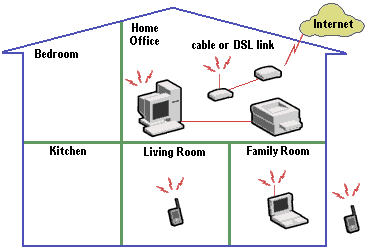
The figure shows how a wireless network could be set up in the home. Internal or external adapters are installed on each PC. Printers or other peripherals can be shared through a connected PC. The devices then communicate using a set of reserved high-frequency radiowaves. An access point device connects to a DSL or cable modem and enables high-rate (broadband) Internet access for the entire network.
Because RF-based wireless home networking technology is not restricted by line-of-sight, network components do not need to be located in the same room to communicate. In a typical home, the maximum distance between devices is about 250 feet. Family members can wander from room to room or relax on the patio while surfing the Internet from their laptops.
Several wireless networking standards exist, including Bluetooth, HomeRF and IEEE 802.11, but each serves different purposes. Bluetooth is a technology to connect devices without wires. The intended use is to provide short-range connections between mobile devices and to the Internet via bridging devices to different networks (wired and wireless) that provide Internet capability. HomeRF SWAP is a wireless technology optimised for the home environment. Its primary use is to provide data networking and dial tones between devices such as PCs, cordless phones, Web Tablets, and a broadband cable or DSL modem. Both technologies share the same frequency spectrum but do not interfere when operating in the same space. Both Bluetooth and HomeRF functionality can be implemented in the same device. IEEE 802.11 is emerging as the primary standard for wireless network and Internet access. It supports 11 Mbit/s wireless access in the 2.4GHz radio band and works over longer distances than Bluetooth and HomeRF.