pctechguide.com

  • Home
  • Guides
  • Tutorials
  • Articles
  • Reviews
  • Glossary
  • Contact

Graphics Card Removal

Replacing your graphics card is easy and the only tools you’ll need are a Phillips screwdriver and – just in case you’re cack-handed – a pair of tweezers for retrieving dropped screws! If you’re wise you’ll also use an antistatic wriststrap during the entire process.
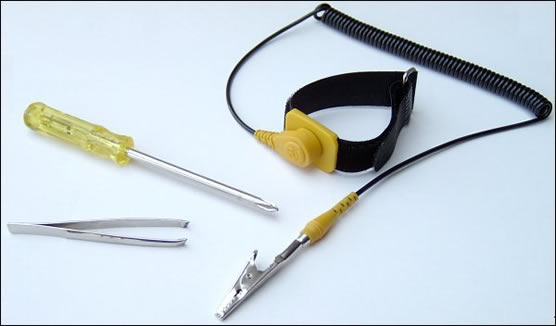
Tools

Power down your PC and remove its mains lead and any other connections that’ll hamper opening up the PC. Make a note of the socket your display is plugged in to; this identifies the location of your current graphics card.

Open up the case, ground yourself to release any antistatic – or better still put on an antistatic wriststrap and ground it by clipping it to an unpainted metal part of the case. Remove the small screw attached to the back plate of your current graphics card and gently pull the card from its slot. It may help to hold the card by either corner and rock it back and forth a little to pry it loose.

PCI was the de facto interface standard for graphics cards from 1993 to 1997, when the advent of 3D Graphics acceleration led to the PCI bus becoming a limiting factor in the performance of graphics applications. The answer was the Accelerated Graphics Port (AGP). Since this operated at the speed of a processor’s frontside bus, at the 66MHz clock rate prevalent at the time, this immediately doubled throughput to 264 MBps. Moreover, for graphics cards specifically designed to support it, the AGP 1.0 standard allowed data to be sent during both the up and down clock cycle, doubling the clock rate to 133MHz and peak transfer to 528 MBps. This was known as X2.

Over the next couple of years, 3D applications (and gaming in particular) accelerated at a phenomenal pace, leading to the release of AGP 2.0 standard in 1998 – a mere two years after the original AGP standard had been ratified – which introduced a 4X pipeline, thereby again doubling AGP’s peak bandwidth to 1.1GBps.

By 2002, with even AGP 4X looking like an impediment to the relentless evolution of 3D hardware and software. The result was the AGP 3.0 standard – released in the autumn of that year – specifying a peak bandwidth of 2.1 GBps (8X).

An AGP slot is shorter that a PCI slot, usually brown in colour and located in line and beside the bank of PCI slots.
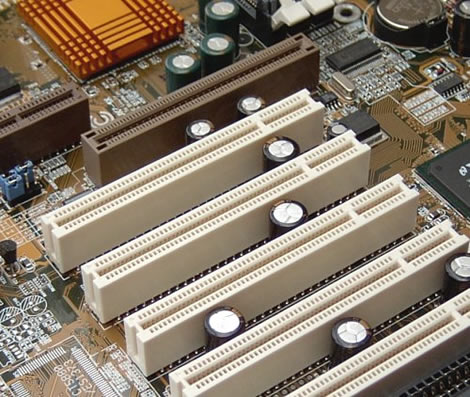
AGP

  • Graphics Card Upgrade Reasons
  • Graphics Card Driver Un-Installation
  • Graphics Card Identification
  • Graphics Card Removal
  • Graphics Card Installation
  • Installing new Windows XP graphics card drivers
  • Graphics Card Driver Upgrade
  • Graphics Card Adjustments
  • Graphics Card Installation – WinXP

Filed Under: How to Upgrade Your Graphics Card

Latest Articles

The Evolution of Software for Digital Gaming Sites

The digital gaming industry is undergoing a major change in 2019. A number of the key players are starting to use more sophisticated software to improve the quality of the services that they offer. This is likely one of the reasons that the gaming market is expected to be worth $103 billion in the … [Read More...]

Privacy Policy – PC Technology Guide (www.pctechguide.com)

The PC Technology Guide respects the privacy of visitors, and will not disclose any information gathered during registration to the forums or through emails received to anyone else unless this is explicitly agreed by both parties. PCTechGuide may occasionally communicate with members by … [Read More...]

VPN

VPN Definition: A virtual private network is a private data network that makes use of the public telecommunication infrastructure (typically the Internet), maintaining privacy through the use of a tunnelling protocol and security procedures. It can be contrasted with a system of … [Read More...]

Everything You Need to Know About Sourcing Circuit Boards From U.S. Suppliers

In This Article This article includes: Why Source PCBs From the United States?How to Get a Quote From a U.S.-Based PCB ManufacturerThe Top U.S. … [Read More...]

Top Taplio Alternatives in 2025 : Why MagicPost Leads for LinkedIn Posting ?

LinkedIn has become a strong platform for professionals, creators, and businesses to establish authority, grow networks, and elicit engagement. Simple … [Read More...]

Shocking Cybercrime Statistics for 2025

People all over the world are becoming more concerned about cybercrime than ever. We have recently collected some statistics on this topic and … [Read More...]

Gaming Laptop Security Guide: Protecting Your High-End Hardware Investment in 2025

Since Jacob took over PC Tech Guide, we’ve looked at how tech intersects with personal well-being and digital safety. Gaming laptops are now … [Read More...]

20 Cool Creative Commons Photographs About the Future of AI

AI technology is starting to have a huge impact on our lives. The market value for AI is estimated to have been worth $279.22 billion in 2024 and it … [Read More...]

13 Impressive Stats on the Future of AI

AI technology is starting to become much more important in our everyday lives. Many businesses are using it as well. While he has created a lot of … [Read More...]

Guides

  • Computer Communications
  • Mobile Computing
  • PC Components
  • PC Data Storage
  • PC Input-Output
  • PC Multimedia
  • Processors (CPUs)

Recent Posts

How To Get Two Monitors On One Computer

Sometimes while attending to multiple tasks on your computer you feel the need for more monitor space to get all your work done at the same time. So, … [Read More...]

Which UK cities have the best network coverage?

The UK’s network connectivity is above average when compared to other countries, sitting at around 77% 4G availability nationwide, for example, and … [Read More...]

Laser Printer Communications

A laser printer needs to have all the information about a page in its memory before it can start printing. How an image … [Read More...]

[footer_backtotop]

Copyright © 2026 About | Privacy | Contact Information | Wrtie For Us | Disclaimer | Copyright License | Authors