pctechguide.com

  • Home
  • Guides
  • Tutorials
  • Articles
  • Reviews
  • Glossary
  • Contact

SCSI Internal Software

SCSI Host Adapter:

Windows 98 and Windows XP both have embedded driver support for the SCSI host adapter being used in this tutorial. On restarting the system, Windows should detect the presence of the adapter and prompt you to take the steps necessary for the associated driver to be installed.

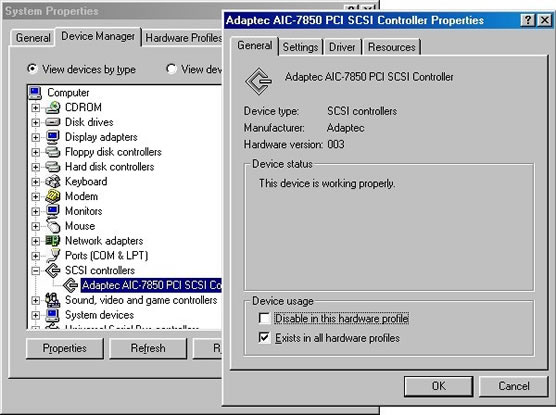
After Windows has been restarted, you can confirm that the driver software has been properly installed via Device Manager. Access this via Windows 98 by going Start > Settings > Control Panel > System > Device Manager. For Windows XP, right-click My Computer and click on Properties, Hardware and Device Manager.
Connected

You should see an entry for your host adapter under SCSI Controllers.

If you don’t, or the entry is accompanied by a yellow exclamation point or red X, follow the manufacturer’s instructions for installing driver support from the floppy disk or CD-ROM media that was provided with the host adapter card.

CD-ReWriter:

The computer’s operating system, whether it is Windows XP, Windows Me, Windows 98, Windows 95, Windows 2000 or Windows XP supplies a generic CD-ROM device driver that will allow your CD-ReWriter to function as a standard CD-ROM drive. You don’t need to install anything else.

However, in order to take advantage of the drive’s ability to record on CD-R or CD-RW media, you’ll need to install packet writing or mastering applications software on your PC. Such applications – such as Roxio’s Easy CD Creator – are generally bundled with CD-ReWriter products.

The Roxio suite comprises three main applications:

  • CD Copier: Lets you copy any CD.
  • DirectCD Format Utility: Prepares a CD-R or CD-RW disc so you can directly copy files to it in much the same way that you copy files to a floppy disk or removable drive. You can then use Windows Explorer, or any other program that can read from and write to a drive letter, to copy files to a CD. You can also recover files from damaged CDs, and even repair CDs.
  • Easy CD Creator: Lets you make your own CDs, including music CDs that can be played on your home or car stereo CD player, or data CDs for storing computer data such as the files and folders on your hard disk.

Note that if you use a CD-R disc with packet writing software, you can’t subsequently use the disc with mastering software (and vice versa).

CD-RW discs must also be used with either one type of software or the other. However, in the case of rewritable media, a CD-RW disc can be erased and subsequently used again with either type of software.

  • SCSI Adapters
  • SCSI Internal Intro
  • SCSI Internal Configuration
  • SCSI Internal Mounting
  • SCSI Internal Connections
  • SCSI Internal Software
  • SCSI External
  • Installing a SCSI device – making the connections
  • SCSI External Config
  • SCSI External Software

Filed Under: How to Install a SCSI Device

Latest Articles

Where to Learn More about Web Design and Website Development

If you're looking for a book on web page building, look for one that matches the tools and technologies that you're going to be using. Tools include: HTML editors (eg FrontPage or Dreamweaver) Graphics editing software Database software Technologies include things … [Read More...]

Windows Backup Installation

Unlike with the Professional Edition of the operating system, the Windows Backup utility is not included in the default installation of Windows XP Home Edition. You'll not, therefore, see the associated program icon on the Start menu in Windows XP Home Edition or find Backup listed in the … [Read More...]

CDR-RW Double Density Media

The idea of a double density writable and rewritable CD media is not new. In the early 1990s a number of companies experimented with extending the White Book and Red Book standards to store large amounts of video. However, these technologies were … [Read More...]

Everything You Need to Know About Sourcing Circuit Boards From U.S. Suppliers

In This Article This article includes: Why Source PCBs From the United States?How to Get a Quote From a U.S.-Based PCB ManufacturerThe Top U.S. … [Read More...]

Top Taplio Alternatives in 2025 : Why MagicPost Leads for LinkedIn Posting ?

LinkedIn has become a strong platform for professionals, creators, and businesses to establish authority, grow networks, and elicit engagement. Simple … [Read More...]

Shocking Cybercrime Statistics for 2025

People all over the world are becoming more concerned about cybercrime than ever. We have recently collected some statistics on this topic and … [Read More...]

Gaming Laptop Security Guide: Protecting Your High-End Hardware Investment in 2025

Since Jacob took over PC Tech Guide, we’ve looked at how tech intersects with personal well-being and digital safety. Gaming laptops are now … [Read More...]

20 Cool Creative Commons Photographs About the Future of AI

AI technology is starting to have a huge impact on our lives. The market value for AI is estimated to have been worth $279.22 billion in 2024 and it … [Read More...]

13 Impressive Stats on the Future of AI

AI technology is starting to become much more important in our everyday lives. Many businesses are using it as well. While he has created a lot of … [Read More...]

Guides

  • Computer Communications
  • Mobile Computing
  • PC Components
  • PC Data Storage
  • PC Input-Output
  • PC Multimedia
  • Processors (CPUs)

Recent Posts

Monitor Controls

Not so long ago, advanced controls were found only on high-end monitors. Now, even budget models boast a wealth of image … [Read More...]

When the Future Takes Flight: Technology’s Impact On Post-COVID-19 Travel

In 2020, international and local travel screeched to an abrupt halt in light of mandatory quarantine precautions and unanswered questions related to … [Read More...]

Motherboard IDE Connections

IDE connectors, like floppy drive and other connectors, are keyed to ensure proper connection. Connect your IDE devices to the motherboard IDE … [Read More...]

[footer_backtotop]

Copyright © 2026 About | Privacy | Contact Information | Wrtie For Us | Disclaimer | Copyright License | Authors