 CoupMania is another in a long list of annoying adware products. It is not a serious or malicious piece of software, but like other forms of adware, it can open up doors to other infection and be an overall nuisance. Therefore, it is best to remove CoupMania as soon as you are aware of its presence.
CoupMania appears to be distributed through a vast network. In other words, it isn’t a manual download and install from a single website. It seems to be distributed through a bunch of different third-party installers. It has appeared in the Amonetize, Vittalia and Installrex installers. The best way to avoid this type of software is to steer clear of file sharing websites. It also rears its head on torrent sites and download websites.
The program is based on the JustPlugIt engine. There are a ton of apps coming from this engine that originates from the Multiplug code. One common footprint of these types of software is that every installation of the program will randomize the name. But, it is still easy to pick out that it is the CoupMania program.
The bad news if you find CoupMania on your computer is that you are probably infected with other issues. There is a good chance that it was bundled with some other unwanted programs and pieces of software. It has been known to be installed with EZDownloader and Websearch.serchfix.info and many others. If you are starting to see a bunch of pop ups and unsolicited ads then there is a good chance you are infected with this or another piece of adware.
In addition to having a virus scanner installed on your machine, you need to be careful when installing software from a third party website. Always opt for the custom install because this will give you the option to pick and choose the software you want installed in most cases. Even if you choose the custom install you need to be careful and read all the install options because they will still try to sneak the programs on your computer with confusing install options.
Removing CoupMania is not too difficult. However, if you would like an automated way to do it then we recommend SpyHunter. This tool will scan your entire computer and let you know if you are infected with CoupMania or other issues. You can do a scan for freea and you can purchase the software if you would like to clean your computer with it. You can click on the orange button below to download the software.

Uninstall CoupMania from Windows.
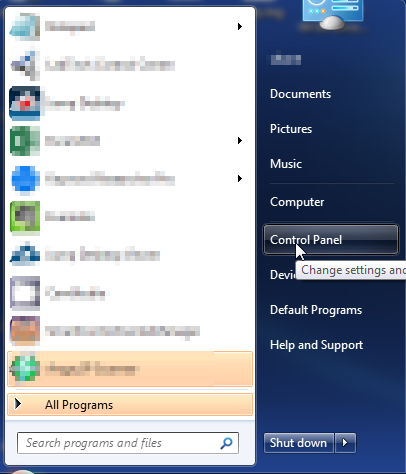
- Open up control panel by clicking on the start button in the lower left corner of your computer, and then going to Control Panel
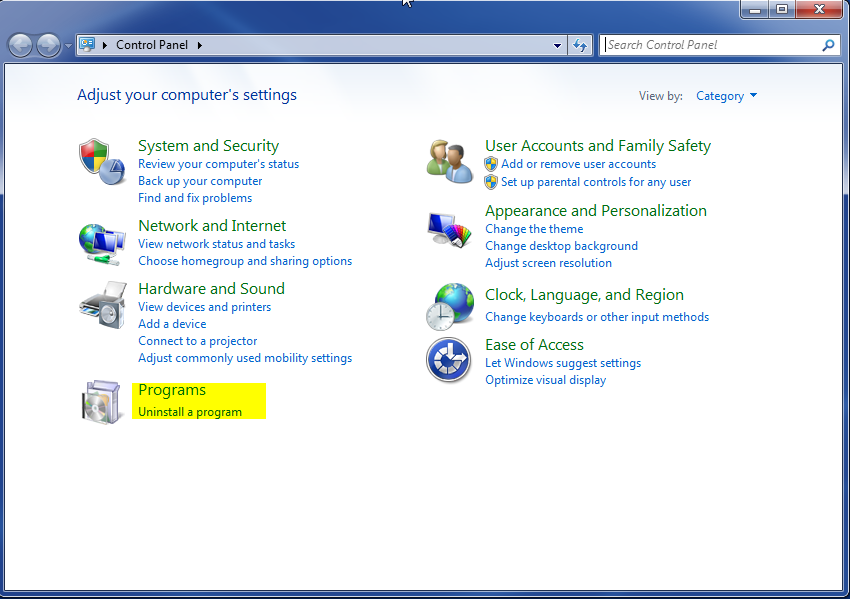
- Once, you are in Control Panel, go to the link labeled “Uninstall a Program”. If your computer does not look like the view below, you may have to sort by categories at the top right.
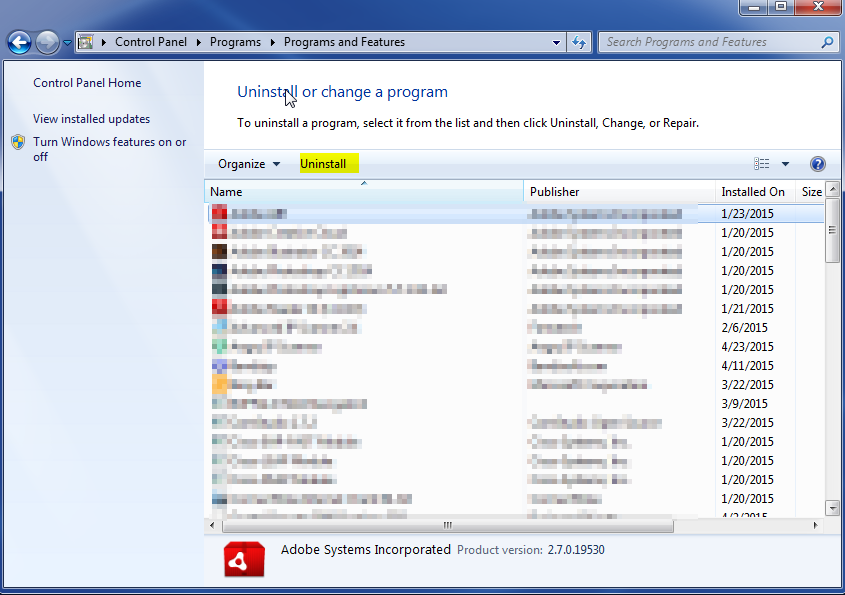
- Once in the uninstall programs section, look for the offending program. You can scroll by date installed to find programs that were installed recently. This may be a clue as to what the offending program is. Once you have found the program, highlight it and select “Uninstall” to remove
Once you have done this, you will need to go into your browser and set it to its default settings to remove the other changes it made. You will also want to scan your computer to make sure no new issues were introduced by the vulnerability. A good tool to use for this is MalwareBytes. If you already have a virus scanner, you should run this as well.