pctechguide.com

  • Home
  • Guides
  • Tutorials
  • Articles
  • Reviews
  • Glossary
  • Contact

Dye Sublimation Printers

For many years dye-sublimation printers were specialist devices widely used in demanding graphic arts and photographic applications. The advent of digital photography led to the technology entering the mainstream, forming the basis of many of the standalone, portable photo printers that emerged in the second half of the 1990s.

The printing process used by true dye-sublimation printers differs from that of inkjets. Instead of spraying jets of ink onto a page as inkjet printers do, dye-sublimation printers apply a dye from a plastic film. This takes the form of a either a roll or a ribbon, similar to that used by thermal wax printers, usually containing consecutive panels of cyan, magenta, yellow and black dye.
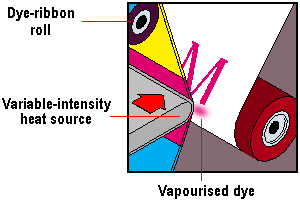
Dye-sublimation

The transfer film passes across a thermal print head consisting of thousands of heating elements. The heat causes the dyes on the film to sublimate – that is, turn from a solid to a gas without a liquid phase in between – and the gaseous dyes are absorbed by the printing paper. The amount of dye actually transferred is controlled by varying the intensity and duration of the heat.

When the ink is absorbed by the paper it tends to diffuse, blurring the edges of. This diffusion helps the printer create continuous tones of colour as a result of the dots of ink blending together. The effect is most pronounced in relation to the direction in which the paper is travelling, since the movement of the paper enlarges the area that the ink is applied to.

Dye-sublimation printers employ a three-pass system, layering cyan, magenta and yellow dyes on top of one another. They then add a clear coat to protect the print against ultraviolet light. Whilst this is capable of producing excellent results, it is far from economical. Even if a particular image needs practically none of one of the pigments, that ribbon segment is still consumed. This is why it’s common for packs of paper for use with dye-sub printers to contain a transfer film capable of producing the same number of prints.

There are now some inkjet printers on the market capable of deploying dye-sublimation techniques. To ensure intricate and precise designs, you can use a plotter printer. The way in which an inkjet uses the technology differs from a true dye-sub in that its inks are in cartridges, which can only cover the page one strip at a time. It heats the inks to form a gas, controlled by a heating element which reaches temperatures of up to 500° C (higher than the average dye sublimation printer). The proprietary Micro Dry technique employed in Alps’ printers is an example of this hybrid technology. These devices operate at 600 to 1200dpi and with some, the standard cartridges can be swapped for special photo ink units for photographic-quality output.

  • Solid Ink Printers
  • Dye Sublimation Printers
  • Thermo AutoChrome Printers
  • Thermal Wax Printers
  • Dot-Matrix Printers

Filed Under: Other Printers

Latest Articles

Tips to Getting Engagement that Works the Instagram Algorithm in Your Favor

Building a formidable presence on Instagram these days requires much planning and patience. With over a billion active users, the site is rocketing in popularity for both personal and professional networking purposes. The frequent upgrades in recent times have made Instagram a very versatile space … [Read More...]

Hard Drive Connection

Having reconfigured the drives as required, they may now be mounted into the appropriate drive bays. In fact, the best arrangement was to move the existing drive up a bay - so as to maintain maximum air circulation and to swap the old hard drive's power supply socket with that of the CD-ROM … [Read More...]

WinXP Installation Phase 4

Setup proceeds with the installation of devices and the network, then copies and configures the other files needed to install Windows XP. The Start Menu items are installed and components are registered. The phase includes specifying: regional and language options your name and … [Read More...]

Why Internet Bundles Are the Next Battleground for Gamers

A weak internet connection can turn seamless gaming sessions into frustrating experiences filled with lag, buffering or sudden disconnects. For … [Read More...]

Importance of Inbound Marketing in the Digital Age

A couple of months ago, Zacks reported that Hubspot was starting to make some major changes to its inbound marketing strategy. They talk a lot about … [Read More...]

Damage Control Strategies for Resolving Online PR Crises

Last July, Astrologer faced a major crisis after its CEO went viral at a ColdPlay concert when having an affair. This was just one of the many times a … [Read More...]

AI is Not Killing Computer Jobs Like Doomers Projected

There is no denying the reality that AI technology has played a massive role in disrupting our lives. A growing number of people claim that AI … [Read More...]

Everything You Need to Know About Sourcing Circuit Boards From U.S. Suppliers

In This Article This article includes: Why Source PCBs From the United States?How to Get a Quote From a U.S.-Based PCB ManufacturerThe Top U.S. … [Read More...]

Top Taplio Alternatives in 2025 : Why MagicPost Leads for LinkedIn Posting ?

LinkedIn has become a strong platform for professionals, creators, and businesses to establish authority, grow networks, and elicit engagement. Simple … [Read More...]

Guides

  • Computer Communications
  • Mobile Computing
  • PC Components
  • PC Data Storage
  • PC Input-Output
  • PC Multimedia
  • Processors (CPUs)

Recent Posts

Intel CoreSolo

Intel Core Solo uses the same two core die as the Core Duo, but features only one active core. There remains a high demand for single-core mobile … [Read More...]

The Benefits of Using Stablecoins

A stablecoin is a type of cryptocurrency with a fixed value. The value shouldn’t frequently fluctuate, which is often the case with typical crypto … [Read More...]

How to Use Print Screen in Windows

There are times where you would like to show something on your screen to someone. I use this all the time in my tutorials and you may be wondering how … [Read More...]

[footer_backtotop]

Copyright © 2026 About | Privacy | Contact Information | Wrtie For Us | Disclaimer | Copyright License | Authors