pctechguide.com

  • Home
  • Guides
  • Tutorials
  • Articles
  • Reviews
  • Glossary
  • Contact

Motherboard Memory Identification

Your motherboard User’s Manual will give a clue as to what type of memory you need to use. However, such is the complexity and variation of memory specifications these days that it may still not be obvious precisely what you require.

No need to panic, Crucial Technology are likely to be able to provide you with a definitive answer!

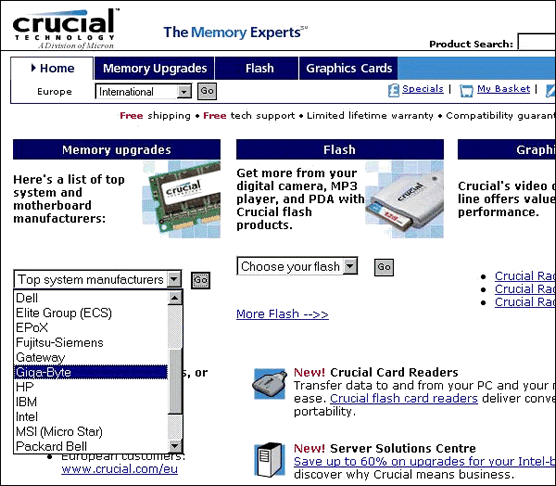
From their Home Page, select your motherboard manufacturer from the dropdown list of Top system manufacturers.
Identify Identify

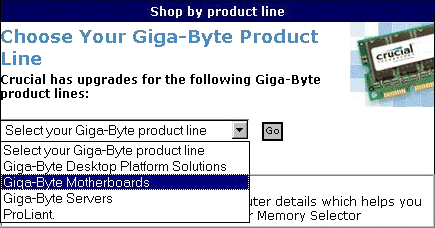
Select the appropriate product line.
Identify

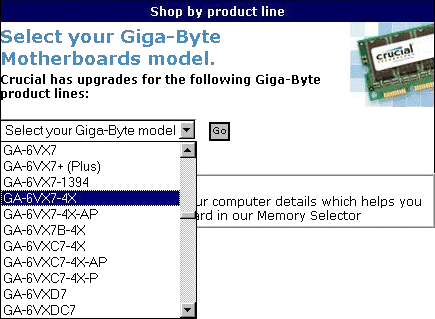
Then select your particular motherboard model.


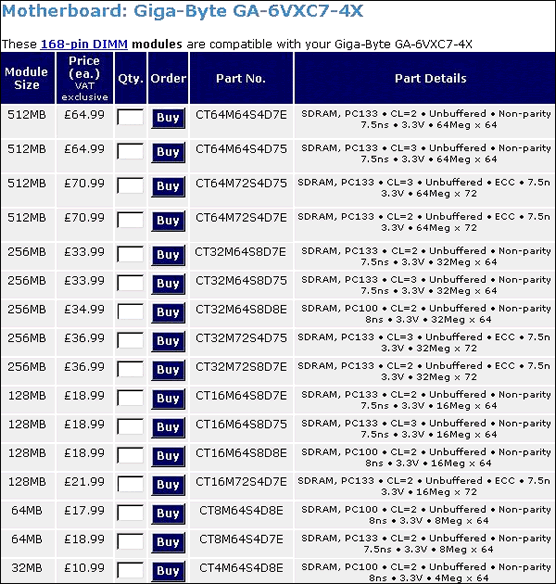
You’ll be presented with a list of suitable memory options.
Identify

Simply specify the quantity of the option you require and click the Buy button.


  • Motherboard Upgrade Reasons
  • Motherboard Removal
  • Motherboard CPU
  • Motherboard Heatsinks
  • Motherboard Memory Identification
  • Motherboard Memory Installation
  • Motherboard Fit
  • Motherboard Power
  • Motherboard Panel
  • Motherboard Fan
  • Motherboard USB Ports
  • Motherboard FireWire Ports
  • Motherboard Audio
  • Motherboard Testing
  • Motherboard Floppy Connections
  • Motherboard IDE Connections
  • BIOS Settings
  • Motherboards and Win98
  • Motherboards and WinXP

Filed Under: How to Upgrade Your Motherboard

Latest Articles

Phase Change Technology

Panasonic's PD system, boasting the company's own patented phase-change technology, has been around since late 1995. Considered innovative at the time, the PD drive combines an optical disk drive capable of handling 650MB capacity disks along with a quad-speed CD-ROM … [Read More...]

Benefits of Artificial Intelligence in Lead Generation

In recent years, marketers have begun to pay more attention to the phenomenon of artificial intelligence. Marketers are projected to spend over $40 billion on AI technology by 2025. The demand for AI in marketing is growing at a remarkable pace, because it offers tremendous … [Read More...]

How To Create A Windows Start Up Disk

You're going to need a Windows 98 Startup Disk to partition and format your PC's hard drive and then to provide CD-ROM support for the re-installation of Windows 98 itself. This is a bootable system disk that supports the FAT32 file system and contains a collection of real-mode Windows 98 commands … [Read More...]

Top Taplio Alternatives in 2025 : Why MagicPost Leads for LinkedIn Posting ?

LinkedIn has become a strong platform for professionals, creators, and businesses to establish authority, grow networks, and elicit engagement. Simple … [Read More...]

Shocking Cybercrime Statistics for 2025

People all over the world are becoming more concerned about cybercrime than ever. We have recently collected some statistics on this topic and … [Read More...]

Gaming Laptop Security Guide: Protecting Your High-End Hardware Investment in 2025

Since Jacob took over PC Tech Guide, we’ve looked at how tech intersects with personal well-being and digital safety. Gaming laptops are now … [Read More...]

20 Cool Creative Commons Photographs About the Future of AI

AI technology is starting to have a huge impact on our lives. The market value for AI is estimated to have been worth $279.22 billion in 2024 and it … [Read More...]

13 Impressive Stats on the Future of AI

AI technology is starting to become much more important in our everyday lives. Many businesses are using it as well. While he has created a lot of … [Read More...]

Graphic Designers on Reddit Share their Views of AI

There are clearly a lot of positive things about AI. However, it is not a good thing for everyone. One of the things that many people are worried … [Read More...]

Guides

  • Computer Communications
  • Mobile Computing
  • PC Components
  • PC Data Storage
  • PC Input-Output
  • PC Multimedia
  • Processors (CPUs)

Recent Posts

Pentium Xeon

In June 1998 Intel introduced its Pentium II Xeon processor, rated at 400MHz. Technically, Xeon represented a … [Read More...]

LP to CD Burning

You can use any CD mastering application - such as Roxio's Easy CD Creator or Ahead's Nero Burning ROM - so burn your .wav files to CD. Since … [Read More...]

Graphics Card Driver Un-Installation

It's important to uninstall your existing drivers so as to avoid any potential conflict with those for your new card. If the drivers in question … [Read More...]

[footer_backtotop]

Copyright © 2026 About | Privacy | Contact Information | Wrtie For Us | Disclaimer | Copyright License | Authors