pctechguide.com

  • Home
  • Guides
  • Tutorials
  • Articles
  • Reviews
  • Glossary
  • Contact

Digital Camera Connectivity

Despite the trend towards removable storage, digital cameras still allow connection to a PC for the purpose of image downloading. Until the late 1990s the principal method of transfer was via a conventional RS-232 serial cable at a maximum speed of 115Kbit/s. However, since then USB connectivity has become the norm, with most manufacturers bundling cameras with the necessary cables and driver software. In the past some professional models offered a fast SCSI connection. However, FireWire has subsequently become the technology of choice for this market sector.
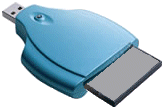
Media

USB is also exploited by a method of image transfer that emerged in the early 2000s and that saves the bother of having to connect a camera to a PC at all. These media readers are available for all the common media types – CompactFlash, SmartMedia, MemoryStick, MultiMedia Card etc. – and simply plug in to a USB port, either directly or via an extension cable. They’re also available in combo units, capable of reading multiple media formats. They draw power from the USB port and so don’t waste a camera’s precious batter power. They vary in speed, the fastest being capable of data transfer rates approaching 1 MBps. For those without USB, adapters are also available that allow a CompactFlash or SmartMedia card to be inserted into a special floppy disk like device that works from a standard 3.5in 1.44MB floppy disk drive.

Supplying a digital camera with TWAIN drivers that allow the user to simply download images to a standard image editing application has also becoming standard practice. Some digital cameras provide a video-out socket and S-Video cable to allow images to be displayed directly to a projector, TV or VCR. Extending the slide show capability further, some allow images to be uploaded to the camera, enabling it to be used as a mobile presentation tool.

An increasing number of digital cameras have the ability to cut out the computer and output images directly to a printer. But without established interface standards, each camera requires a dedicated printer from its own manufacturer. As well as the more established printer technologies, there are two distinct technologies used in this field: thermo autochrome and dye sublimation.

  • What is CCD in the Context of Digital Cameras?
  • CMOS Digital Cameras
  • What Controls The Picture Quality of a Digital Camera
  • Features and Parts of a Digital Camera
  • PIM Technology
  • Digital Camera Batteries: Types and How They Work
  • Memory Storage
  • Storage of Photos and Videos on Digital Cameras
  • Digital Camera Connectivity
  • Digital Cameras vs. Film
  • X3 Technology
  • What is PictBridge and PTP?

Filed Under: Digital Cameras

Latest Articles

Keep Your PC Cool

Computers need to stay as cool as possible in order to work properly. This becomes increasingly difficult as more people are trying to squeeze more processing power inside of their rigs. More components combined with people overclocking processors to get as much processing muscle as possible can … [Read More...]

Why is it worth getting an online university degree?

When it comes to looking into the job market, you might be in for a bit of a shock. Even experienced job seekers get surprised by the current expectations held by many companies when it comes to recruiting employees. Not because they are expecting the bare minimum, but because they are expecting too … [Read More...]

ADSL Sharing

Sharing your broadband Internet across multiple computers is simply a matter of connecting the other PCs to the local network and setting up their IP configurations in the same way as previously. Extending the range of a wired Ethernet home network is well within the scope of anyone with … [Read More...]

Importance of Inbound Marketing in the Digital Age

A couple of months ago, Zacks reported that Hubspot was starting to make some major changes to its inbound marketing strategy. They talk a lot about … [Read More...]

Damage Control Strategies for Resolving Online PR Crises

Last July, Astrologer faced a major crisis after its CEO went viral at a ColdPlay concert when having an affair. This was just one of the many times a … [Read More...]

AI is Not Killing Computer Jobs Like Doomers Projected

There is no denying the reality that AI technology has played a massive role in disrupting our lives. A growing number of people claim that AI … [Read More...]

Everything You Need to Know About Sourcing Circuit Boards From U.S. Suppliers

In This Article This article includes: Why Source PCBs From the United States?How to Get a Quote From a U.S.-Based PCB ManufacturerThe Top U.S. … [Read More...]

Top Taplio Alternatives in 2025 : Why MagicPost Leads for LinkedIn Posting ?

LinkedIn has become a strong platform for professionals, creators, and businesses to establish authority, grow networks, and elicit engagement. Simple … [Read More...]

Shocking Cybercrime Statistics for 2025

People all over the world are becoming more concerned about cybercrime than ever. We have recently collected some statistics on this topic and … [Read More...]

Guides

  • Computer Communications
  • Mobile Computing
  • PC Components
  • PC Data Storage
  • PC Input-Output
  • PC Multimedia
  • Processors (CPUs)

Recent Posts

Ergonomic Keyboards

Carpal tunnel syndrome (CTS) is a medical condition - more common in women than it is in men - in which the median nerve is … [Read More...]

Client-Server Architecture

Client-server networking architectures became popular in the late 1980s and early 1990s as many applications were migrated … [Read More...]

Hard Disk Longitudinal Recording

For nearly 50 years, the disk drive industry has focused nearly exclusively on a method called longitudinal magnetic recording, in which the … [Read More...]

[footer_backtotop]

Copyright © 2026 About | Privacy | Contact Information | Wrtie For Us | Disclaimer | Copyright License | Authors