pctechguide.com

  • Home
  • Guides
  • Tutorials
  • Articles
  • Reviews
  • Glossary
  • Contact

WinXP Windows Update

With previous versions of Windows, tracking down system patches and updated drivers was difficult. However, Microsoft streamlined the process in Windows 98 by including Windows Update on the Start menu, effectively providing an online extension of Windows designed to help maintain your computer at an optimum level of serviceability.

Central to Windows Update is a product Updates catalogue that includes individual bug fixes, service packs, newly available Windows features and updated system files and device drivers. These enhancements will be recommended to you based on what is needed for your specific computer.

Assuming you have Internet access it’s wise to use Windows Update to update your installation of Windows 98SE without delay.

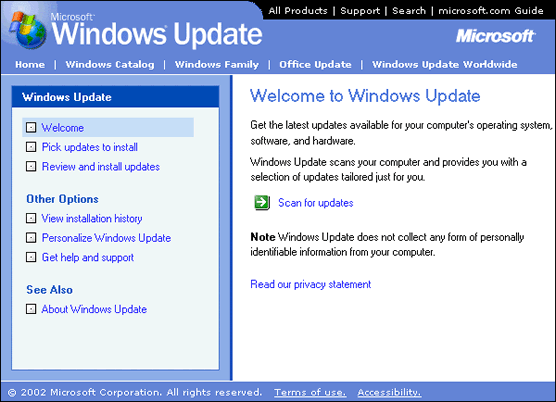
From the Start button, select Windows Update.
Tools

Click the Scan for updates button, and the Update Wizard will scan your Windows XP installation and display any updates that are available from Microsoft.
Tools

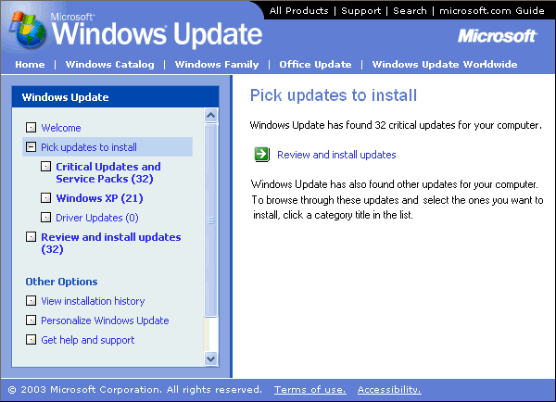
After a clean reinstall of Windows XP, there will be a large number of updates identified. Updates in the Critical Updates and Service Packs should be installed as soon as possible, since many of these will be concerned with addressing security issues that have been identified since the Windows 98SE Updates were released.

Click on the appropriate category title to browse the other identified updates.
Tools

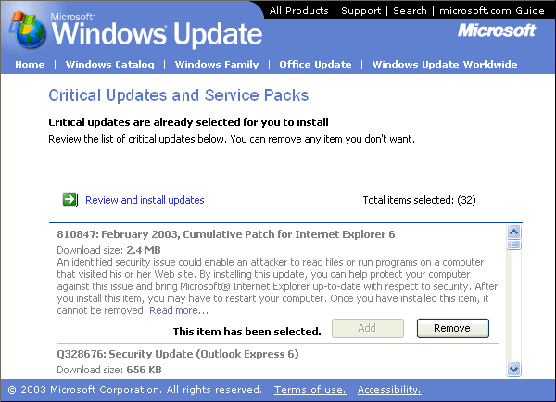
Click the Add button to select the updates you wish to install. Don’t try to install too many updates at a time. Each update indicates its size and estimated download time, enabling you to organise them into sensibly-sized groupings.

  • WinXP Installation Planning
  • Windows XP Upgrade Advisor
  • WinXP Installation Information Collection
  • WinXP Installation
  • How To Do a Clean Installation of Windows XP – Phase 1
  • Dynamic Update – How to do a clean installation of Windows XP
  • Preparing Installation – How to do a clean installation of Windows XP
  • WinXP Installation Phase 4
  • WinXP Installation Phase 5
  • WinXP Windows Update
  • WinXP Driver Installation
  • WinXP Installation Tuning
  • Files and Settings Transfer – How to do a clean installation of Windows XP

Filed Under: How To Do a Clean Installation of WinXP

Latest Articles

Object Oriented Programming 5

To illustrate putting together an object oriented (OO) class hierarchy design, let's take a look at a simple maze game. We'll be creating an OO design, but we're not going to select a programming language at this stage. We'll see how we can analyse the problem from an OO perspective, and produce … [Read More...]

Two Factor Authentication Is Now Easier Than Ever

Protecting the information you keep online is becoming more important than ever. Having an extra layer of protection is almost required as a single password just does not cut it anymore. Therefore, two-factor authentication has become more popular recently. The knock against two-factor … [Read More...]

How to Remove Bitcryptor Virus

Bitcryptor Virus is a virus of the ransomware variety. These are viruses that infect your computer and try to trick you into paying money in order to get rid of the virus. It will encrypt the files on your computer and keep you from using important programs on your computer. If you are unable to … [Read More...]

Why Internet Bundles Are the Next Battleground for Gamers

A weak internet connection can turn seamless gaming sessions into frustrating experiences filled with lag, buffering or sudden disconnects. For … [Read More...]

Importance of Inbound Marketing in the Digital Age

A couple of months ago, Zacks reported that Hubspot was starting to make some major changes to its inbound marketing strategy. They talk a lot about … [Read More...]

Damage Control Strategies for Resolving Online PR Crises

Last July, Astrologer faced a major crisis after its CEO went viral at a ColdPlay concert when having an affair. This was just one of the many times a … [Read More...]

AI is Not Killing Computer Jobs Like Doomers Projected

There is no denying the reality that AI technology has played a massive role in disrupting our lives. A growing number of people claim that AI … [Read More...]

Everything You Need to Know About Sourcing Circuit Boards From U.S. Suppliers

In This Article This article includes: Why Source PCBs From the United States?How to Get a Quote From a U.S.-Based PCB ManufacturerThe Top U.S. … [Read More...]

Top Taplio Alternatives in 2025 : Why MagicPost Leads for LinkedIn Posting ?

LinkedIn has become a strong platform for professionals, creators, and businesses to establish authority, grow networks, and elicit engagement. Simple … [Read More...]

Guides

  • Computer Communications
  • Mobile Computing
  • PC Components
  • PC Data Storage
  • PC Input-Output
  • PC Multimedia
  • Processors (CPUs)

Recent Posts

Figuring Out Which iPAd Model You Have

iPads are peculiar. They may look the same on the outside, but they operate very differently. We're going to show you how you can differentiate each … [Read More...]

Self-driving cars face their Achilles’ heel and may be targets of hackers

The market for self-driving cars is booming. Customers spent $22.22 billion on these autonomous vehicles in 2021 and they will likely spend more in … [Read More...]

United States Courts virus | Locked Computer

United States Courts virus is a scam. This kind of scam has been going on for around a year under other names all across the world. The makers use the … [Read More...]

[footer_backtotop]

Copyright © 2026 About | Privacy | Contact Information | Wrtie For Us | Disclaimer | Copyright License | Authors