pctechguide.com

  • Home
  • Guides
  • Tutorials
  • Articles
  • Reviews
  • Glossary
  • Contact

WinXP Installation Tuning

The final task is to fine-tune your Windows installation, especially if you elected to Install the most common components during the course of the installation.

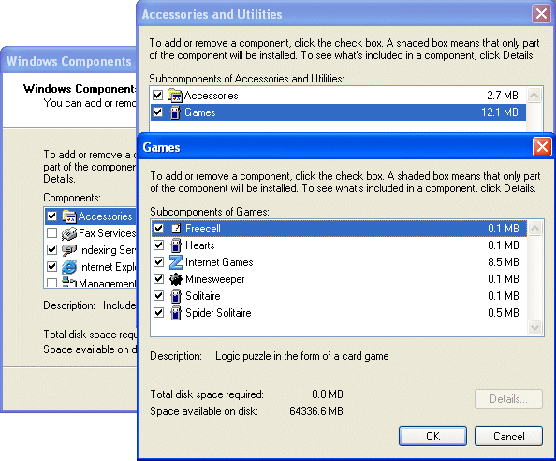
You can do this by clicking Start > Settings > Control Panel > Add/Remove Programs and then selecting the Add/Remove Windows Components option. Setup searches for and displays the installed components. The check boxes indicate whether or not a component is installed, shaded check boxes denoting that only part of the component is installed.
Add/Remove

Where present, clicking Details brings up a second dialogue box which describes precisely what’s installed and what isn’t. Select or clear check boxes to modify your selection as required. The net change in the disk space requirement will be shown. When you’re happy with your current selection, click OK. You’ll be asked to load the Windows XP CD-ROM. The selected components will then be installed.

It’s also not a bad idea to check that your regional settings are as you intend them to be now. There’s nothing more annoying than discovering when you’re in a rush that, for example, the @ key on your keyboard is working as expected!

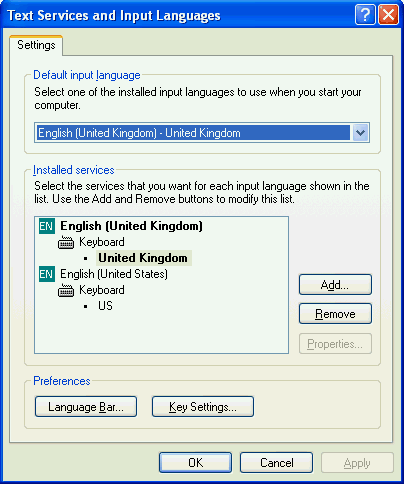
To check your keyboard settings, click Start > Settings > Control Panel, double-click Regional and Language Options, click the Languages tab and Details.
Tools

On the Settings tab, make sure you have the correct keyboard layout enabled.

  • WinXP Installation Planning
  • Windows XP Upgrade Advisor
  • WinXP Installation Information Collection
  • WinXP Installation
  • How To Do a Clean Installation of Windows XP – Phase 1
  • Dynamic Update – How to do a clean installation of Windows XP
  • Preparing Installation – How to do a clean installation of Windows XP
  • WinXP Installation Phase 4
  • WinXP Installation Phase 5
  • WinXP Windows Update
  • WinXP Driver Installation
  • WinXP Installation Tuning
  • Files and Settings Transfer – How to do a clean installation of Windows XP

Filed Under: How To Do a Clean Installation of WinXP

Latest Articles

Protect Your Business with Online Reputation Management

As a company grows the potential for negative comments online become more common. This type of activity needs to be monitored for potential issues.  Online Reputation Management (ORM) is important, and here’s how you can get started with it. ORM is still a relatively new concept, and one that small … [Read More...]

Bluetooth technology

Named after a tenth-century Danish king, Bluetooth is a specification for a small form-factor, low-cost radio solution providing links between mobile computers, mobile phones and other portable handheld devices, and connectivity to the … [Read More...]

Pentium Smithfield

Essentially, the Smithfield core is no more than a pair of 90nm Prescott 1M dies bound together. Each core has its own 1MB L2 cache which may be accessed by the other either via a special bus interface. The result is a 206mm2 die comprising … [Read More...]

Why Internet Bundles Are the Next Battleground for Gamers

A weak internet connection can turn seamless gaming sessions into frustrating experiences filled with lag, buffering or sudden disconnects. For … [Read More...]

Importance of Inbound Marketing in the Digital Age

A couple of months ago, Zacks reported that Hubspot was starting to make some major changes to its inbound marketing strategy. They talk a lot about … [Read More...]

Damage Control Strategies for Resolving Online PR Crises

Last July, Astrologer faced a major crisis after its CEO went viral at a ColdPlay concert when having an affair. This was just one of the many times a … [Read More...]

AI is Not Killing Computer Jobs Like Doomers Projected

There is no denying the reality that AI technology has played a massive role in disrupting our lives. A growing number of people claim that AI … [Read More...]

Everything You Need to Know About Sourcing Circuit Boards From U.S. Suppliers

In This Article This article includes: Why Source PCBs From the United States?How to Get a Quote From a U.S.-Based PCB ManufacturerThe Top U.S. … [Read More...]

Top Taplio Alternatives in 2025 : Why MagicPost Leads for LinkedIn Posting ?

LinkedIn has become a strong platform for professionals, creators, and businesses to establish authority, grow networks, and elicit engagement. Simple … [Read More...]

Guides

  • Computer Communications
  • Mobile Computing
  • PC Components
  • PC Data Storage
  • PC Input-Output
  • PC Multimedia
  • Processors (CPUs)

Recent Posts

CD-ROM CD-I Bridge

CD-I Bridge is a Philips/Sony specification, for discs intended to play on CD-i players and other platforms such as the … [Read More...]

Object Oriented Programming 2

Imagine creating a blueprint for an intelligent robot. The robot's purpose is very simple: to open the curtains in the morning, and to close … [Read More...]

OKI C110 44173601 Color Digital LED Printer

The OKI C110 44173601 Color Digital LED Printer is a mid range printer that is great at printing. It's a real work horse and shines when it comes to … [Read More...]

[footer_backtotop]

Copyright © 2026 About | Privacy | Contact Information | Wrtie For Us | Disclaimer | Copyright License | Authors