pctechguide.com

  • Home
  • Guides
  • Tutorials
  • Articles
  • Reviews
  • Glossary
  • Contact

Windows XP Upgrade Advisor

If you’re smart, installing Windows XP will involve less guesswork and less nasty surprises than has traditionally been the case when upgrading to a subsequent version of Windows. The Upgrade Advisor is a tool that checks system-level software and hardware drivers against a database of compatible products and warns you of any possible problems with your configuration.

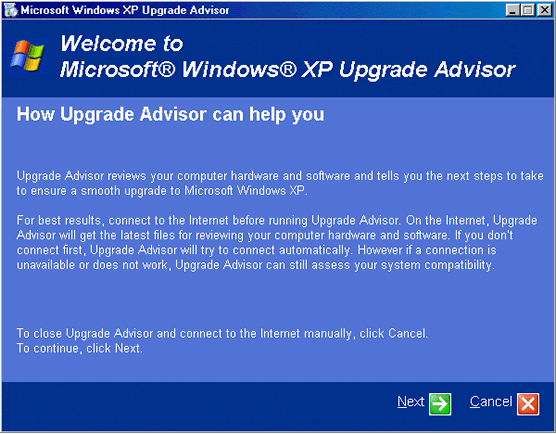
The following series of screenshots illustrate how the Upgrade Advisor works:
Tools

The Upgrade Advisor is a standard Microsoft wizard application, which guides you through the associated process a step at a time.

Click Next to continue.

Tools

Indicate your acceptance of the conditions and click Next to continue.

Tools

Check Yes and click Next to ensure that you run the latest available version of Upgrade Advisor.

Tools

Click Next to continue.

Tools

If you allow it to, Upgrade Advisor will download an updated list of compatible products when you run it:

Tools Tools

Armed with the latest compatibility information, the utility begins examining your system. This may take several minutes, depending on the speed of your system and the number of hardware and software components you have installed.

Tools

Eventually, a summary of the Upgrade Report is displayed. You’re invited to save the detailed report to a location of your choice. By default, a copy is saved to the Windows folder.

Tools

  • WinXP Installation Planning
  • Windows XP Upgrade Advisor
  • WinXP Installation Information Collection
  • WinXP Installation
  • How To Do a Clean Installation of Windows XP – Phase 1
  • Dynamic Update – How to do a clean installation of Windows XP
  • Preparing Installation – How to do a clean installation of Windows XP
  • WinXP Installation Phase 4
  • WinXP Installation Phase 5
  • WinXP Windows Update
  • WinXP Driver Installation
  • WinXP Installation Tuning
  • Files and Settings Transfer – How to do a clean installation of Windows XP

Filed Under: How To Do a Clean Installation of WinXP Tagged With: upgrading from Windows 98, what is the upgrade advisor, windows 98 upgrade advice

Latest Articles

RAID tutorial – maintaining the RAID array

Since the context of this tutorial is a new system build, the configuration of of the RAID array was performed via the RAID Controller's BIOS Setup program. Subsequent maintenance of the array - and the initial set up in cases where it's being carried out in a fully operational environment - can … [Read More...]

AMD Athlon 64

Of the pair of desktop CPUs announced in the autumn of 2003, the Athlon 64 was aimed at the mass market while the top-of-the range, limited-availability Athlon 64 FX-51 model was specifically targeted at gamers and … [Read More...]

Maximise the Use of Group Chats to Brainstorm Advertisement Plans

With the advent of modern communication tools, you can now stay in contact with the people you work with even when you are not at the office or during the weekends. The use of group chats, for instance, is useful in sending messages to everyone in your team at once. You are saving time and energy … [Read More...]

Why Internet Bundles Are the Next Battleground for Gamers

A weak internet connection can turn seamless gaming sessions into frustrating experiences filled with lag, buffering or sudden disconnects. For … [Read More...]

Importance of Inbound Marketing in the Digital Age

A couple of months ago, Zacks reported that Hubspot was starting to make some major changes to its inbound marketing strategy. They talk a lot about … [Read More...]

Damage Control Strategies for Resolving Online PR Crises

Last July, Astrologer faced a major crisis after its CEO went viral at a ColdPlay concert when having an affair. This was just one of the many times a … [Read More...]

AI is Not Killing Computer Jobs Like Doomers Projected

There is no denying the reality that AI technology has played a massive role in disrupting our lives. A growing number of people claim that AI … [Read More...]

Everything You Need to Know About Sourcing Circuit Boards From U.S. Suppliers

In This Article This article includes: Why Source PCBs From the United States?How to Get a Quote From a U.S.-Based PCB ManufacturerThe Top U.S. … [Read More...]

Top Taplio Alternatives in 2025 : Why MagicPost Leads for LinkedIn Posting ?

LinkedIn has become a strong platform for professionals, creators, and businesses to establish authority, grow networks, and elicit engagement. Simple … [Read More...]

Guides

  • Computer Communications
  • Mobile Computing
  • PC Components
  • PC Data Storage
  • PC Input-Output
  • PC Multimedia
  • Processors (CPUs)

Recent Posts

When the Future Takes Flight: Technology’s Impact On Post-COVID-19 Travel

In 2020, international and local travel screeched to an abrupt halt in light of mandatory quarantine precautions and unanswered questions related to … [Read More...]

Choosing a Dedicated Server for your Website

There are a lot of companies who will offer you a dedicated server, and there appears to be an infinite number of options. Following some principles … [Read More...]

Kaspersky Anti-Virus (2015) – A Quick Peek Review

Released in July 2014, the Kaspersky Anti-virus 2015 was said to be the slight improvement of the Kaspersky Anti-virus 2014. More so, it still has so … [Read More...]

[footer_backtotop]

Copyright © 2026 About | Privacy | Contact Information | Wrtie For Us | Disclaimer | Copyright License | Authors