pctechguide.com

  • Home
  • Guides
  • Tutorials
  • Articles
  • Reviews
  • Glossary
  • Contact

WinXP Driver Installation

Windows XP Setup will have attempted to load drivers for the hardware it recognised. However, there is no guarantee that the default drivers loaded are the latest available, or – if you’re re-building what had previously been an operational system – the same as the versions you were running previously.

The first thing to do is to check the status of all your installed hardware via Device Manager. Access this via Start > Control Panel, double-click System the click the Hardware tab and then Device Manager.

An exclamation mark in a yellow circle is used to indicate devices in a problem state. Right-clicking the entry and selecting Properties will display further information, including an associated error code. Oftentimes the problem will be the absence of an installed driver. In such cases you’ll need to install this, either from the CD-ROM or floppy disk that came with you hardware, or from a file that you subsequently downloaded from the Internet.

Click here to view the Microsoft Knowledge Base Article entitled Explanation of Error Codes Generated by Device Manager. This provides a listing of error codes and associated error messages, together with explanations and possible resolutions.

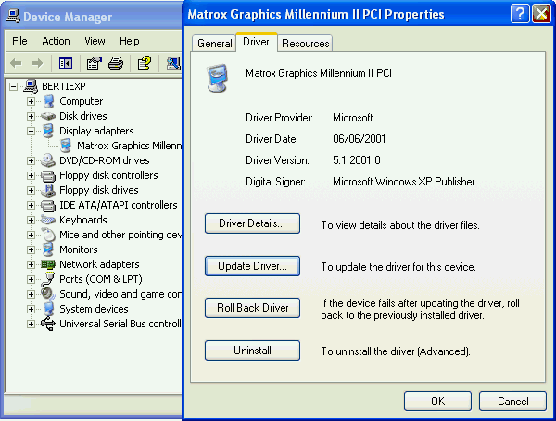
There are a number of ways to update a driver, one being to select the item in the Device Manager list, right-click and select Properties and then the Driver tab.
Tools

Click Update Driver.

Tools

… and proceed as appropriate.

An alternative method of installation – and one that is perhaps more guaranteed to work successfully – is to simply run the the driver’s Setup.exe program, if this is provided. This will install the drivers and usually prompt you to re-boot the system. Upon re-boot, Windows automatic installation routine will locate the drivers and install the hardware.

  • WinXP Installation Planning
  • Windows XP Upgrade Advisor
  • WinXP Installation Information Collection
  • WinXP Installation
  • How To Do a Clean Installation of Windows XP – Phase 1
  • Dynamic Update – How to do a clean installation of Windows XP
  • Preparing Installation – How to do a clean installation of Windows XP
  • WinXP Installation Phase 4
  • WinXP Installation Phase 5
  • WinXP Windows Update
  • WinXP Driver Installation
  • WinXP Installation Tuning
  • Files and Settings Transfer – How to do a clean installation of Windows XP

Filed Under: How To Do a Clean Installation of WinXP

Latest Articles

AMD Socket AM2

In May 2006, AMD unveiled Socket AM2, the fourth generation of its Hammer architecture (which had made its market debut in 2003), and successor to the earlier Socket 754, 939 and 940 implementations. At the same time the company announced … [Read More...]

General Midi

In September of 1991 the MIDI Manufacturers Association (MMA) and the Japan MIDI Standards Committee (JMSC) created the beginning of a new era in MIDI technology, by adopting the General MIDI System Level 1, referred to as GM or GM1. … [Read More...]

Machine Learning Advances Lay Foundation for More Effective Presentations

Machine learning is setting new standards for communication. The global market for machine learning technology was estimated to be worth $1.4 billion in 2017. The market is projected to grow 43.6% between 2017 and 2022. One of the ways that machine learning is changing the future of … [Read More...]

Why Internet Bundles Are the Next Battleground for Gamers

A weak internet connection can turn seamless gaming sessions into frustrating experiences filled with lag, buffering or sudden disconnects. For … [Read More...]

Importance of Inbound Marketing in the Digital Age

A couple of months ago, Zacks reported that Hubspot was starting to make some major changes to its inbound marketing strategy. They talk a lot about … [Read More...]

Damage Control Strategies for Resolving Online PR Crises

Last July, Astrologer faced a major crisis after its CEO went viral at a ColdPlay concert when having an affair. This was just one of the many times a … [Read More...]

AI is Not Killing Computer Jobs Like Doomers Projected

There is no denying the reality that AI technology has played a massive role in disrupting our lives. A growing number of people claim that AI … [Read More...]

Everything You Need to Know About Sourcing Circuit Boards From U.S. Suppliers

In This Article This article includes: Why Source PCBs From the United States?How to Get a Quote From a U.S.-Based PCB ManufacturerThe Top U.S. … [Read More...]

Top Taplio Alternatives in 2025 : Why MagicPost Leads for LinkedIn Posting ?

LinkedIn has become a strong platform for professionals, creators, and businesses to establish authority, grow networks, and elicit engagement. Simple … [Read More...]

Guides

  • Computer Communications
  • Mobile Computing
  • PC Components
  • PC Data Storage
  • PC Input-Output
  • PC Multimedia
  • Processors (CPUs)

Recent Posts

Avoiding Fraud When Purchasing Online

Myself as well as millions of others buy many items online.  Everything from electronics, books, clothes.  You name it, you can most likely find a … [Read More...]

AI is Driving Changes in the Field of Urban Planning

Artificial intelligence is changing many aspects of our lives. It is being used in more fields than ever before. One of the fields affected by AI … [Read More...]

Dual Channel DDR Memory

The terminology dual-channel DDR is, in fact, a misnomer. The fact is there's no such thing as dual-channel DDR memory. … [Read More...]

[footer_backtotop]

Copyright © 2026 About | Privacy | Contact Information | Wrtie For Us | Disclaimer | Copyright License | Authors