Apart from far more sophisticated error-checking techniques, the innards of a CD-ROM drive are pretty much the same as those used in CD audio players. Data is stored in the same way on all CDs. The information is stored in sequential 2KB sectors that form a single spiral track that starts at the centre of the disc and wraps around many times until it reaches the outer edge of the disc.
A player reads information from the CD’s spiral track of pits and lands, starting from the centre of the disc and moving to the outer edge. It does this by firing an infrared laser – 780 nano-millimetres wide and generated by a small gallium arsenate semiconductor – through the clear optical grade polycarbonate plastic layer and onto the metallic sheet. Although it’s of very low power, it’s strong enough to damage the eye if shined directly into it. As the disc rotates at between 200 and 500 rpm, the light bounces off the pits and the frequency of the light changes.
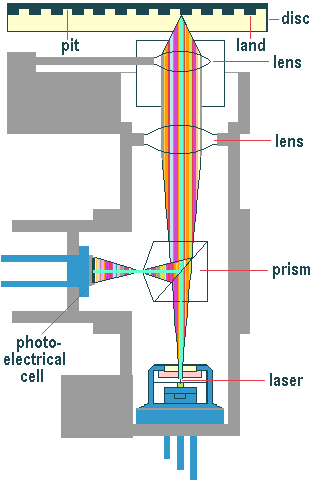
The areas around the pits, called lands, also play a part in the process. The reflected light passes through a prism and onto a photosensor, the output of which is proportional to the amount of light it receives. Light reflected from a pit is 180 degrees out of phase with the light from the lands, and the differences in intensity are measured by the photo-electric cells and converted into electrical pulses. The result is that the series of pits and lands of varying lengths stamped into the surface of the disc are interpreted as a series of corresponding 0s and 1s from which the data – or, via a digital-to-analogue converter (DAC), the audio – stored on the disc is recreated. And since just a weak bandwidth laser is the only thing to touch the surface of the CD directly, there’s none of the wear and tear of traditional analogue media to contend with.
Things would be relatively simple if CD-ROM discs were perfectly flat and could be spun with no horizontal deviation. In fact, a considerable amount of extra electronics wizardry is needed to ensure that the laser stays in focus on the disc surface and that it follows the track it’s reading.
There are various methods for maintaining radial tracking, the most common being the three-beam approach. The laser beam isn’t shone directly onto the disc surface but is emitted from a semiconductor laser unit and passed through a diffraction grating to produce two extra light sources, one each side of the main beam. A collimator lens takes the three beams and makes them parallel, after which they’re passed through a prism called a polarised beam splitter. The beam splitter’s job is to allow the outbound beams to pass through while reflecting the returning beams through 90 degrees down to the photodiode that interprets the signal.
The two side beams are measured for intensity, which remains equal as long as they stay on either side of the track. Any sideways movement of the disc will result in an imbalance and a servo motor will reposition the objective lens. Vertical movement is countered by splitting the receptor photodiode into four quadrants and placing it halfway between the horizontal and vertical focal points of the beam. Any deviation of the disc will cause the spot to become elliptical, with a corresponding current imbalance between each opposing pair of quadrants. The objective lens is then moved up or down to ensure the spot remains circular.
CD technology has built-in error correction systems which are able to suppress most of the error that arise from physical particles on the surface of a disc. Every CD-ROM drive and CD player in the world uses Cross Interleaved Reed Solomon Code (CIRC) detection and the CD-ROM standard provides a second level of correction via the Layered Error Correction Code algorithm. With CIRC, an encoder adds two dimensional parity information, to correct errors, and also interleaves the data on the disc to protect from burst errors. It is capable of correcting error bursts up to 3,500 bits (2.4 mm in length) and compensates for error bursts up to 12,000 bits (8.5 mm) such as caused by minor scratches.
- CD-ROM Red Book
- CD-ROM Yellow Book
- CD-ROM XA
- CD-ROM Green Book
- CD-ROM Orange Book
- CD-ROM White Book
- CD-ROM Blue Book
- CD-ROM Purple Book
- CD-ROM CD-I Bridge
- CD-ROM Photo CD
- CD-ROM File Systems
- CD-ROM Manufacturing
- CD-ROM The Disc
- CD-ROM Operations
- CD-ROM Digital Audio
- CD-ROM CLV
- CD-ROM CAV
- CD-ROM Applications
- CD-ROM Interfaces
- CD-ROM DMA vs. PIO Mode
- CD-ROM TrueX Technology