pctechguide.com

  • Home
  • Guides
  • Tutorials
  • Articles
  • Reviews
  • Glossary
  • Contact

BIOS Reasons

In the past there have been compelling reasons to upgrade your BIOS, such as for Y2K compliance or to support high capacity hard drives that older BIOS chips simply wouldn't recognise. These days the rate of technological development is such that … [Continue reading]

Filed Under: How to Update Your System BIOS

Bios Configuration

Whichever method you've used to update your BIOS, it's important that the new BIOS Setup defaults are used when the system is next powered on. You can do this by entering Setup by pressing the appropriate key - generally DEL as soon as POST starts … [Continue reading]

Filed Under: How to Update Your System BIOS

RAID tutorial – installing Windows on the RAID drive
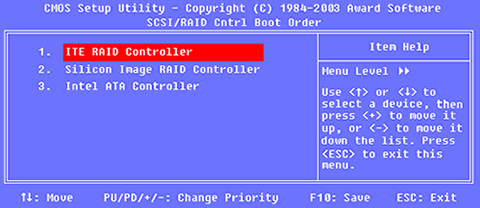
The Welcome to Setup screen offers the following options: To set up Windows XP now, press ENTER To repair a Windows XP installation using Recovery Console, press R To quit Setup without installing Windows XP, press F3 Press ENTER and then … [Continue reading]

Filed Under: How to Set Up a RAID Array Tagged With: install Windows XP on RAID, RAID Windows installation, Windows RAID installation

RAID tutorial – installing the drivers

Now is the time to use the previously prepared floppy disk containing the RAID Controller driver software. Proceed as follows: Press F6 when invited to do so, to ...... install third party SCSI or RAID driver. Press S when invited to do so, to … [Continue reading]

Filed Under: How to Set Up a RAID Array Tagged With: RAID drivers, Windows XP RAID installation

RAID tutorial – configuring a RAID array installation
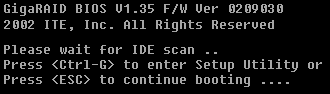
Having performed the preparatory tasks and physically connected the hard disk drives, we're now ready to configure the RAID array. Insert the Windows XP CD-ROM in the CD-ROM drive and power-on the system. Press Ctrl-G to enter the … [Continue reading]

Filed Under: How to Set Up a RAID Array Tagged With: configure RAID for Windows, how to configure a RAID array

RAID tutorial – preparing for the installation
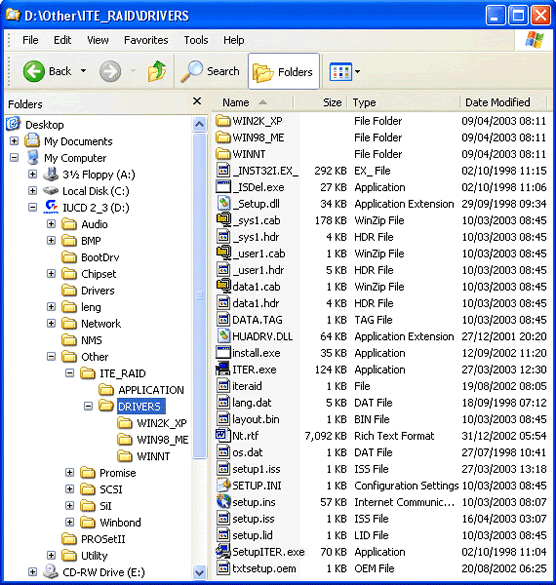
You'll need first to complete a couple of preparatory steps: 1. Create a floppy disc containing the relevant RAID Controller drivers Locate the relevant drivers on the supplied CD-ROM. In this case, they're labelled ITE_RAID … [Continue reading]

Filed Under: How to Set Up a RAID Array Tagged With: access BIOS, boot from CD, Copying RAID drivers

RAID tutorial – the benefits of using RAID

RAID (Redundant Array of Inexpensive Disks) is a system developed whereby two or more disks are physically linked together to form a single logical, large capacity storage device that offers a number of advantages over conventional hard disk … [Continue reading]

Filed Under: How to Set Up a RAID Array Tagged With: benefits of RAID, RAID advantages, why use RAID

RAID tutorial – maintaining the RAID array
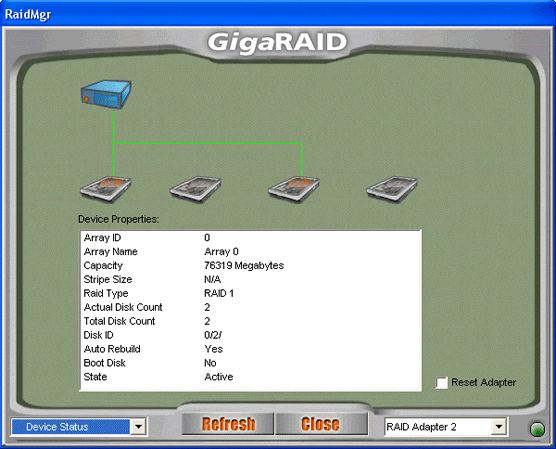
Since the context of this tutorial is a new system build, the configuration of of the RAID array was performed via the RAID Controller's BIOS Setup program. Subsequent maintenance of the array - and the initial set up in cases where it's being … [Continue reading]

Filed Under: How to Set Up a RAID Array Tagged With: RAID drivers, RAID maintenance

Hard Drive Formating

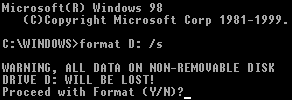
With the Fdisk procedure completed, restart you computer with the Windows 98 Startup disk in the floppy disk drive and proceed to format the partitions you've created with a file system, using the Format tool as follows: When the Windows 98 … [Continue reading]

Filed Under: How to Install a Second Hard Disk Drive

Hard Drive Partitioning

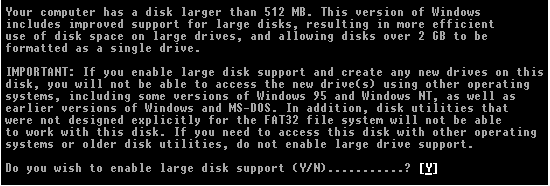
If your second drive is a new, empty hard disk, you're going to have to first create a primary partition on the disk and then format a file system on that partition. If you're installing on a disk you've been using previously, you may want to … [Continue reading]

Filed Under: How to Install a Second Hard Disk Drive

« Previous Page
Next Page »

Why Internet Bundles Are the Next Battleground for Gamers

A weak internet connection can turn seamless gaming sessions into frustrating experiences filled with lag, buffering or sudden disconnects. For … [Read More...]

Importance of Inbound Marketing in the Digital Age

A couple of months ago, Zacks reported that Hubspot was starting to make some major changes to its inbound marketing strategy. They talk a lot about … [Read More...]

Damage Control Strategies for Resolving Online PR Crises

Last July, Astrologer faced a major crisis after its CEO went viral at a ColdPlay concert when having an affair. This was just one of the many times a … [Read More...]

AI is Not Killing Computer Jobs Like Doomers Projected

There is no denying the reality that AI technology has played a massive role in disrupting our lives. A growing number of people claim that AI … [Read More...]

Everything You Need to Know About Sourcing Circuit Boards From U.S. Suppliers

In This Article This article includes: Why Source PCBs From the United States?How to Get a Quote From a U.S.-Based PCB ManufacturerThe Top U.S. … [Read More...]

Top Taplio Alternatives in 2025 : Why MagicPost Leads for LinkedIn Posting ?

LinkedIn has become a strong platform for professionals, creators, and businesses to establish authority, grow networks, and elicit engagement. Simple … [Read More...]

Guides

  • Computer Communications
  • Mobile Computing
  • PC Components
  • PC Data Storage
  • PC Input-Output
  • PC Multimedia
  • Processors (CPUs)

Recent Posts

Understanding the Basics of Visual Basic Script

Visual Basic Script, derived from the programming language "Visual Basic".Excerpt from the article "Playing with VBScript: TBS Gladiators": Visual … [Read More...]

Vital Security Guidelines for Playing Online

Tuning in to play online represents one of the most popular aspects of the world of gaming. Millions of daily gambler around the world are forever … [Read More...]

The Case for Multiple Screens

In the past, multiple monitors have been the domain of programmers. Visit Google headquarters, for example, and you wll see awe-inspiring … [Read More...]

[footer_backtotop]

Copyright © 2026 About | Privacy | Contact Information | Wrtie For Us | Disclaimer | Copyright License | Authors