pctechguide.com

  • Home
  • Guides
  • Tutorials
  • Articles
  • Reviews
  • Glossary
  • Contact

RAID tutorial – configuring a RAID array installation

Having performed the preparatory tasks and physically connected the hard disk drives, we’re now ready to configure the RAID array.

Insert the Windows XP CD-ROM in the CD-ROM drive and power-on the system.
RAID

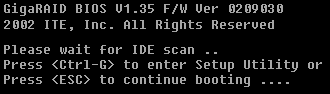
Press Ctrl-G to enter the GigaRAID BIOS when so directed.

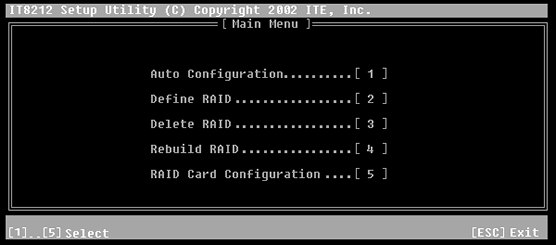
The Setup Utility’s Main Menu will be displayed.
Main

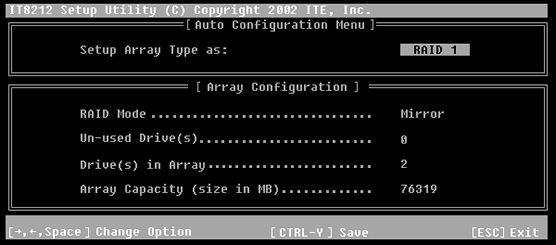
Press 1 to enter Auto Configuration.

Auto

Set up the Array Type as RAID 1.

Press CTRL-Y to save the setting, followed by ESC to first return to the Main Menu and then to resume booting.

The system proceeds to boot from the Windows XP CD-ROM and enters Windows Setup.


  • RAID tutorial – the benefits of using RAID
  • RAID tutorial – preparing for the installation
  • RAID tutorial – connecting the hard drives
  • RAID tutorial – configuring a RAID array installation
  • RAID tutorial – installing the drivers
  • RAID tutorial – installing Windows on the RAID drive
  • RAID tutorial – maintaining the RAID array

Filed Under: How to Set Up a RAID Array Tagged With: configure RAID for Windows, how to configure a RAID array

Latest Articles

Capturing Digital Video

The digitisation of the analogue TV signal is performed by a video capture card which converts each frame into a series of bitmapped images to be displayed and manipulated on the PC. This takes one horizontal line at a time and, for the PAL … [Read More...]

Tips to Protect your Snapchat Account from a Data Breach

Ephemeral messaging is all the rage. But it carries certain risks. The popular messaging app Snapchat, which has more than 100 million followers worldwide, has a problem that can cause confusion among its users. According to experts at security firm Kaspersky Lab, many Snapchat users are unaware … [Read More...]

Free Back up Data: Pro-Trick of IT on Virtual Hard Drives (VHD)

  If you decided to back up your files/data, did you consider VHD or virtual hard drive? It’s been years when the IT professionals used Virtual Hard Drive (VHD) in server applications and virtual machines, however, you can also use them freely with few clicks for backup format by the use of … [Read More...]

Why Internet Bundles Are the Next Battleground for Gamers

A weak internet connection can turn seamless gaming sessions into frustrating experiences filled with lag, buffering or sudden disconnects. For … [Read More...]

Importance of Inbound Marketing in the Digital Age

A couple of months ago, Zacks reported that Hubspot was starting to make some major changes to its inbound marketing strategy. They talk a lot about … [Read More...]

Damage Control Strategies for Resolving Online PR Crises

Last July, Astrologer faced a major crisis after its CEO went viral at a ColdPlay concert when having an affair. This was just one of the many times a … [Read More...]

AI is Not Killing Computer Jobs Like Doomers Projected

There is no denying the reality that AI technology has played a massive role in disrupting our lives. A growing number of people claim that AI … [Read More...]

Everything You Need to Know About Sourcing Circuit Boards From U.S. Suppliers

In This Article This article includes: Why Source PCBs From the United States?How to Get a Quote From a U.S.-Based PCB ManufacturerThe Top U.S. … [Read More...]

Top Taplio Alternatives in 2025 : Why MagicPost Leads for LinkedIn Posting ?

LinkedIn has become a strong platform for professionals, creators, and businesses to establish authority, grow networks, and elicit engagement. Simple … [Read More...]

Guides

  • Computer Communications
  • Mobile Computing
  • PC Components
  • PC Data Storage
  • PC Input-Output
  • PC Multimedia
  • Processors (CPUs)

Recent Posts

AIT – Advanced Intelligent Tape – family of tape storage

(Advanced Intelligent Tape (AIT) was the first multisourced tape standard targeted at the midrange server market, which is typically characterised … [Read More...]

A Cool Computer– Fans and Overclocking

Heat and computers do not get along. A cool computer runs more smoothly and efficiently. A computer that can not rid itself of heat properly can … [Read More...]

LCD Light Polarisation

LCD is described as a transmissive technology because the display works by letting varying amounts of a fixed-intensity white backlight through … [Read More...]

[footer_backtotop]

Copyright © 2026 About | Privacy | Contact Information | Wrtie For Us | Disclaimer | Copyright License | Authors