pctechguide.com

  • Home
  • Guides
  • Tutorials
  • Articles
  • Reviews
  • Glossary
  • Contact

How To Connect Speaker Systems to Your Sound Card

If you get distorted sound when connecting to an optical drive using the CD_SPDIF connector, remove it and use the CD_IN connector only.   Disabling and Uninstalling Soundcards How To Install a New Sound Card In Your PC … [Continue reading]

Filed Under: How to Upgrade Your Audio Subsystem

Soundcard Optical Connections

For analogue CD audio output Connect an analogue CD audio cable from the Analogue Audio connector on your CD-ROM or DVD-ROM drive to CD_IN connector on the sound card. For digital CD audio output Connect a digital CD audio cable from the Digital … [Continue reading]
Filed Under: How to Upgrade Your Audio Subsystem

How To Install a New Sound Card In Your PC

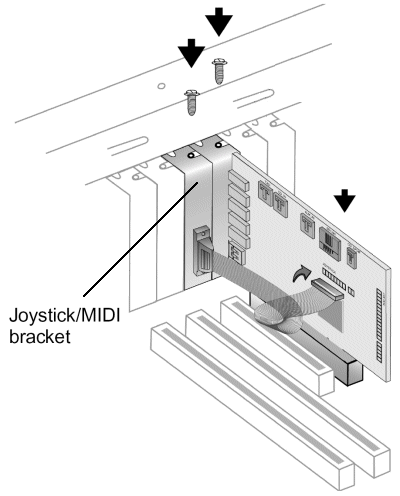
If you're planning on using a joystick or MIDI device you're going to need access to two adjacent PCI slots. Fit the sound card and joystick/MIDI bracket as illustrated, connecting the latter to the associated connector on the sound card … [Continue reading]
Filed Under: How to Upgrade Your Audio Subsystem

Disabling and Uninstalling Soundcards

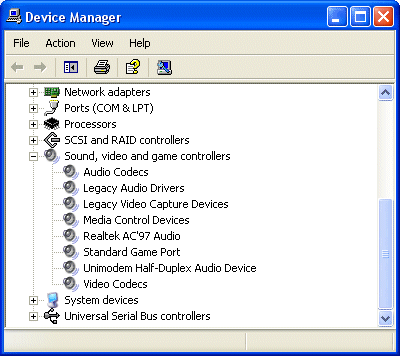
You first need to remove or disable any existing audio components. Under Windows XP, invoke Device Manager by right-clicking My Computer > Properties > Hardware > Device Manager. Expanding the Sound, video and game controllers item … [Continue reading]

Filed Under: How to Upgrade Your Audio Subsystem

Updating Your Creative Soundcard Drivers

It's wise to check periodically to see if updated drives have been released for your sound card. For the Creative Audigy card, this means going to the appropriate Support page for your country or region, and clicking on DOWNLOAD DRIVERS. Make … [Continue reading]
Filed Under: How to Upgrade Your Audio Subsystem

Updating the BIOS

In fact, motherboard manufacturers have made the process of updating your BIOS considerably easier, by providing software that allows this - and more besides - to be done from within Windows. Gigabyte claims to have been the first off the mark … [Continue reading]
Filed Under: How to Update Your System BIOS

Flashing the BIOS

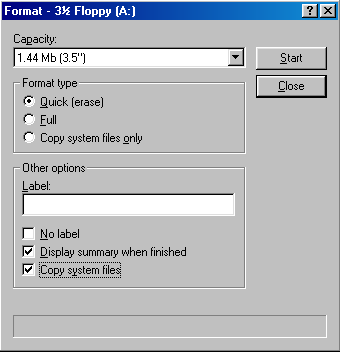
The traditional procedure for flashing your BIOS from within DOS using a floppy disk is similar for all motherboard manufacturers. It starts by making a couple of MS-DOS Startup Disks. The following describes how to do this for either a Windows … [Continue reading]
Filed Under: How to Update Your System BIOS

BIOS updates – how to locate the latest BIOS update for your motherboard

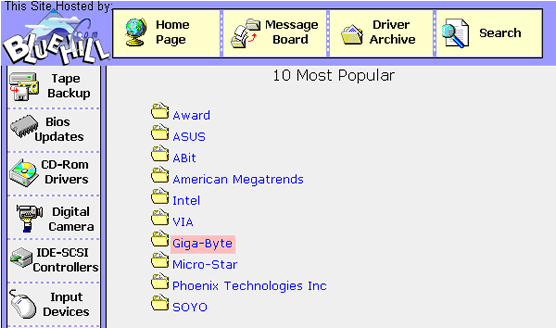
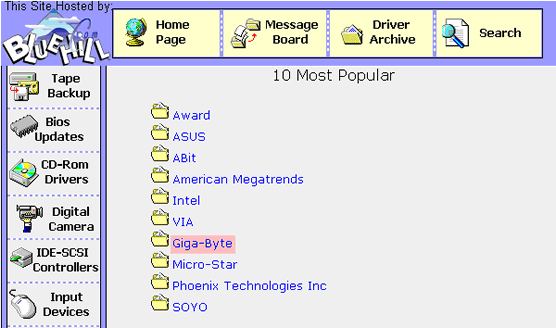
The best place to start when trying to locate BIOS updates is your motherboard manufacturer's web site. One way to get to this is via a specialist driver site, such as missingdrivers.com. Select the Bios Updates category and then your motherboard … [Continue reading]
Filed Under: How to Update Your System BIOS Tagged With: BIOS updates, find the latest BIOS, how to identify BIOS, identifying BIOS, update my BIOS

Replacing your BIOS chip – how to update your system BIOS

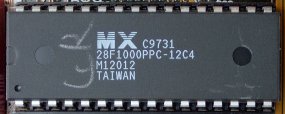
Modern-day motherboards have EEPROM BIOS chips that can be reprogrammed by software. These are also referred to as flash PROM or flash ROM, the process by which they're updated being known as flashing. If your BIOS isn't flashable it's still … [Continue reading]
Filed Under: How to Update Your System BIOS Tagged With: can I replace my BIOS, how do I replace my BIOS chip, how to replace a BIOS chip, remove the BIOS chip

BIOS Ident

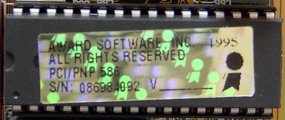
Your BIOS will most likely be stored in a 32-pin chip, which can typically be identified by a silver or gold sticker that shows the name of the BIOS company - such as AMIBIOS, AWARD or Phoenix - and a code that indicates the version of code it … [Continue reading]

Filed Under: How to Update Your System BIOS

« Previous Page
Next Page »

Why Internet Bundles Are the Next Battleground for Gamers

A weak internet connection can turn seamless gaming sessions into frustrating experiences filled with lag, buffering or sudden disconnects. For … [Read More...]

Importance of Inbound Marketing in the Digital Age

A couple of months ago, Zacks reported that Hubspot was starting to make some major changes to its inbound marketing strategy. They talk a lot about … [Read More...]

Damage Control Strategies for Resolving Online PR Crises

Last July, Astrologer faced a major crisis after its CEO went viral at a ColdPlay concert when having an affair. This was just one of the many times a … [Read More...]

AI is Not Killing Computer Jobs Like Doomers Projected

There is no denying the reality that AI technology has played a massive role in disrupting our lives. A growing number of people claim that AI … [Read More...]

Everything You Need to Know About Sourcing Circuit Boards From U.S. Suppliers

In This Article This article includes: Why Source PCBs From the United States?How to Get a Quote From a U.S.-Based PCB ManufacturerThe Top U.S. … [Read More...]

Top Taplio Alternatives in 2025 : Why MagicPost Leads for LinkedIn Posting ?

LinkedIn has become a strong platform for professionals, creators, and businesses to establish authority, grow networks, and elicit engagement. Simple … [Read More...]

Guides

  • Computer Communications
  • Mobile Computing
  • PC Components
  • PC Data Storage
  • PC Input-Output
  • PC Multimedia
  • Processors (CPUs)

Recent Posts

Colombia is Becoming a Major LATAM Software Producing Country

Over a two-day period in December, Cali hosted Softic 2019, an international software business conference organized by Fedesoft, Procolombia and the … [Read More...]

Keep Corporate Data Safe

Everyday we hear about some a company having its network and data breached. The scary part is it is done to large corporations that we assume have … [Read More...]

PcSync Review

PROS: The file shredder worked, albeit very slowly. CONS: As the long time runner in the data transfer market, LapLink's PCsync still … [Read More...]

[footer_backtotop]

Copyright © 2026 About | Privacy | Contact Information | Wrtie For Us | Disclaimer | Copyright License | Authors