pctechguide.com

  • Home
  • Guides
  • Tutorials
  • Articles
  • Reviews
  • Glossary
  • Contact

SCSI Internal Connections

The SCSI devices inside a computer are attached to an internal SCSI cable. The last device on the cable must be terminated. Most internal SCSI devices have a jumper or switch that controls termination. Refer to the device’s documentation on enabling or disabling termination.
Host

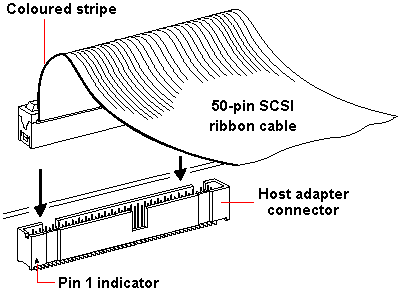
Find the coloured stripe on the 50-pin internal SCSI cable and then align it with Pin-1 on the host adapter’s connector. Pin-1 is usually identified an arrowhead or 1 on the connector.
Internal

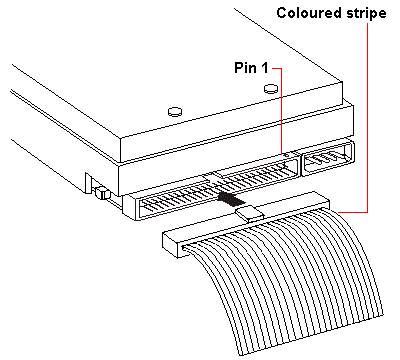
Align the SCSI cable’s coloured (typically red or blue) stripe with Pin-1 on the SCSI device connector, and then plug it in.


Generally, the SCSI device that is attached at the end of the internal SCSI cable should be terminated. However, if you are using both internal and external SCSI devices, you must disable host adapter SCSI termination.

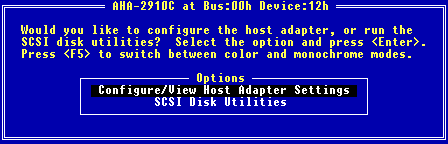
Adaptec SCSI host adapter cards can be configured via a SCSISelect configuration utility which allows you to change host adapter settings without having to open up the computer’s system case.

To enter the SCSISelect utility, simply boot your system with the SCSISelect floppy disk inserted.
SCSISelect

The available options may then be navigated and changed in similar fashion to a BIOS Setup facility.

The aforementioned Host Adapter SCSI Termination option can be configured to Automatic to either enable or disable termination as appropriate.
Power

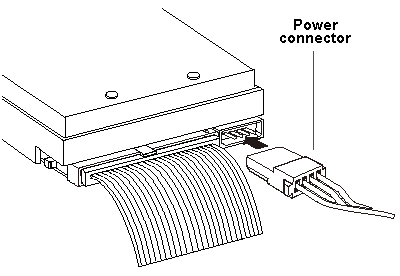
Connect a DC power cable from your computer’s power supply to the power connector on the SCSI device.


If appropriate, you may connect the CD-ReWriter’s analogue audio output connector to an audio amplifier or a sound card’s internal audio input connector using a sound cable terminated with a standard MPC-3 type, 4-pin connector.
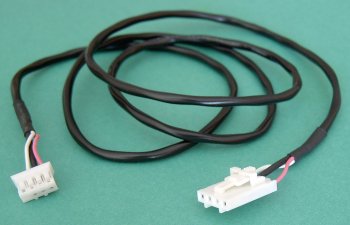
Analogue

Often, retail optical drive products will include such a cable. The larger connector connects to the CD-ReWriter.


That completes the connection of the CD-ReWriter.
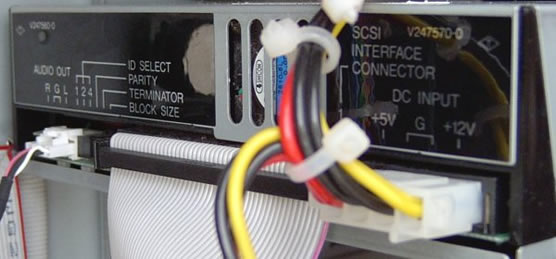
Connected

Now reboot the system to effect the installation of the associated driver software.

  • SCSI Adapters
  • SCSI Internal Intro
  • SCSI Internal Configuration
  • SCSI Internal Mounting
  • SCSI Internal Connections
  • SCSI Internal Software
  • SCSI External
  • Installing a SCSI device – making the connections
  • SCSI External Config
  • SCSI External Software

Filed Under: How to Install a SCSI Device

Latest Articles

Drupal vs. Joomla vs. WordPress – What’s the best platform for you?

Content management systems are widely used in modern websites. One analysis by BuiltWith.com found that 791,981 of the top 1 million websites had some content management system. There are a number of great CMS applications on the web. But which is ideal for a given website? Drupal. Joomla. … [Read More...]

Pentium Dual Core

Pentium is the flagship series of Intel processors. With the launch of Celeron (low priced microprocessor brand) in 1998 the company had planned to discontinue the Pentium series, but such was the demand of the mid-range dual core processors that the Pentium processors were re launched by Intel in … [Read More...]

Your Business and the Facebook Dislike Button

The dislike button is finally coming to Facebook. Many people have been asking for this for years. But, businesses are facing the news with some trepidation. Many businesses have built their reputations and profits on Facebook and they are concerned how the dislike button can impact them. Here are … [Read More...]

Why Internet Bundles Are the Next Battleground for Gamers

A weak internet connection can turn seamless gaming sessions into frustrating experiences filled with lag, buffering or sudden disconnects. For … [Read More...]

Importance of Inbound Marketing in the Digital Age

A couple of months ago, Zacks reported that Hubspot was starting to make some major changes to its inbound marketing strategy. They talk a lot about … [Read More...]

Damage Control Strategies for Resolving Online PR Crises

Last July, Astrologer faced a major crisis after its CEO went viral at a ColdPlay concert when having an affair. This was just one of the many times a … [Read More...]

AI is Not Killing Computer Jobs Like Doomers Projected

There is no denying the reality that AI technology has played a massive role in disrupting our lives. A growing number of people claim that AI … [Read More...]

Everything You Need to Know About Sourcing Circuit Boards From U.S. Suppliers

In This Article This article includes: Why Source PCBs From the United States?How to Get a Quote From a U.S.-Based PCB ManufacturerThe Top U.S. … [Read More...]

Top Taplio Alternatives in 2025 : Why MagicPost Leads for LinkedIn Posting ?

LinkedIn has become a strong platform for professionals, creators, and businesses to establish authority, grow networks, and elicit engagement. Simple … [Read More...]

Guides

  • Computer Communications
  • Mobile Computing
  • PC Components
  • PC Data Storage
  • PC Input-Output
  • PC Multimedia
  • Processors (CPUs)

Recent Posts

Files and Settings Transfer – How to do a clean installation of Windows XP

Now's the time to transfer the files and settings preserved from your previous version of Windows to the new Windows XP environment. Do this by … [Read More...]

The Sony Xperia Z2 Tablet, 4G LTE

  Waterproof, slim and light plus 4G LTE Tablet. Enjoying the apps, lifestyle accessories, entertainment, handling mishaps, and what’s even … [Read More...]

PC Lock Review

[starreviewmulti id=3 tpl=20] PROS: The Data Encyption program worked well on the XP computer we tested and was very easy to use. CONS: As with … [Read More...]

[footer_backtotop]

Copyright © 2026 About | Privacy | Contact Information | Wrtie For Us | Disclaimer | Copyright License | Authors