pctechguide.com

  • Home
  • Guides
  • Tutorials
  • Articles
  • Reviews
  • Glossary
  • Contact

Installing a SCSI device – making the connections

Squeeze either side of the connector to connect the supplied SCSI cable to the SCSI host adapter card’s external SCSI connector.
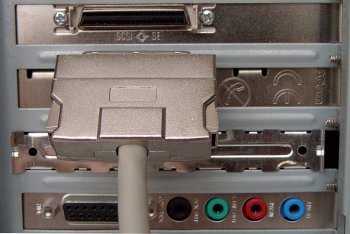
External

Connect the other end to the scanner’s 50-pin DB50 connector …

… and plug in the power adapter power cord
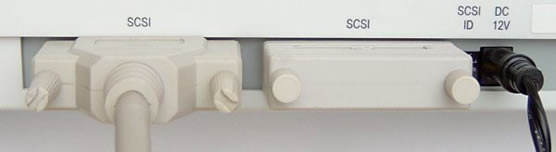
Scanner

The proliferation of SCSI standard versions over the years has led to a situation in which there exist many different types of SCSI cables and connectors. Whilst each new version of SCSI is backwards compatible, it can require a bewildering array of cables, connectors and adapters to connect together a bunch of SCSI peripherals that spans multiple variants of the standard:

Host or Host Adapter Connector
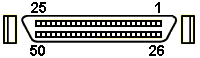
50-pin Centronics:

Most SCSI SLOW (5 MBps) computers and host adapters use the Centronics-type 50-pin connector. Also some 8-bit Fast computers and host adapters.

Centronics
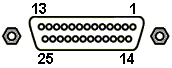
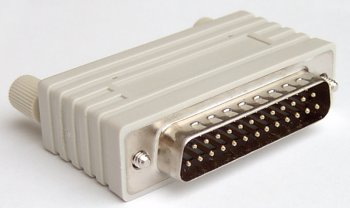
DB25:

Apple/Mac and some older Sun 8-bit workstations.

Centronics
DB50:

Old Sun and DG Computers, Zip drives and many scanners.

Centronics
HD50:

Many 8-bit SCSI FAST (up to 10 MBps) computers and host adapters use this 50-pin High-Density connector.

Centronics
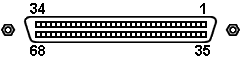
HD68:

All FAST/WIDE (16-bit) SCSI-3 computers and host adapters plus old DEC single-ended SCSI use this 68-pin High Density connector.

Centronics
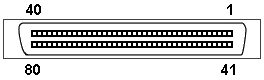
SCA80:

New Single Connector Attachment 80-pin connector used for Ultra2Wide/LVD, Ultra160 and Ultra32O applications

Centronics

SCSI

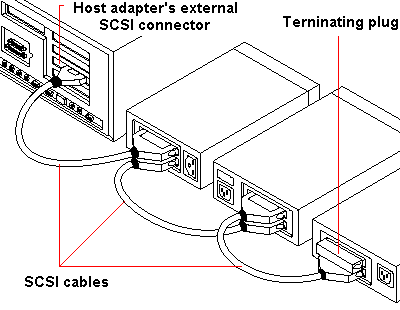
It’s possible to connect a number of SCSI devices by creating a daisy-chain, that is, plugging one device into the next.
SCSI

The last device in the chain needs to terminated.

In this case, since it’s going to be the only external SCSI device, the SCSI terminator the scanner was supplied should be left in place.

To ensure reliable communication on the SCSI bus, the end of the chain of devices on the SCSI bus must be properly terminated with resistors to prevent signal reflections and guarantee data integrity over long cable lengths.

In fact, there may be one or two chains. One is the external chain from the external port on the SCSI adapter card, the other is the internal chain, connected from the card’s internal SCSI connector. Termination is accomplished by the peripheral at the end of each cable – or the end of the cable itself – having a terminator installed (or enabled). It is important for devices between the ends of each cable to have their terminators removed (or disabled).

Here are some general guidelines for termination:

  • Termination on internal SCSI peripherals usually is controlled by manually setting a jumper or a switch on the peripheral, or by physically removing or installing one or more resistor modules on the peripheral.
  • Termination on external SCSI peripherals usually is controlled by installing or removing a SCSI terminator. On some external peripherals, termination is controlled by setting a switch on the back of the drive.
  • By default, termination on SCSI host adapter card themselves is automatic.
  • Internal Ultra2 peripherals are set at the factory with termination disabled and cannot be changed. Proper termination for internal Ultra2 peripherals is provided by the built-in terminator at the end of the Ultra2 internal SCSI cable.
  • Most non Ultra2 SCSI peripherals come from the factory with termination enabled.
  • SCSI Adapters
  • SCSI Internal Intro
  • SCSI Internal Configuration
  • SCSI Internal Mounting
  • SCSI Internal Connections
  • SCSI Internal Software
  • SCSI External
  • Installing a SCSI device – making the connections
  • SCSI External Config
  • SCSI External Software

Filed Under: How to Install a SCSI Device Tagged With: connecting a SCSI device, connecting a SCSI printer, how to connect SCSI devices

Latest Articles

Remove Antimalware Doctor

Just like Antivirus IS and AV Security Suite, Antimalware Doctor is also a rouge program that will give fake threat alerts and false scan results once it infects a system. The results and the alerts may look quite scary at the first place because it will inform you that your computer is … [Read More...]

Fahrenheit Graphic Cards

Fahrenheit was another Microsoft initiative eventually to founder in the rapidly changing, quixotic multimedia graphics technology arena. It emerged out of the battle between Silicon Graphics' and Microsoft's 3D computer graphics APIs in … [Read More...]

How to Remove Win 7 Security 2012

Easiest Removal Option: Remote Repair: Paying an expert to remove this threat is always the easiest option. It's also the most expensive. PCTechGuide.com has reviewed several remote computer repair companies and we recommend http://www.pcninja.com This is a small computer repair company (Two … [Read More...]

Why Internet Bundles Are the Next Battleground for Gamers

A weak internet connection can turn seamless gaming sessions into frustrating experiences filled with lag, buffering or sudden disconnects. For … [Read More...]

Importance of Inbound Marketing in the Digital Age

A couple of months ago, Zacks reported that Hubspot was starting to make some major changes to its inbound marketing strategy. They talk a lot about … [Read More...]

Damage Control Strategies for Resolving Online PR Crises

Last July, Astrologer faced a major crisis after its CEO went viral at a ColdPlay concert when having an affair. This was just one of the many times a … [Read More...]

AI is Not Killing Computer Jobs Like Doomers Projected

There is no denying the reality that AI technology has played a massive role in disrupting our lives. A growing number of people claim that AI … [Read More...]

Everything You Need to Know About Sourcing Circuit Boards From U.S. Suppliers

In This Article This article includes: Why Source PCBs From the United States?How to Get a Quote From a U.S.-Based PCB ManufacturerThe Top U.S. … [Read More...]

Top Taplio Alternatives in 2025 : Why MagicPost Leads for LinkedIn Posting ?

LinkedIn has become a strong platform for professionals, creators, and businesses to establish authority, grow networks, and elicit engagement. Simple … [Read More...]

Guides

  • Computer Communications
  • Mobile Computing
  • PC Components
  • PC Data Storage
  • PC Input-Output
  • PC Multimedia
  • Processors (CPUs)

Recent Posts

AMD K6-3

In February 1999 AMD announced that it had begun volume shipments of the 400MHz AMD K6-III processor, codenamed … [Read More...]

WHAT IS CLOUD COMPUTING AND WHAT ARE ITS MAIN BENEFITS?

Users are Increasingly using cloud computing to store their information, which is replacing local storage. The business digitization process goes … [Read More...]

WLAN

WLAN Wireless LAN: a local area network that transmits over the air typically in an unlicensed frequency such as the 2.4GHz band. Wireless … [Read More...]

[footer_backtotop]

Copyright © 2026 About | Privacy | Contact Information | Wrtie For Us | Disclaimer | Copyright License | Authors