pctechguide.com

  • Home
  • Guides
  • Tutorials
  • Articles
  • Reviews
  • Glossary
  • Contact

Connecting External DV Converter Hardware to VCR and PC for VHS Video to DVD Transfer

Connecting up the ADVC-55 external DV converter to your PC and VCR is fairly straightforward.
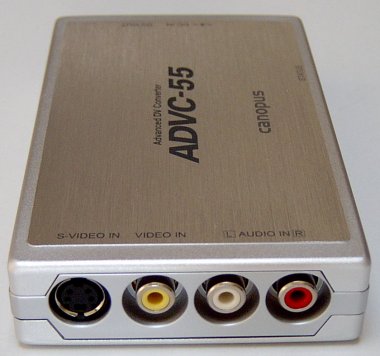
ADVC-55

First, connect up either composite video RCA Phono or S-Video socket, and twin RCA Phono audio connectors …

… at one end of the Canpous device …
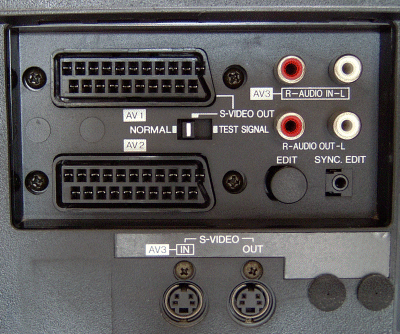
VCR

to your VCR.

Video capture devices generally always provide composite video and S-video connectors. If your VCR provides both, use the latter, since this will give a higher level of video quality.

Both types of connector have the same bandwidth. The sole difference between S-video (also known as Y/C Separated video) and composite video is that the former carries the chroma separate from the luminance, while the latter mixes them together. S-video’s superior performance stems from the elimination for the need for a chroma separator at the destination and the avoidance of any signal degradation that this can cause.
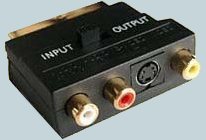
SCART

In Europe, it’s common for VCR players to have a only a SCART (aka Peritel or Euroconnector) connector.

In this case, you’ll need to use a suitable SCART-to-phono adapter set. Such adapters are generally available wherever video recorders are being sold.

Then connect the unit to your PC …
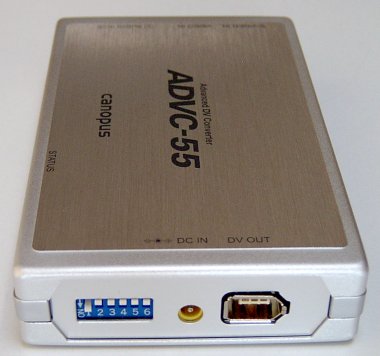
FireWire

… by plugging in the FireWire cable to the other end of the unit.

Many modern-day motherboards provide a pin header that allows connection to a front-mounted IEEE-1394 port.
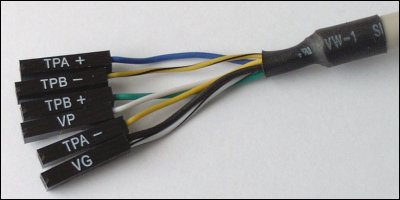
FireWire

Typically, there are six wires coming from the system case’s front-mounted IEEE-1394 port, consisting of two sets of twisted pair cables (TPA and TPB), a power cable (VP) and a ground cable (VG).

IFPCG

The Intel Front Panel Connectivity Guide recommends the following design for a front-mounted IEEE-1394 connectors. If your motherboard is a recent design, it’s likely it will be identical, or at least similar.

Pin Signal name Pin Signal name
1 TPA+ 2 TPA-
3 Ground 4 Ground
5 TPB+ 6 TPB-
7 +12V (Fused) 8 +12V (Fused)
9 Key 10 Ground

Connecting the wires to the pin header can be tricky. Where not all the pins are going to be used, it’s easy to inadvertently connect a wire to a wrong pin.

Take great care to avoid this, if you don’t want to risk seeing the external device disappear in a cloud of blue smoke!

The DIP switches are used to specify the appropriate video format (PAL, NTSC or SECAM) and to boost the audio level if you subsequently feel the volume converted sound is insufficient.

The ADVC-55 doesn’t require any driver installation, so as soon as you’ve done so …

Found

… Windows should recognise the presence of the device …

… and ask you what you want it to do next.
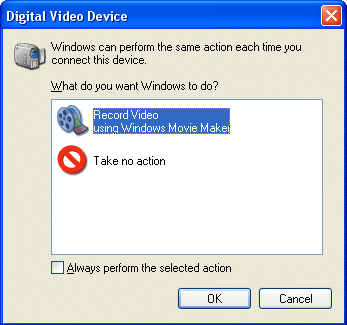
Trial

At this point it’s wise to run a trial video capture, to conform that the hardware is properly connected and working correctly. The native Windows XP Movie Maker application can be used for this purpose.

  • Transfer VHS to DVD Method
  • VCR to DVD – Video Digitisation and Compression Codecs
  • VCR to DVD Conversion – Video Capture Cards and PC Hardware
  • How to Transfer VCR Video to DVD – Preparation
  • Converting VCR Video to DVD Using Canopus ADVC-55
  • Connecting External DV Converter Hardware to VCR and PC for VHS Video to DVD Transfer
  • Testing the External DV Converter
  • Installing the Software for the ADVC-55 DV Converter – including NERO
  • One-Click Operation of VHS Video to DVD Transfer Using ADVC-55
  • Rip / Import / Copy VCR VHS Video and Burn to DVD with Nero
  • Labelling your DVDs – tutorial on how to transfer your VCR tapes to DVD

Filed Under: How to Transfer Your VCR Tapes to DVD

Latest Articles

8 Great Budget-Friendly Ways for Growing Your YouTube Subscribers Count

If you are serious about creating independent video content, you probably have a YouTube account set up. And why not? YouTube is one of the most popular and budget-friendly video content-sharing social platforms in the digital space today. When created with public settings, YouTube content is … [Read More...]

10 Tips To Keep Your Computer Safe From Hackers And Viruses

There`s a never-ending flow of sophisticated scams and they come in many different disguises, that even the most IT savvy people can get caught in the hacker`s net. From corrupt email links to people calling you claiming to be from your provider, wanting your credit card details or trying to make … [Read More...]

Windows Control Series

Windows Control Series Hello again! If you've found this page, you've probably been infected with Windows Control Series. Malware of this kind, while not particularly insidious, is designed to fool the user into purchasing itself to remove fake infections its supposedly found on your computer. … [Read More...]

Why Internet Bundles Are the Next Battleground for Gamers

A weak internet connection can turn seamless gaming sessions into frustrating experiences filled with lag, buffering or sudden disconnects. For … [Read More...]

Importance of Inbound Marketing in the Digital Age

A couple of months ago, Zacks reported that Hubspot was starting to make some major changes to its inbound marketing strategy. They talk a lot about … [Read More...]

Damage Control Strategies for Resolving Online PR Crises

Last July, Astrologer faced a major crisis after its CEO went viral at a ColdPlay concert when having an affair. This was just one of the many times a … [Read More...]

AI is Not Killing Computer Jobs Like Doomers Projected

There is no denying the reality that AI technology has played a massive role in disrupting our lives. A growing number of people claim that AI … [Read More...]

Everything You Need to Know About Sourcing Circuit Boards From U.S. Suppliers

In This Article This article includes: Why Source PCBs From the United States?How to Get a Quote From a U.S.-Based PCB ManufacturerThe Top U.S. … [Read More...]

Top Taplio Alternatives in 2025 : Why MagicPost Leads for LinkedIn Posting ?

LinkedIn has become a strong platform for professionals, creators, and businesses to establish authority, grow networks, and elicit engagement. Simple … [Read More...]

Guides

  • Computer Communications
  • Mobile Computing
  • PC Components
  • PC Data Storage
  • PC Input-Output
  • PC Multimedia
  • Processors (CPUs)

Recent Posts

Motherboard Memory Identification

Your motherboard User's Manual will give a clue as to what type of memory you need to use. However, such is the complexity and variation of memory … [Read More...]

CD-ROM White Book

The White Book, finalised in 1993, defines the VideoCD specification and comprises: Disc format including use of tracks, … [Read More...]

The History of Digital Video

In the early 1990s, a digital video system capable of capturing full-screen video images would have cost several … [Read More...]

[footer_backtotop]

Copyright © 2026 About | Privacy | Contact Information | Wrtie For Us | Disclaimer | Copyright License | Authors