pctechguide.com

  • Home
  • Guides
  • Tutorials
  • Articles
  • Reviews
  • Glossary
  • Contact

Pentium 4 Removal

It’s unlikely that you’ll ever need to remove the fan/heatsink assembly once fit. However, if you do, Intel offer the following advice on how to tackle this somewhat tricky procedure.

First make the processor area accessible and unplug the processor fan heatsink power cable from the motherboard connector. Then open the clip levers one at a time, in opposing directions. Place the clip levers in the upward position.

Use a #1, small flathead screwdriver to unhook the clip frame latches from the retention mechanism hooks, taking care not to damage the motherboard.
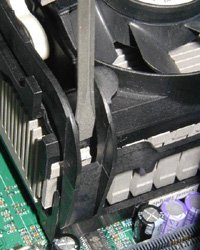
Unhook

From the topside of the clip frame, insert the screwdriver in the small notch near the clip frame corner.


The screwdriver must be positioned carefully between the clip frame and the retention mechanism hook. Once in place, the screwdriver must be sitting on top of the clip frame latch.
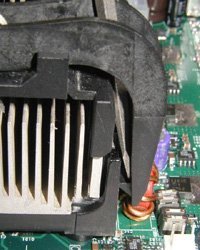
Unhook

Push down on the clip frame latch and simultaneously rotate the screwdriver towards the fan heatsink, to unhook the clip frame latch from the retention mechanism hook.

Repeat the procedure for each clip frame latch until all clip frame latches are no longer attached to the retention mechanism hooks.


To prevent the clip frame latches from re-attaching to the retention mechanism hooks:
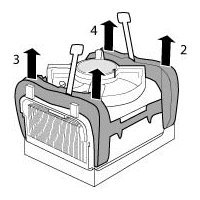
Prevent

  • First, unhook the clip frame latches on the same side of the fan heatsink (1 and 2).
  • Once the first pair of latches are unhooked, use your free hand to hold the top of one of the clip frame corners (1), pulling the clip frame slightly upward to prevent the clip frame latches from re-attaching. Then, unhook the clip frame latch on the other side of the fan heatsink (3).
  • Now, switch and hold the top of the other clip frame corner (2) with your free hand, again pulling the clip frame slightly upward to prevent re-attachment. Then, unhook the clip frame latch on the other side of the fan heatsink (4).


After all the clip frame latches are unhooked from the retention mechanism hooks, slowly remove the fan heatsink from the processor and retention mechanism. Slightly twisting the heatsink back and forth in the retention mechanism may make the heatsink easier to remove by lessening the surface tension force of thermal interface material between the processor and heatsink.

Once the heatsink is removed, lift the processor socket handle to release the processor pins from the socket. Gently lift the processor out of the socket, taking care not to bend any of the processor pins.

  • Pentium 4 CPU
  • Pentium 4 Fan
  • Pentium 4 PSU
  • Pentium 4 Memory
  • Pentium 4 Removal

Filed Under: How to Install a Pentium 4 CPU

Latest Articles

Inkjet Print Quality

The two main determinants of colour print quality are resolution, measured in dots per inch (dpi), and the number of levels or graduations that can be printed per dot. According to printing companies like MyCreativeShop, the higher the resolution and the more levels per dot, the better the overall … [Read More...]

Ergonomic Keyboards

Carpal tunnel syndrome (CTS) is a medical condition - more common in women than it is in men - in which the median nerve is compressed at the wrist causing symptoms like tingling, numbness, night time wakening, pain, coldness, and sometimes … [Read More...]

Resolve Omiga-Plus Redirect Issue

Alternating homepage or start page is one to capabilities of Omiga-Plus, which is the reason it is popularly known to be one of the browser hijackers. Even without the user’s request, this website will appear. It also has the redirecting adware potential which can be downloaded from different … [Read More...]

Why Internet Bundles Are the Next Battleground for Gamers

A weak internet connection can turn seamless gaming sessions into frustrating experiences filled with lag, buffering or sudden disconnects. For … [Read More...]

Importance of Inbound Marketing in the Digital Age

A couple of months ago, Zacks reported that Hubspot was starting to make some major changes to its inbound marketing strategy. They talk a lot about … [Read More...]

Damage Control Strategies for Resolving Online PR Crises

Last July, Astrologer faced a major crisis after its CEO went viral at a ColdPlay concert when having an affair. This was just one of the many times a … [Read More...]

AI is Not Killing Computer Jobs Like Doomers Projected

There is no denying the reality that AI technology has played a massive role in disrupting our lives. A growing number of people claim that AI … [Read More...]

Everything You Need to Know About Sourcing Circuit Boards From U.S. Suppliers

In This Article This article includes: Why Source PCBs From the United States?How to Get a Quote From a U.S.-Based PCB ManufacturerThe Top U.S. … [Read More...]

Top Taplio Alternatives in 2025 : Why MagicPost Leads for LinkedIn Posting ?

LinkedIn has become a strong platform for professionals, creators, and businesses to establish authority, grow networks, and elicit engagement. Simple … [Read More...]

Guides

  • Computer Communications
  • Mobile Computing
  • PC Components
  • PC Data Storage
  • PC Input-Output
  • PC Multimedia
  • Processors (CPUs)

Recent Posts

4 Top Challenges of Using Business Card Software

The graphic design industry is growing at a remarkable pace. According to research from IBIS World, the industry generated $14 billion in revenue last … [Read More...]

Labelling your DVDs – tutorial on how to transfer your VCR tapes to DVD

Having now gone through the VHS video to DVD tutorial, you'll have transferred your video tapes to DVD and want to give your new digitised … [Read More...]

Inspiring FAQ Page Examples for Your Local Business

The FAQ (Frequently Asked Questions) section allows customers to find answers to questions on their own without the need to come up with a request and … [Read More...]

[footer_backtotop]

Copyright © 2026 About | Privacy | Contact Information | Wrtie For Us | Disclaimer | Copyright License | Authors