pctechguide.com

  • Home
  • Guides
  • Tutorials
  • Articles
  • Reviews
  • Glossary
  • Contact

Pentium 4 Fan

A boxed Pentium 4 processor includes a high quality unattached fan heatsink specifically designed to provide sufficient cooling to the Pentium 4 processor when used in a suitable chassis environment.
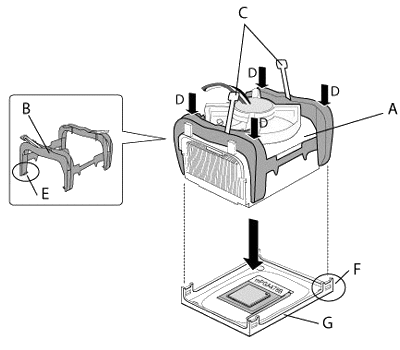
Fan/Heatsink

The fan heatsink and clip assembly (A) comprises:

  • B: Clip frame
  • C: Clip levers
  • D: Clip frame corners
  • E: Clip frame latch
  • F: Retention mechanism hook.

and attaches to the motherboard-mounted retention mechanism (G).


Normally, there will be thermal interface material attached to the bottom of the processor’s fan heatsink. Take care not to damage this. Alternatively, use the enclosed syringe to apply all of the thermal interface material provided to the IHS surface of the processor.
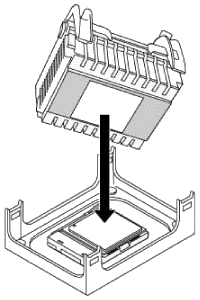
Align

Align the heatsink and clip assembly with the retention mechanism (the fan heatsink is symmetrical) and place it on the processor. Allow the heatsink base to compress (without rotating or twisting) the thermal interface material over the surface of the processor’s integrated heat spreader.
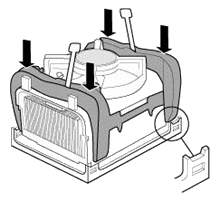
Secure

With the clip levers in the upward position, push down on all four clip frame corners to secure the clip frame latches to the retention mechanism hooks, making sure the processor fan cable is free from any obstruction and is not trapped under clip frame.


It is important to not allow the heatsink to rotate or twist on the processor’s integrated heat spreader. Securing the fan heatsink while closing the clip levers will ensure the thermal interface material is not damaged and the processor will operate correctly.
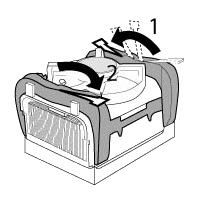
Close

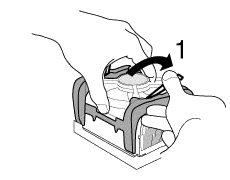
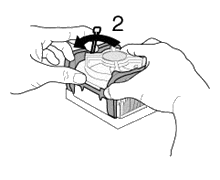
Close the clips levers in opposing directions, one at a time. The levers require some force to be completely closed.
Close

First, close clip lever 1 while holding the topside of the fan heatsink with your hand.
Close

Then, close clip lever 2 while holding the topside of the fan heatsink with your other hand.

Once the clip levers are closed, verify that the heatsink is securely retained and that the clip frame latches are properly engaged with the retention mechanism hooks.
Fan

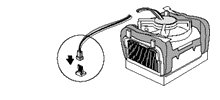
Finally, connect the processor fan cable to the motherboard fan power header. Consult the motherboard manual to determine the correct fan header to use.
Installed

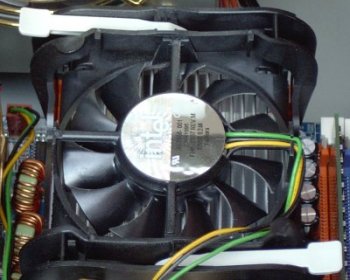
When installed, the fan heatsink and clip assembly may cause the motherboard to slightly bend or flex. This is nothing to be concerned about, and provides the proper mechanical support for the processor (with attached fan heatsink and clip assembly) and helps prevent against damage during system shipment.

  • Pentium 4 CPU
  • Pentium 4 Fan
  • Pentium 4 PSU
  • Pentium 4 Memory
  • Pentium 4 Removal

Filed Under: How to Install a Pentium 4 CPU

Latest Articles

What to do when Windows 10 won’t boot (Part 1)

It can be very frightening when your computer won't boot or Windows 10 crashes when you turn it on. What could have happened? And more importantly, what can you do to try to fix it? Today we bring you a guide with a few solutions for the most common problems when Windows 10 does not boot correctly … [Read More...]

Beginner Guide to UI Design for Websites

Understanding how to make it easy and efficient for a person to interact with a user interface (UI) can be done when you become familiar with the components of UI design. Learning how to build out a UI properly should lead to a logical organization of elements and help convey the appropriate look … [Read More...]

IDE Interfaces

One of the earliest and most significant standards introduced into PC hardware was IDE (Integrated Drive Electronics), a standard which controls the flow of data between the processor and the hard disk. The IDE concept was initially proposed by … [Read More...]

Why Internet Bundles Are the Next Battleground for Gamers

A weak internet connection can turn seamless gaming sessions into frustrating experiences filled with lag, buffering or sudden disconnects. For … [Read More...]

Importance of Inbound Marketing in the Digital Age

A couple of months ago, Zacks reported that Hubspot was starting to make some major changes to its inbound marketing strategy. They talk a lot about … [Read More...]

Damage Control Strategies for Resolving Online PR Crises

Last July, Astrologer faced a major crisis after its CEO went viral at a ColdPlay concert when having an affair. This was just one of the many times a … [Read More...]

AI is Not Killing Computer Jobs Like Doomers Projected

There is no denying the reality that AI technology has played a massive role in disrupting our lives. A growing number of people claim that AI … [Read More...]

Everything You Need to Know About Sourcing Circuit Boards From U.S. Suppliers

In This Article This article includes: Why Source PCBs From the United States?How to Get a Quote From a U.S.-Based PCB ManufacturerThe Top U.S. … [Read More...]

Top Taplio Alternatives in 2025 : Why MagicPost Leads for LinkedIn Posting ?

LinkedIn has become a strong platform for professionals, creators, and businesses to establish authority, grow networks, and elicit engagement. Simple … [Read More...]

Guides

  • Computer Communications
  • Mobile Computing
  • PC Components
  • PC Data Storage
  • PC Input-Output
  • PC Multimedia
  • Processors (CPUs)

Recent Posts

How to publicise your website

Sometimes, a website can explode from nowhere with absolutely no publicity, but it will catch a mood and suddenly be pulling millions of visitors. The … [Read More...]

IEEE 802.11b

The 802.11b group within IEEE was driven largely by Lucent Technologies and Intersil Corp., and was designed to operate … [Read More...]

Utilize Google Trends for Business

Google Trends is a tool provided by Google that lets people see topics and subjects that are gaining in popularity online. It gives people the ability … [Read More...]

[footer_backtotop]

Copyright © 2026 About | Privacy | Contact Information | Wrtie For Us | Disclaimer | Copyright License | Authors