pctechguide.com

  • Home
  • Guides
  • Tutorials
  • Articles
  • Reviews
  • Glossary
  • Contact

Kong Games Ads Removal

Kong Games Ads is another type of adware that will display ads on your computer. They will show up in the web pages you visit and can become very intrusive and annoying. The ads will be embedded in the websites, but will also show up as pop ups and underlined keywords on the websites.

The hook of Kong Games is that it lets you play games on the Internet. That is the way they get people to install the software. But, without reading the fine print, you will soon find your self overwhelmed with all these annoying ads. Typically, you will see the ads display something like “Kong Games”, “Powered by Kong Games” or something similar to that to identify where the ads are coming from.

Infected with Kong Games Ads? Scan Your PC for Free

 

The ads create a vicious cycle because the advertisers hope to get you to install their software on your machine which can lead to even more issues on your machine; some even malicious. Kong Games makes money if you go to these third party ads and install the software and do not care much about what happens to your machine afterwards.

How Was I Infected with Kong Games?

Again, Kong Games is adware. It is bundled with free programs you obtain from the internet. Most likely, you did not read the fine print that other software would be installed. But, not many people do. On the other hand, it may have not even been disclosed to begin with. This is why you need to be careful when downloading software from the Internet, and be sure to pay close attention during the install process for extras being added to your machine.

The best course of action is to opt for the custom installation if given the option. This is most likely to give the the opportunity to skip all these third-party apps. If you pick basic installation it will just install everything without asking.

How to Uninstall Kong Games

The best course of action is to remove the software from the Uninstall Programs option. You can do this by clicking on the start button and going to control panel.
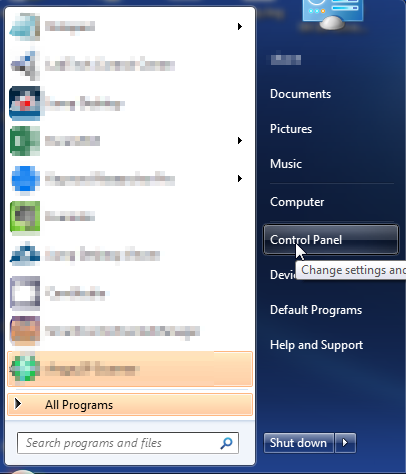
Once you click on that link, you will be taken to the Control Panel
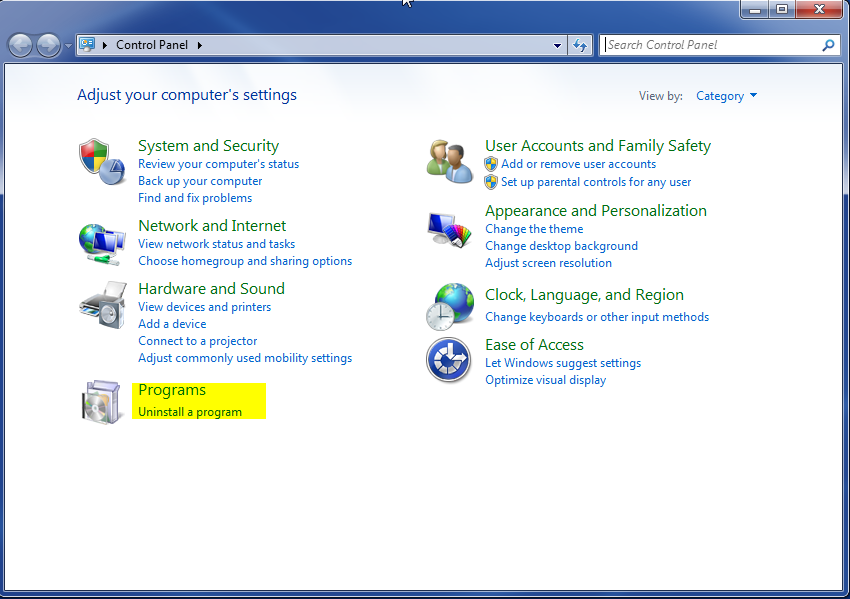
Inside the control panel, you will want to go to the programs section and click on “Uninstall a Program” as shown above. If your Control Panel does not look like the one above, you can click on “View By” and change to category to get it to look like the image above

You will then be taken to the uninstall app. From there you can select the application you want to remove. In this case, you will want to select Kong Games and then click on the Uninstall Button at the top.
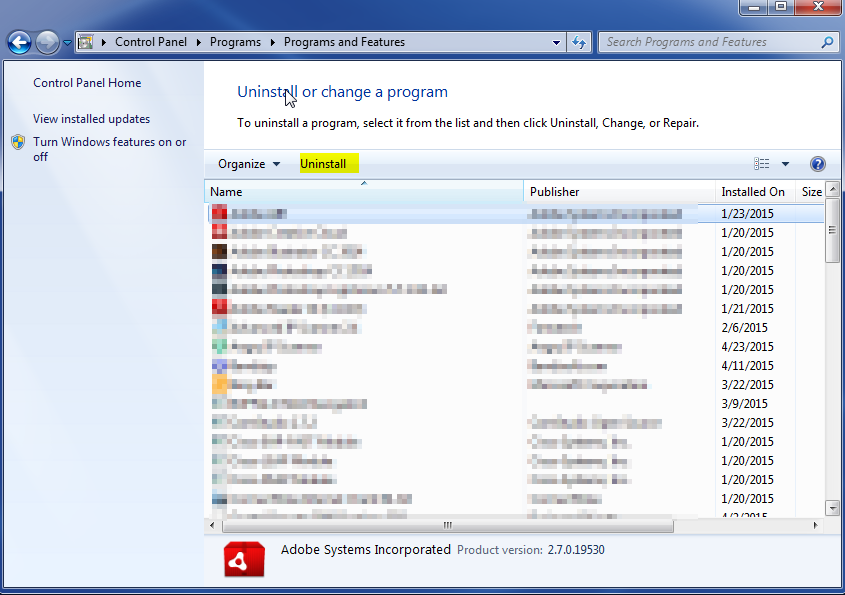
If the issue started happening recently, you can sort by install date to see the most recent installations. Otherwise, the software is sorted in alphabetical order by default.

Once you have completed this step, it is a good idea to run a malware scanner on your machine to make sure you have removed any other issues caused by the program. It is recommended to run something like Malwarebytes.

Filed Under: Virus Removal

Latest Articles

i810 Chipset

Formerly codenamed Whitney, the 810 AGPset finally reached the market in the summer of 1999. It is a three-chip solution comprising the 82810 Graphics Memory Controller Hub (GMCH), 82801 I/O Controller Hub (ICH) and 82802 Firmware Hub (FWH) for … [Read More...]

Good Sync Review

GoodSync Software Review

PROS: GoodSync is very easy to use and install. CONS: The mobile device list for GoodSync has been found as lacking, as many phones do not use the Windows Mobile operating system. OVERVIEW: GoodSync's varied options give the purchaser many ways to perform data transfer and … [Read More...]

Linux Commands for Navigating and Viewing Directories

Linux has hundreds of commands available, but to get around the system, view and edit text files we only need a handful. We'll take a look here at the basic commands that are essential in setting up the dedicated server (download a free copy of Linux to test drive it). Notice the convention of the … [Read More...]

Why Internet Bundles Are the Next Battleground for Gamers

A weak internet connection can turn seamless gaming sessions into frustrating experiences filled with lag, buffering or sudden disconnects. For … [Read More...]

Importance of Inbound Marketing in the Digital Age

A couple of months ago, Zacks reported that Hubspot was starting to make some major changes to its inbound marketing strategy. They talk a lot about … [Read More...]

Damage Control Strategies for Resolving Online PR Crises

Last July, Astrologer faced a major crisis after its CEO went viral at a ColdPlay concert when having an affair. This was just one of the many times a … [Read More...]

AI is Not Killing Computer Jobs Like Doomers Projected

There is no denying the reality that AI technology has played a massive role in disrupting our lives. A growing number of people claim that AI … [Read More...]

Everything You Need to Know About Sourcing Circuit Boards From U.S. Suppliers

In This Article This article includes: Why Source PCBs From the United States?How to Get a Quote From a U.S.-Based PCB ManufacturerThe Top U.S. … [Read More...]

Top Taplio Alternatives in 2025 : Why MagicPost Leads for LinkedIn Posting ?

LinkedIn has become a strong platform for professionals, creators, and businesses to establish authority, grow networks, and elicit engagement. Simple … [Read More...]

Guides

  • Computer Communications
  • Mobile Computing
  • PC Components
  • PC Data Storage
  • PC Input-Output
  • PC Multimedia
  • Processors (CPUs)

Recent Posts

Why Did No One Tell Drivers About This New Rule?

Do not pay your next car insurance bill until you read this… May - (2015): Your Current car insurance company doesn't want you to know this but as … [Read More...]

Hard Disks – What IS ATA and Ultra ATA?

In the second half of 1997 EIDE's 16.6 MBps limit was doubled to 33 MBps by the new Ultra ATA (also referred to as … [Read More...]

What to do when Windows 10 won’t boot (Part 1)

It can be very frightening when your computer won't boot or Windows 10 crashes when you turn it on. What could have happened? And more importantly, … [Read More...]

[footer_backtotop]

Copyright © 2026 About | Privacy | Contact Information | Wrtie For Us | Disclaimer | Copyright License | Authors