 PROS: GoodSync is very easy to use and install.
CONS: The mobile device list for GoodSync has been found as lacking, as many phones do not use the Windows Mobile operating system.
OVERVIEW: GoodSync’s varied options give the purchaser many ways to perform data transfer and synchronization and backup. Menus are easy to comprehend, intuitive, and are presented in a straight forward fashion. The software’s sync process is quite quick. Business users will find the software very suitable for networked devices, providing the transfer of ACLS, SFTP and WebDav support.


GoodSync Review
Company: GoodSync
Version: 8.5.8.8
Operating Network, etc.. Windows XP, Vista,
Systems: Windows 7 (32 and 64 bit),
Microsoft Server 2000, 2003, 2008,
Macintosh
Price: $29.95
What It Does
It synchronizes all data files, folders, contacts, photos, audio, video, email, and web page favorites from:
–PC to PC -PC to Mac – Mac to PC – PC to Network –PC to FTP/SFTP -PC to Palm/Treo/Mobile PC
Product Details
GoodSync is a very thorough products for synchronization. After the installation, a wizard immediately begins to walk the user through creating the first synchronized job. The user interface presented is very easy to understand. This job can either be a back up or a sync job. Synchronization between two computers that are in different locations (work versus home) is done by means of a USB drive. GoodSync will recognize the USB and move the requested files into this location. The user would next insert the USB into the receiving computer where GoodSync is installed and it will update the files and folders on the target PC using what was updated on the USB drive.
Windows mobile phone and pocket PC will show up as a USB drive in your windows system, enabling you to sync your files from the phone to a computer. Active sync or Windows Mobile device software must be installed on the computer and the phone connected to the PC via a USB cable.
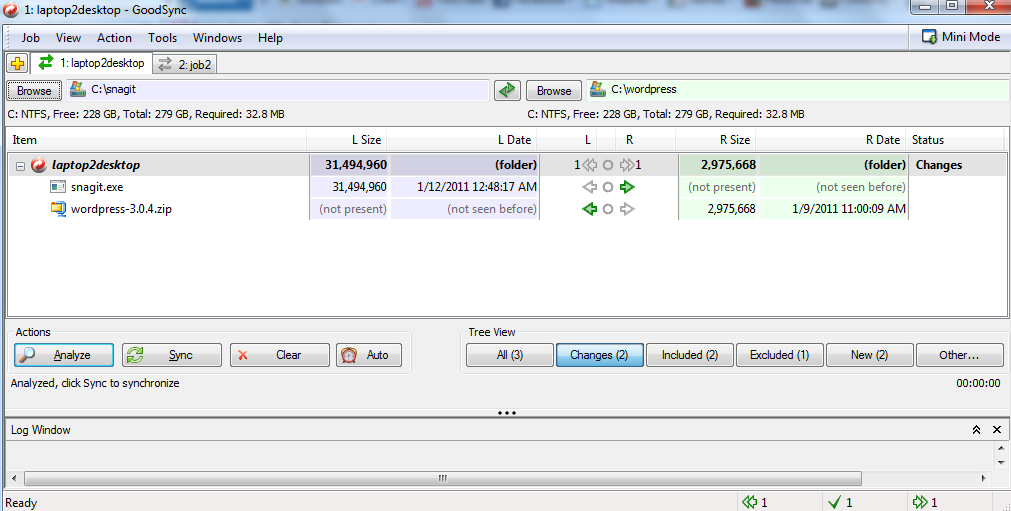
On each side of the screen is a browse button to select the location of the data to be transferred. Once selected, it will show the path, which is a nice visual reminder of where you’ve set the software to target. It also displays the file format (NTFS, FAT32) of the storage locations, how much total space is located on the source and target, as well as the storage size needed for the files to be moved to the opposite direction.
The entire C drive cannot be selected for a one step sync job. You must select the folders and files within the drive. This is due to the fact that your Windows program contains many files that are actively operating Windows. Also, if Windows crashes and you go through a reinstall, many files will be replaced with the new install files, so there is no need to have these backed up. Lastly Windows contains many temporary files created during web browsing or regular operations and many of these are junk files and have no need to be keep pristine.
GoodSync performs an “analyze” function at the initial synchronize process. This calculates the data size of target files and folders and shows an arrow for each indicating which direction the sync will be processed.
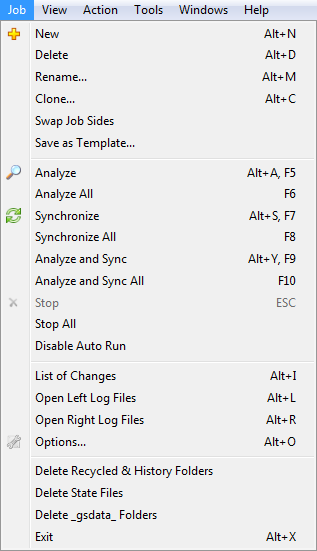
The number of sync choices under the job menu is remarkable. The software company has thought through every aspect of files transfer from one computer to another. There are options to rename a sync job, create templates, clone a job and disable jobs that were set to launch automatically. Even changing directions of the sync process is as easy as choosing the “Swap Job Sides” option in the job menu.
When selecting the AUTO button, options are given for setting what action on a file should be analyzed and/or synced automatically. You also set specific schedules for these choices.
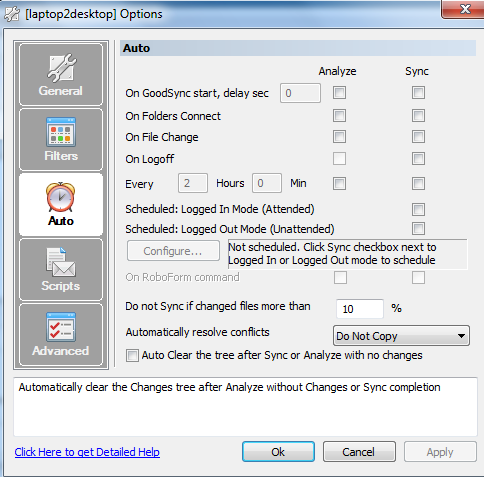
In this same menu, there is an option to forgo synchronization of a file if it is larger than a specified size. This is useful if you’ve got storage limitations on the destination drive, rather than have the entire sync fail when you discovered you ran out of disk space.
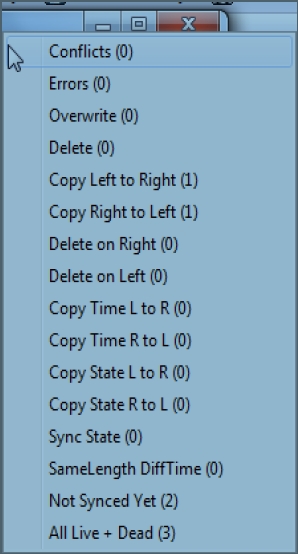
In the event of a syn job failure, the Other button displays a list of potential issues with the job and the log is also displayed at the bottom of the sync job screen.

Security
For business network users of NTFS files systems, under the Advance option of the Auto menu, is a check box for whether the ACLs are passed to the receiving system files and folders.
Authentication credentials are cached by the system. If you change the location of where the synced files will be placed (ie. alternate server), you must use the login credentials for that system.
Filters can be set to prevent files from being included in the sync process. Files such as mail profiles or executable files can be omitted.
For users of FTPS, encryption of files uploaded to the FTP site is supported and the Explicit mode is the preferred method for this connection.
WebDav, a protocol used for file storage and collaboration on web servers is also supported.
For transfers between computers on the internet, GoodSync recommends a Secure Shell on the server on the local area network. It does not provide this function in their product.
Installation
The software is installed via an exe file and you must have the GoodSync program installed on every computer that is going to be used.
Knowledge Level
Novice = 3 Intermediate = 2 Expert = 1
The software has been created in such a way that a novice could have the software up and running in minutes. An advanced user however, would appreciate all the additional content to fine tune the sync pairs and the additional log files to analyst upon a job error.
Technical Support
Support is provided via web ticket submission 24/7. The Tutorial from the GoodSync website provides users with step by step instructions and screen shots for creating the first sync job, including settings from the AUTO menu. Additional online support documents include a Frequently Asked Questions and a manual, which can be either viewed online or downloaded.
It uses simple language and provides very succinct details on each of the software’s functions. A Version link presents issues and fixes with each of the releases in circulation.
License Model
A GoodSync license is required on each computer from where a sync job will occur. However, when syncing to a server, the server does not require a license.
Extras
GoodSync To Go. This feature provides the use of a USB stick to sync files between systems.
Conclusion
GoodSync ‘s varied options give the purchaser many ways to perform data transfer and synchronization and backup. Menus are easy to comprehend, intuitive, and are presented in a straight forward fashion. The software’s sync process is quite quick. Business users will find the software very suitable for networked devices, providing the transfer of ACLS, SFTP and WebDav support.
Unfortunately, the mobile device list is found lacking, as many of today’s phones do not use the Windows Mobile operating system. Overall, it’s a very useful product.