pctechguide.com

  • Home
  • Guides
  • Tutorials
  • Articles
  • Reviews
  • Glossary
  • Contact

How To Remove Disk Antivirus Professional

Disk Antivirus Professional is a malware virus. This threat once installed will show false scan results making the computer user think they are infected with a virus. It’s actually Disk Antivirus Professional that is the virus and the results the client shows are made up.

These kinds of scams are nothing new. In fact Disk Antivirus Professional has come out before under a dozen different names.

disk-antiviruspro-download-tool

How Did I get infected with Disk Antivirus Professional?

Most computers get infected with malware from a drive by download. This is when you visit a website and software is injected onto your computer and Disk Antivirus Professional then installs it’s self. There are a number of other ways to get infected like being tricked into installed Disk Antivirus Professional thinking it’s something else.

Disk Antivirus Professional
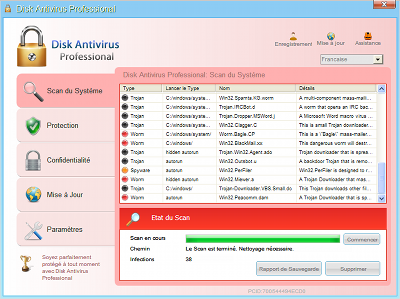
disk Antivirus Professional

disk-antiviruspro-download-tool

Our Guide below includes a step by step guide showing you how to remove Disk Antivirus Professional.

We have also located a serial that may help with you registering the program to make it easier to remove:  Try the serial AA39754E-715219CE. May not work for every one.

Automatic Disk Antivirus Professional Removal
Online Disk Antivirus Professional Removal Service

computer repair

Disk Antivirus Professional Manual Removal Procedures

The first thing you need to focus on is stopping the main executable file. This is a single .exe file you need to stop and then delete.

The virus name is like the below (See Video for Guidance)

  • [random].exe ( Example is lg583d.exe ) Your file trace will be named different.

Some Tips on Locating the file.

A. Browse to the file location shown below under File Locations and re-name the file first and then restart your computer. Then browse to that file location again and delete the file. You can not delete a file while it is in use.

B.  Boot into Safe Mode and delete the file. Again look at the file path below. You can also boot into “safe mode with networking” and download Spyware Doctor with Antivirus. You will be able to install it and run the virus scan. Learn how to boot into safe mode here

C: Log-into another users account and see if you can delete the file. Again use the File Locations below to locate the file

E:  Start the Task Manager the very second you login and terminate the process that way.

File Locations

Take note that the below file locations contain hidden files and folders. For instance the AppData folder is a hidden folder. In order to view these folders you will need to show hidden files and folders. Learn how to at http://www.removevirus.org/show-hidden-files-and-folders

Windows XP:

  • C:\Documents and Settings\USER NAME\Local Settings\Application Data

Windows Vista/7:

  • C:\Users\USER NAME\AppData\Local
  • New Path C:\ProgramData\[random characters]\[random characters].exe

Once you have deleted the above executable, you need to run a full virus scan. We recommend you use Spyware Doctor with Antivirus because it will pick up any left over traces.

If you can’t seem to delete this virus you can hire a professional to help. We recommend www.pcninja.com

disk-antiviruspro-download-tool

Conclusion

Like other malware clients, you just have to kill off that 1 single file and then you can use your computer again normally. It’s getting to that file and stopping it that can be hard. The above guide has worked time and time again and should work well for you. If you need advanced help use http://www.pcninja.com and they can remove the virus for you. We do recommend Spyware Doctor with Antivirus to help remove this threat or for use after you manually remove the virus as it’s a very solid antivirus client and works great.

Filed Under: Virus Removal Tagged With: delete Disk Antivirus Professional, Disk Antivirus Professional, Disk Antivirus Professional virus, how to remove Disk Antivirus Professional, remove Disk Antivirus Professional

Latest Articles

Inkjet Paper and Ink

The ink used in inkjet technology is water-based, which poses certain problems. The results from some of the early inkjet printers were prone to smudging and running, but since then there have been enormous improvements in ink chemistry. … [Read More...]

5 Wonderful Online Business Ideas to Test Out in 2021

Are you wondering how you can create a successful online business? More and more often, entrepreneurs are looking for answers. We wanted to share some of the best business ideas in 2021 that are suitable for almost everyone, and some of them can be implemented without investment. You can find a few … [Read More...]

The Benefits of Using Stablecoins

A stablecoin is a type of cryptocurrency with a fixed value. The value shouldn’t frequently fluctuate, which is often the case with typical crypto assets. This fixed value frequently ties to the U.S. dollar, but other currencies can fix different price indices. In some instances, Stablecoins can be … [Read More...]

Comments

  1. Jason says

    March 28, 2013 at 9:42 pm

    Great guide. worked for me to remove disk antivirus professional

  2. Mr. N says

    July 18, 2013 at 5:08 pm

    What of the computer won’t start at all but shows (for example) the FBI page demanding money to unlock?

Why Internet Bundles Are the Next Battleground for Gamers

A weak internet connection can turn seamless gaming sessions into frustrating experiences filled with lag, buffering or sudden disconnects. For … [Read More...]

Importance of Inbound Marketing in the Digital Age

A couple of months ago, Zacks reported that Hubspot was starting to make some major changes to its inbound marketing strategy. They talk a lot about … [Read More...]

Damage Control Strategies for Resolving Online PR Crises

Last July, Astrologer faced a major crisis after its CEO went viral at a ColdPlay concert when having an affair. This was just one of the many times a … [Read More...]

AI is Not Killing Computer Jobs Like Doomers Projected

There is no denying the reality that AI technology has played a massive role in disrupting our lives. A growing number of people claim that AI … [Read More...]

Everything You Need to Know About Sourcing Circuit Boards From U.S. Suppliers

In This Article This article includes: Why Source PCBs From the United States?How to Get a Quote From a U.S.-Based PCB ManufacturerThe Top U.S. … [Read More...]

Top Taplio Alternatives in 2025 : Why MagicPost Leads for LinkedIn Posting ?

LinkedIn has become a strong platform for professionals, creators, and businesses to establish authority, grow networks, and elicit engagement. Simple … [Read More...]

Guides

  • Computer Communications
  • Mobile Computing
  • PC Components
  • PC Data Storage
  • PC Input-Output
  • PC Multimedia
  • Processors (CPUs)

Recent Posts

Inspiring FAQ Page Examples for Your Local Business

The FAQ (Frequently Asked Questions) section allows customers to find answers to questions on their own without the need to come up with a request and … [Read More...]

Hard Disk Capacity

Since its advent in 1955, the magnetic recording industry has constantly and dramatically increased the performance and … [Read More...]

The Wonderfully Disruptive Role of Machine Learning in Agriculture

Towards Data Science author Oleksii Kharkovyna wrote an article about the evolving role of machine learning in agriculture. Kharkovyna referred to … [Read More...]

[footer_backtotop]

Copyright © 2026 About | Privacy | Contact Information | Wrtie For Us | Disclaimer | Copyright License | Authors