pctechguide.com

  • Home
  • Guides
  • Tutorials
  • Articles
  • Reviews
  • Glossary
  • Contact

GardeningEnthusiast Toolbar Removal

The GardeningEnthusiast toolbar is another product that is advertised as a helpful addition to your browsing experience when it is really nothing more than software you should remove as soon as possible. It is touted as a toolbar that will provide you with a lot of useful gardening tips. That is the hook to get you to install it. But, in truth, it can cause extreme PC slow down and invite other malicious software into your computer. If you have willingly installed this toolbar, or have noticed it in your browser then you should make every effort to remove it as soon as possible.

Most of the time this toolbar is installed because it is bundled with other software. Some people do download and install it willingly, but a vast majority install it without even knowing until it is too late. This is a quite common technique of spreading dubious software. It is a good idea to avoid installing software from third party websites if you can avoid it. But, if you must install software choose to install it manually rather than automatically. Then you can see all the options available during the install process. Hopefully this will allow you to pick and choose what you want to install and you will be given the opportunity to skip the installation of this unwanted software.

The GardeningEnthusiast toolbar will make subtle changes to the settings in your web browser. It will change the default home page and search engine. Plus it will install a toolbar at the top of your browser. Furthermore, search results are presented on a third party website which is highly suspicious.

The removal process of Gardening Enthusiast is not too difficult. You can do it manually with the steps listed below. However, if you would like a more automated approach to removing the software you can use a tool like SpyHunter to help you remove it more easily. You can download it using the link below.

 

Uninstall Gardening Enthusiast from Windows.

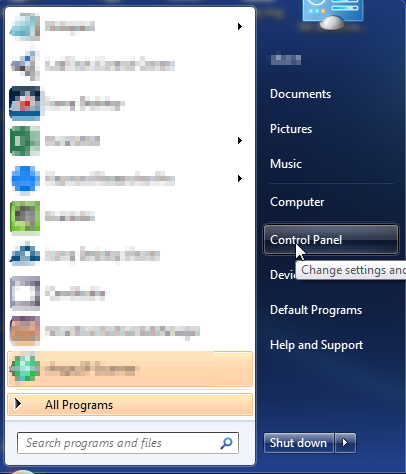
  1. Open up control panel by clicking on the start button in the lower left corner of your computer, and then going to Control Panel
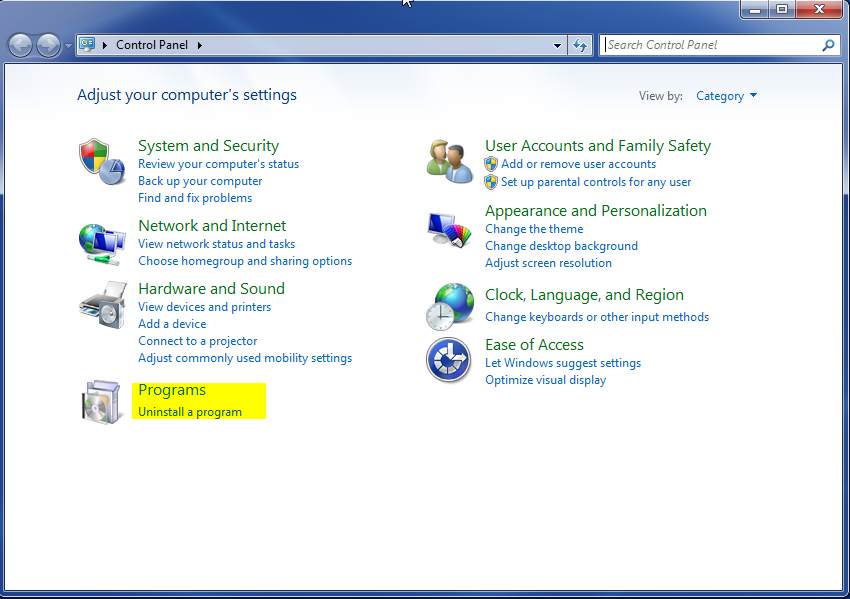
  1. Once, you are in Control Panel, go to the link labeled “Uninstall a Program”. If your computer does not look like the view below, you may have to sort by categories at the top right.
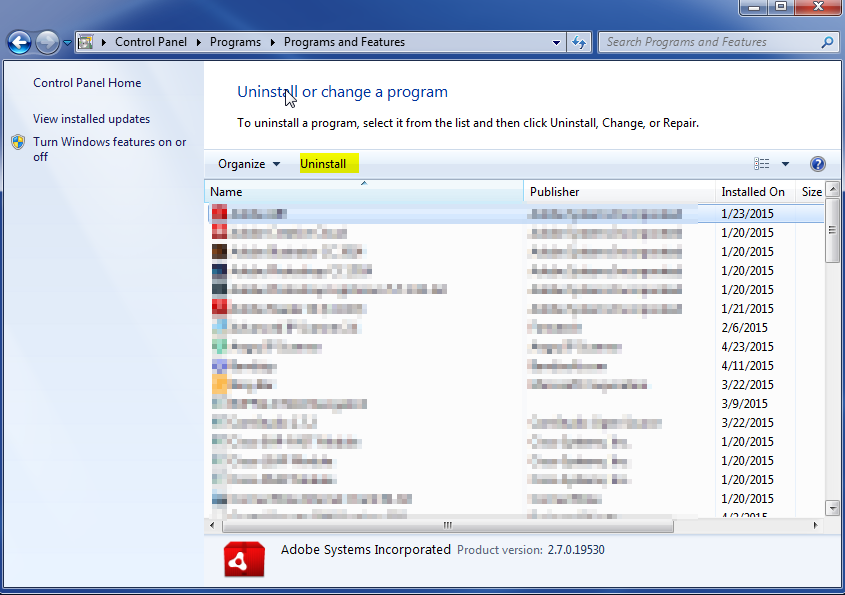
  1. Once in the uninstall programs section, look for the offending program. You can scroll by date installed to find programs that were installed recently. This may be a clue as to what the offending program is. Once you have found the program, highlight it and select “Uninstall” to remove
 

Once you have done this, you will need to go into your browser and set it to its default settings to remove the other changes it made. You will also want to scan your computer to make sure no new issues were introduced by the vulnerability. A good tool to use for this is MalwareBytes. If you already have a virus scanner, you should run this as well.

Filed Under: Virus Removal

Latest Articles

Managing and Operating a Dedicated Server Over the Internet Using Online Control Panels

Operation and management of a dedicated server over the Internet can be achieved in several ways. Most straightforwardly, you can use control panels, provided by your hosting company, which give you easy to use interfaces for controlling the hardware and also completing common tasks on your server … [Read More...]

WiFi Access

In the early 2000s, the momentum gained by IEEE 802.11b in the wake of the surge in home networking so as to allow the sharing of broadband Internet connections saw the technology migrate from the home to outdoors. The WLAN configuration was the same - an Access Point (AP) transceiver connected to a … [Read More...]

Fight the Search Protect Invasion by Conduit

When it comes of web surfing, browser extension is believed to have malicious characteristics. Many users observed this to be true these past years where several adware is masked as legitimate browser and one of them is the Search Protect by Conduit. Once Search Protect is installed in your … [Read More...]

Why Internet Bundles Are the Next Battleground for Gamers

A weak internet connection can turn seamless gaming sessions into frustrating experiences filled with lag, buffering or sudden disconnects. For … [Read More...]

Importance of Inbound Marketing in the Digital Age

A couple of months ago, Zacks reported that Hubspot was starting to make some major changes to its inbound marketing strategy. They talk a lot about … [Read More...]

Damage Control Strategies for Resolving Online PR Crises

Last July, Astrologer faced a major crisis after its CEO went viral at a ColdPlay concert when having an affair. This was just one of the many times a … [Read More...]

AI is Not Killing Computer Jobs Like Doomers Projected

There is no denying the reality that AI technology has played a massive role in disrupting our lives. A growing number of people claim that AI … [Read More...]

Everything You Need to Know About Sourcing Circuit Boards From U.S. Suppliers

In This Article This article includes: Why Source PCBs From the United States?How to Get a Quote From a U.S.-Based PCB ManufacturerThe Top U.S. … [Read More...]

Top Taplio Alternatives in 2025 : Why MagicPost Leads for LinkedIn Posting ?

LinkedIn has become a strong platform for professionals, creators, and businesses to establish authority, grow networks, and elicit engagement. Simple … [Read More...]

Guides

  • Computer Communications
  • Mobile Computing
  • PC Components
  • PC Data Storage
  • PC Input-Output
  • PC Multimedia
  • Processors (CPUs)

Recent Posts

20 Cool Pictures of Silicon Valley You’re Sure to Love

Silicon Valley, a name synonymous with innovation and technological prowess, is a place where dreams and ideas come to life. Nestled in the heart of … [Read More...]

The Unwanted Isearch Omiga, Browser Hijacker

Known to be one of the browser hijacker, isearch omiga has no value to you except it was built for marketing tool at your expense. It has the same … [Read More...]

Holographic Data Storage

In late 1995 a joint university/industry/government consortium initiated the Holographic Data Storage System (HDSS) … [Read More...]

[footer_backtotop]

Copyright © 2026 About | Privacy | Contact Information | Wrtie For Us | Disclaimer | Copyright License | Authors