pctechguide.com

  • Home
  • Guides
  • Tutorials
  • Articles
  • Reviews
  • Glossary
  • Contact

Avasoft Antivirus Professional Removal

Avasoft Antivirus Professional is a malware client that attempts to extort money from it’s victims. This computer virus comes from a long family of malware clients including Disk Antivirus Professional, System Progressive Protection, Live Security Platinum, Smart Fortress 2012, Smart Protection 2012, Personal Shield Pro.

Manual Removal is not recommended as it may cause severe system damage. The simplest way to remove Avasoft Antivirus Professional is to use this Avasoft Antivirus Professional Removal Tool.

download_body


What Damage Is Avasoft Antivirus Professional Doing?

This malware client will block the install of most newer programs and limit what computer programs can run on the system. The software is basically trying to limit the use of your computer so you are forced into paying for the false security software. This is normal for fake antivirus programs such as Avasoft Antivirus Professional.

Avasoft Antivirus Professional
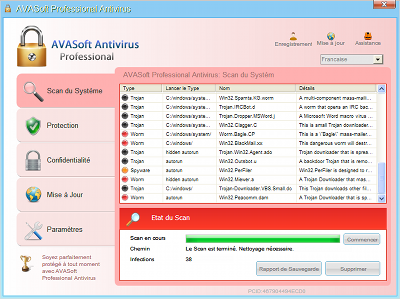
avasoft-antivirus-professional

ยป Download Avasoft Antivirus Professional Removal Tool

Automatic Avasoft Antivirus Professional Removal
Online Avasoft Antivirus Professional Removal Service

computer repair

Avasoft Antivirus Professional Manual Removal Procedures

We do not recommend manual removal but you can still do it.

To start you need to kill off the main program that is “Avasoft Antivirus Professional”. The exact location and name of the file constantly changes and yours won’t be the exact same as the traces we show. However it should give you a good indication of what to look for. We also list several ways of searching for the virus threat.

  • [random].exe ( Example is 6CB34JGG0G4095TUGJ30K30R943RKJF55K4.EXE ) Your file trace will be named different. Every infection will have a different name. However the file tends to hide in the same location

Some Tips on Locating the file.

Known File Paths. To view these file paths you will need to either manually type them in or show hidden files and folders. Learn how to at http://www.removevirus.org/show-hidden-files-and-folders

Windows XP:

  • C:\Documents and Settings\USER NAME\Local Settings\Application Data

Windows Vista/ Windows 7/ Windows 8:

  • c:\ProgramData\6CB34JGG0G4095TUGJ30K30R943RKJF55K4.EXE
  • c:\ProgramData\6CB34JGG0G4095TUGJ30K30R943RKJF55K4.ICO
  • c:\ProgramData\6CB34JGG0G4095TUGJ30K30R943RKJF55K4

A. Browse to the file location shown above under File Locations and re-name the file first and then restart your computer. Then browse to that file location again and delete the file. You can not delete a file while it is in use.

While you may not know the exact name of the file here are a few tips to locate it.

A1. The file will not be named something that makes sense, it will be jumbled like 6CB34JGG0G4095TUGJ30K30R943RKJF55K4.EXE

A2. You can sort the file by date in the folder and see which ones have been installed in the last few days. In most cases you will only have 1-3 files that match the time of your infection. From there it should be easy to see which one is the one you need to re-name.

B. Boot into Safe Mode with networking and download an Antivirus client and run a full scan. We like Spyware Doctor with Antivirus.

You will be able to install it and run the virus scan. Learn how to boot into safe mode here

C: Log-into another users account and see if you can delete the file. Again use the File Locations below to locate the file

D: Start the Task Manager the very second you login and terminate the process that way.

After you have killed off the file you have to run a full virus scan. We already mentioned which AV client we like to use. You can use another if you like. Just be sure to run a full scan. This is to ensure you have everything and no other threats are present on the computer.

As mentioned already, we also like http://www.pcninja.com. This computer repair company can remote into your PC and fully remove all virus threats found on the system. They do a great job and based in California.

Download Avasoft Antivirus Professional Removal Tool

Filed Under: Virus Removal Tagged With: Avasoft Antivirus Professional, Avasoft Antivirus Professional removal, Avasoft Antivirus Professional virus, delete Avasoft Antivirus Professional, how to remove Avasoft Antivirus Professional, remove Avasoft Antivirus Professional

Latest Articles

What Tools Do You Need to be Successful in Sales in 2024?

Digital technology has led to major changes in the sales industry. Last year, salespeople around the world spent over $36 billion on software and online tools that help them optimize their sales strategies. That figure is growing by 16% a year and will be worth over $104 billion in the next six … [Read More...]

Drive Installation Terminology

A drive bay is an area within a PC's system case designed to accommodate drive devices, such as a hard disk drive, floppy drive, CD-ROM drive, tape drive etc. There are two types, external and internal, the former allowing a drive to be accessed from the exterior, the latter requiring that the … [Read More...]

What is CCD in the Context of Digital Cameras?

The CCD is the technology at the heart of most digital cameras, and replaces both the shutter and film found in conventional cameras. Its origins lie in 1960s, when the hunt was on for inexpensive, mass-producible memory solutions. Its eventual … [Read More...]

Why Internet Bundles Are the Next Battleground for Gamers

A weak internet connection can turn seamless gaming sessions into frustrating experiences filled with lag, buffering or sudden disconnects. For … [Read More...]

Importance of Inbound Marketing in the Digital Age

A couple of months ago, Zacks reported that Hubspot was starting to make some major changes to its inbound marketing strategy. They talk a lot about … [Read More...]

Damage Control Strategies for Resolving Online PR Crises

Last July, Astrologer faced a major crisis after its CEO went viral at a ColdPlay concert when having an affair. This was just one of the many times a … [Read More...]

AI is Not Killing Computer Jobs Like Doomers Projected

There is no denying the reality that AI technology has played a massive role in disrupting our lives. A growing number of people claim that AI … [Read More...]

Everything You Need to Know About Sourcing Circuit Boards From U.S. Suppliers

In This Article This article includes: Why Source PCBs From the United States?How to Get a Quote From a U.S.-Based PCB ManufacturerThe Top U.S. … [Read More...]

Top Taplio Alternatives in 2025 : Why MagicPost Leads for LinkedIn Posting ?

LinkedIn has become a strong platform for professionals, creators, and businesses to establish authority, grow networks, and elicit engagement. Simple … [Read More...]

Guides

  • Computer Communications
  • Mobile Computing
  • PC Components
  • PC Data Storage
  • PC Input-Output
  • PC Multimedia
  • Processors (CPUs)

Recent Posts

Apple’s first computer is for sale on eBay and here’s its price

Apple recently made one of its biggest announcements since the unfortunate passing of Steve Jobs. The company is about to sell its first computer ever … [Read More...]

Stellar Phoenix Photo Recovery Review

Stellar Photo Recovery Stellar Photo Recovery basically covers it all, for photos and media options, that is. This product, like the title says, is … [Read More...]

VCR to DVD – Video Digitisation and Compression Codecs

The transfer of a video cassette recording to DVD involves the capture and digitisation of the analogue video, editing the digitised video as … [Read More...]

[footer_backtotop]

Copyright © 2026 About | Privacy | Contact Information | Wrtie For Us | Disclaimer | Copyright License | Authors