pctechguide.com

  • Home
  • Guides
  • Tutorials
  • Articles
  • Reviews
  • Glossary
  • Contact

Optical Mice

Early optical mice used an infrared LED to detect the movement the mouse pad, rather relying on the traction between the mouse ball and the rollers. While this type of mouse was more accurate than an optical mechanical mouse, and avoided the maintenance problems associated with the moving parts of an optical mechanical mouse, it did have its drawbacks. The most obvious one was reliance on a special grid-patterned mouse pad. Another was that performance could be compromised by bright lights.

As computing power grew cheaper, it became possible to embed more powerful special-purpose image processing chips in the mouse. This advance enabled the mouse to detect relative motion on a wide variety of surfaces, translating the movement of the mouse into the movement of the pointer, eliminating the need for a special mouse pad. This advance paved the way for widespread adoption of optical mice.

1999 saw the introduction of the most radical mouse design advancement since its first appearance way back in 1968 with the introduction of Microsoft’s revolutionary Intellieye technology, which was completely dependent on optical navigation technology and capable to working on virtually any surface. Gone were the mouse ball and other moving parts inside the mouse used to track the mouse’s mechanical movement, replaced by a tiny CMOS optical sensor – the same chip used in digital cameras – and an on-board digital signal processor (DSP).
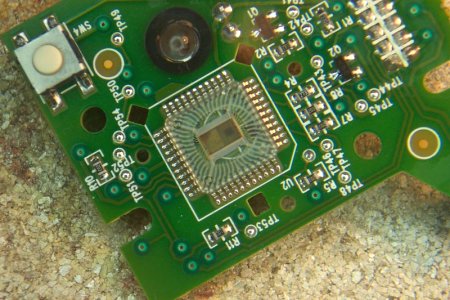
IntelliEye

In optical mice a LED illuminates the surface underneath the mouse. The light from the LED reflects off microscopic textural features in the area of traverse, a plastic lens collecting the reflected light and forming images on a sensor. The original Microsoft IntelliMouse Explorer was capable of capturing 1,500 images a second. Executing of the order of 18 million MIPS, a DSP identifies and compares texture or other features in captured images to determine the mouse’s motion and translates this into X and Y co-ordinates to indicate on-screen pointer movements.

The technique, called image correlation processing, results in smoother, more precise pointer movement. Moreover, the absence of moving parts means the mouse’s traditional enemies – such as food crumbs, dust and grime – are all but completely avoided. Optical mice work on nearly any surface, such as wood, paper, and cloth – although they do have some difficulty with reflective surfaces, such as CD jewel cases, mirrors and glass.

A year after Microsoft’s launch of the IntelliMouse Explorer, rival Logitech followed suit with the release of its first optical mouse, the Logitech Optical MouseMan Wheel. By 2001, Microsoft had further developed its IntelliEye technology, managing to increase its image capture rate fourfold, to a staggering 6,000 images a second.

  • Keyboards
  • Ergonomic Keyboards
  • Opto-Mechanical mice
  • Optical Mice
  • Cordless Input Devices
  • Laser Mice
  • Trackballs
  • Joysticks
  • Input Device Interfaces
  • Touchscreens

Filed Under: Input Devices

Latest Articles

New Technology Trends for the New Year (Part 2)

We recently published an article on three major technology trends to expect in 2020. We wanted to share some more in this piece. Hyperautomation: the revolution of the machines We are talking about the implementation of Artificial Intelligence (AI) in automation, that is to say, that the … [Read More...]

Why You Need to Regularly Defragment Your Hard Drive

Your computer's hard disk of is one of the most vital parts of your machine. It needs to operate reliably and quickly for your computer to function well. For this to happen, we need to routinely perform some fundamental maintenance. Hard disk defragmentation is frequently performed by computer … [Read More...]

RAID tutorial – installing the drivers

Now is the time to use the previously prepared floppy disk containing the RAID Controller driver software. Proceed as follows: Press F6 when invited to do so, to ...... install third party SCSI or RAID driver. Press S when invited to do so, to specify additional SCSI adapters, CD-ROM drives, … [Read More...]

Why Internet Bundles Are the Next Battleground for Gamers

A weak internet connection can turn seamless gaming sessions into frustrating experiences filled with lag, buffering or sudden disconnects. For … [Read More...]

Importance of Inbound Marketing in the Digital Age

A couple of months ago, Zacks reported that Hubspot was starting to make some major changes to its inbound marketing strategy. They talk a lot about … [Read More...]

Damage Control Strategies for Resolving Online PR Crises

Last July, Astrologer faced a major crisis after its CEO went viral at a ColdPlay concert when having an affair. This was just one of the many times a … [Read More...]

AI is Not Killing Computer Jobs Like Doomers Projected

There is no denying the reality that AI technology has played a massive role in disrupting our lives. A growing number of people claim that AI … [Read More...]

Everything You Need to Know About Sourcing Circuit Boards From U.S. Suppliers

In This Article This article includes: Why Source PCBs From the United States?How to Get a Quote From a U.S.-Based PCB ManufacturerThe Top U.S. … [Read More...]

Top Taplio Alternatives in 2025 : Why MagicPost Leads for LinkedIn Posting ?

LinkedIn has become a strong platform for professionals, creators, and businesses to establish authority, grow networks, and elicit engagement. Simple … [Read More...]

Guides

  • Computer Communications
  • Mobile Computing
  • PC Components
  • PC Data Storage
  • PC Input-Output
  • PC Multimedia
  • Processors (CPUs)

Recent Posts

8 Great Budget-Friendly Ways for Growing Your YouTube Subscribers Count

If you are serious about creating independent video content, you probably have a YouTube account set up. And why not? YouTube is one of the most … [Read More...]

Mophie Powerstation Plus – More Innovated With Better Charging Mileage

You probably heard about Mophie, the company that makes some of the world’s most reliable juice packs, charging docks and battery power stations. … [Read More...]

Utilizing the Where Command with Ruby

We recently covered an article on the major benefits of Ruby on Rails. You may want to read a little bit more about it if you are still trying to get … [Read More...]

[footer_backtotop]

Copyright © 2026 About | Privacy | Contact Information | Wrtie For Us | Disclaimer | Copyright License | Authors