IDE connectors, like floppy drive and other connectors, are keyed to ensure proper connection.
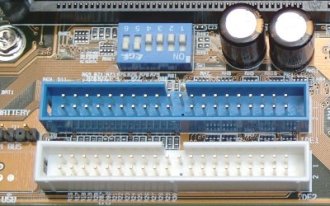
Connect your IDE devices to the motherboard IDE connectors, taking care to assign these to give optimal performance for your particular system configuration.
Although a single IDE channel can handle two connected devices, it’s important to understand that these share the channel, which can only process a single request at a time. This means that when one device is active, the other is, by definition, inactive. In the event of two requests being made simultaneously, an IDE controller will give precedence to that made by the primary device. Furthermore, the chipset on some older systems will not support independent timing, with the result that both devices connected to an IDE channel will run at the speed of the slowest.
These factors need to be taken into account in determining which configuration of multiple IDE/ATA devices will maximise your overall system performance.
The most common 4-drive scenario is:
- hard drive 1
- hard drive 2
- CD-ROM drive
- CD-(Re)Writer drive
The first hard disk drive should always be configured as the primary master.
In the past, the conventional wisdom was that the way to minimise making coasters was to have the CD-ROM and CD-Writers on different channels, and to configure the CD-ROM drive as a master. For older systems this may still be an important consideration. However, it’s less relevant for more modern systems, and especially those that include a CD-Writer that supports one of the several technologies now available for avoiding buffer underruns.
On the assumption that the hard drives are likely to be the fastest devices, perhaps a more appropriate rule is to allocate these as the primary devices on each of the IDE channels unless you have a dual-boot system, in which case they should be configured as master and slave on the primary channel.
The bottom line is that there’s no one single configuration that is optimal for everyone. You simply need to figure out what arrangement will work best for you, and perhaps refine this by trial and error. In truth, the more modern your system, the less likely is that the way in which you configure your IDE channels will make an appreciable difference to performance.
Here we’ve used rounded IDE cables. These have been around for a few years and have found favour with the PC modding community because they look a lot better than conventional ribbon cables. They won’t improve the performance of your system, but they may well allow it to run cooler as a result of improved airflow around your system. They’re much easier to install than regular ribbon cables, bending and twisting more freely and being easier to fasten down with cable ties.
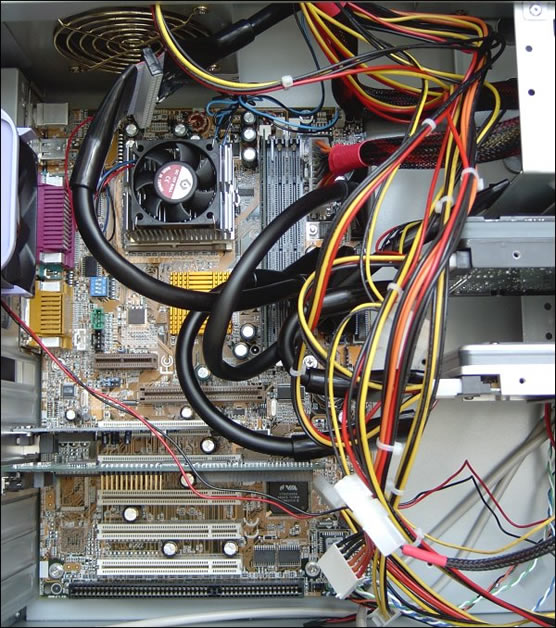
With everything now fully connected it’s time to power the system up, fine-tune the BIOS settings and find out if we still have a working system!
While rounded IDE cables’ appeal is more to do with cosmetics and ease of use, Serial ATA – which began to ship is mid-2002 and is becoming increasingly widely available – also has important performance ramifications.
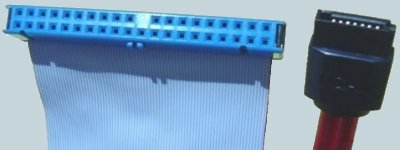
Serial ATA’s primary benefits over Parallel ATA include:
- Reductions in voltage and pin count: Serial ATA’s low-voltage requirement (500mV peak-to-peak) will effectively alleviate the increasingly difficult-to-accommodate 5-volt signalling requirement that hampers the current Parallel ATA interface.
- Smaller, easier-to-route cables: Elimination of the cable-length limitation: The Serial ATA architecture replaces the wide Parallel ATA ribbon cable with a thin, flexible cable that can be up to 1 meter in length. The serial cable is smaller and easier to route inside a PC’s chassis and eliminates the need for the large and cumbersome 40-pin connectors required by Parallel ATA. The small-diameter cable also helps improve air flow inside the PC system chassis and will facilitate future designs of smaller PC systems.
- Improved data robustness: Serial ATA will offer more thorough error checking and error correcting capabilities than are currently available with Parallel ATA. The end-to-end integrity of transferred commands and data can be guaranteed across the serial bus.
- Motherboard Upgrade Reasons
- Motherboard Removal
- Motherboard CPU
- Motherboard Heatsinks
- Motherboard Memory Identification
- Motherboard Memory Installation
- Motherboard Fit
- Motherboard Power
- Motherboard Panel
- Motherboard Fan
- Motherboard USB Ports
- Motherboard FireWire Ports
- Motherboard Audio
- Motherboard Testing
- Motherboard Floppy Connections
- Motherboard IDE Connections
- BIOS Settings
- Motherboards and Win98
- Motherboards and WinXP