pctechguide.com

  • Home
  • Guides
  • Tutorials
  • Articles
  • Reviews
  • Glossary
  • Contact

Startup Configuration

To start the System Configuration Utility, click Start and Run.
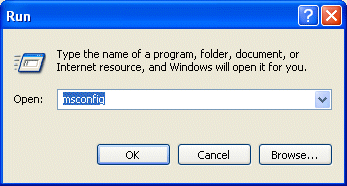
Msconfig

Type msconfig in the Open box and then click OK.

This opens the Microsoft Windows System Configuration Utility.
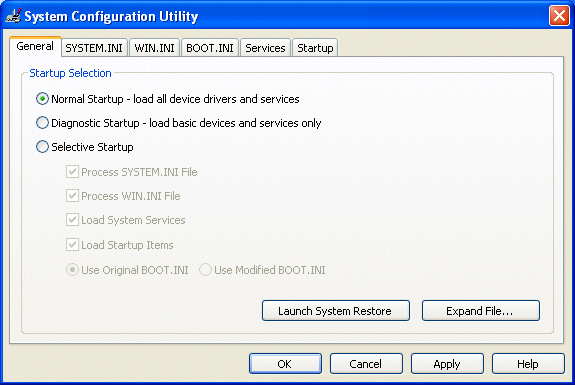
Normal

The System Configuration Utility allows you to easily reset or change the configuration settings in Windows to include preferences for the following files and settings:

  • the System.ini file
  • the Win.ini file
  • the Boot.ini file
  • programs that are set to load during the startup process (specified in the Startup folder and in the registry)
  • environment settings
  • international settings

To prevent any one of these items from loading when you restart the computer, use either of the following two methods:

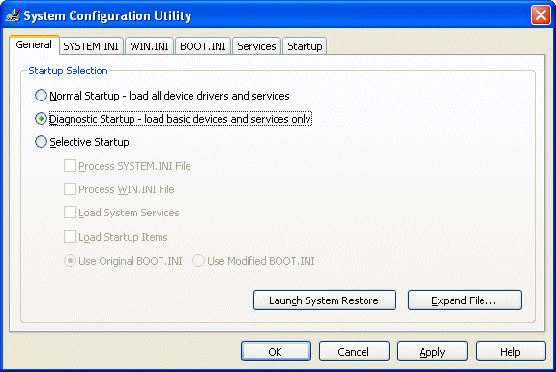
  1. Click the General tab, and then click Diagnostic Startup – load basic devices and services only. When you use this option, device drivers and software are loaded interactively when you restart the computer.
  2. Diagnostic

  3. Click the General tab, and then click Selective Startup. You can chose the files and the settings that you want the computer to load when you restart the computer.
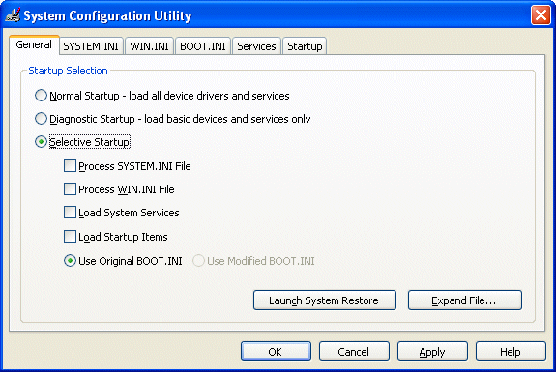
Selective

Selective Startup allows you to select any of the following options:

  • Process SYSTEM.INI File
  • Process WIN.INI file
  • Load System Services
  • Load Startup Items

Note, you cannot clear the Use Original BOOT.INI check box.

Generally, the way to troubleshoot a problem where there is no evidence to indicate it’s likely source, is to begin with a clean environment – and one in which the problem under investigation does not occur – and to progressively add items one at a time, restarting the computer with each incrementally modified configuration, until the problem is reproduced.

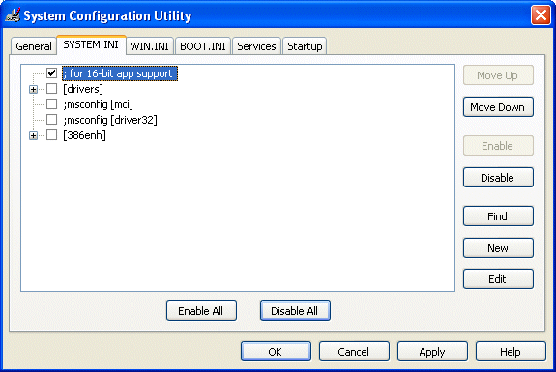
So, for each of the SYSTEM.INI and WIN.INI tabs, you’ll likely start by clicking Disable All, and proceed by adding items one at a time, using the Move Up or Move Down to move between entries.

Click on Apply then Close and restart your PC for the changes to take effect.
System.ini

At a more advanced stage in the diagnosis process, you may want to edit a suspected entry by selecting it and clicking Edit.

Once the problem reappears, the finger of suspicion will be firmly pointed at the last entry to have been added, and this is where further diagnostic efforts should be focused. At this point, the suspect entry may be edited by first selecting it and then clicking Edit. Alternatively, you may want to consider uninstalling the offending item of software.

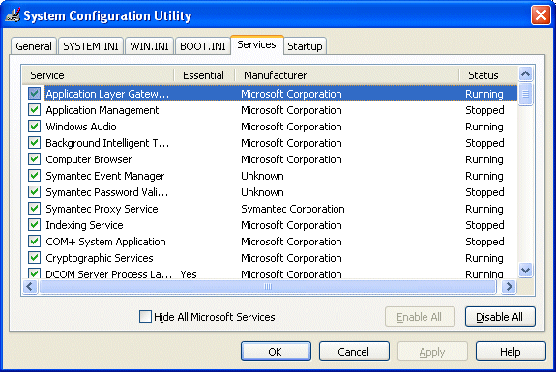
The same technique may then be employed wrt the Services tab.
Services

Note that de-selecting Load System Services will temporarily disable Microsoft services (such as, Networking, Plug and Play, Event Logging, and Error Reporting) as well as permanently deleting all restore points for the System Restore utility. You should not, therefore do this if you either want to retain your restore points for System Restore or if you’re likely to need to use a Microsoft service to further investigate the problem you’re having.

  • Startup Configuration
  • Windows XP Startup Applications

Filed Under: How to Troubleshoot Startup Problems

Latest Articles

Understanding the Basics of IoT Interfaces

The Internet of Things is one of the biggest developments over the last few years. It was a concept I had not even heard of until 2013, even though I have an engineering degree. But it has made a huge impression on the digital technology industry recently. One study shows that the IoT market will be … [Read More...]

GPS Technology

The Global Positioning System (GPS), is a constellation of 24 satellites - three of which are backup satellites - which orbit the Earth twice a day at an altitude of about 12,000 miles. Twenty-four hours a day, these satellites continuously broadcast high-frequency radio signals containing position … [Read More...]

Celeron D

Intel's competitiveness in the value chip arena was given a considerable boost in mid-2004, with the Celeron's transition to the company's 90nm Prescott core. As though in recognition of the fact, the new processors were marketed under the … [Read More...]

Why Internet Bundles Are the Next Battleground for Gamers

A weak internet connection can turn seamless gaming sessions into frustrating experiences filled with lag, buffering or sudden disconnects. For … [Read More...]

Importance of Inbound Marketing in the Digital Age

A couple of months ago, Zacks reported that Hubspot was starting to make some major changes to its inbound marketing strategy. They talk a lot about … [Read More...]

Damage Control Strategies for Resolving Online PR Crises

Last July, Astrologer faced a major crisis after its CEO went viral at a ColdPlay concert when having an affair. This was just one of the many times a … [Read More...]

AI is Not Killing Computer Jobs Like Doomers Projected

There is no denying the reality that AI technology has played a massive role in disrupting our lives. A growing number of people claim that AI … [Read More...]

Everything You Need to Know About Sourcing Circuit Boards From U.S. Suppliers

In This Article This article includes: Why Source PCBs From the United States?How to Get a Quote From a U.S.-Based PCB ManufacturerThe Top U.S. … [Read More...]

Top Taplio Alternatives in 2025 : Why MagicPost Leads for LinkedIn Posting ?

LinkedIn has become a strong platform for professionals, creators, and businesses to establish authority, grow networks, and elicit engagement. Simple … [Read More...]

Guides

  • Computer Communications
  • Mobile Computing
  • PC Components
  • PC Data Storage
  • PC Input-Output
  • PC Multimedia
  • Processors (CPUs)

Recent Posts

P2P Networking

By early 2000 a revolution was underway in an entirely new form of peer-to-peer computing. Sparked by the phenomenal success … [Read More...]

miniDVD

If SVCD can be viewed as format that seeks to combine the advantages of DVD quality with the cheapness of writable CD … [Read More...]

Unified Display Special Interest Group

The Unified Display Interface Special Interest Group (UDI SIG) was announced in December 2005, with a membership which includes Silicon … [Read More...]

[footer_backtotop]

Copyright © 2026 About | Privacy | Contact Information | Wrtie For Us | Disclaimer | Copyright License | Authors