pctechguide.com

  • Home
  • Guides
  • Tutorials
  • Articles
  • Reviews
  • Glossary
  • Contact

Hard Drive Maintenance Clean Up

The Disk Cleanup tool helps you free up space on your hard disk by searching your disk for files that you can safely delete. You can choose to delete some or all of:

  • temporary Internet files
  • downloaded program files, such as ActiveX controls and Java applets
  • the Recycle Bin
  • temporary Windows files
  • optional Windows components that you are not using
  • installed programs that you no longer use.

The following provides step-by-step instructions on how to use the Disk Cleanup tool under Windows XP.
Launch

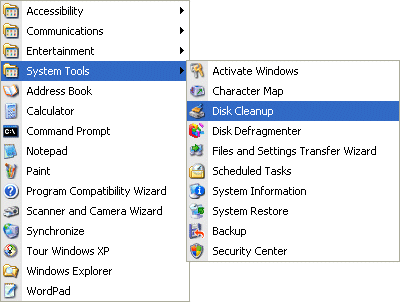
Launch Disk Cleanup via Start > All Programs > Accessories > System Tools.

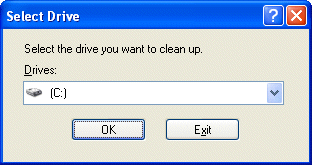
A dialogue window will appear enabling you to select the drive you want to clean up.
Select

Select the required drive and click OK.

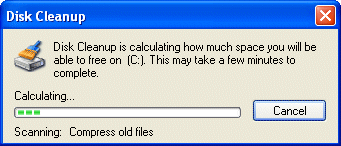
The specified drive is examined…
Scanning

… and the amount of space you can potentially free up calculated.

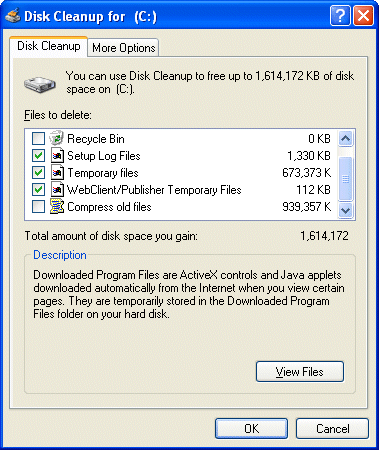
The results, showing the amount of space that can be recovered by deleting different areas and files, are then displayed on the Disk Cleanup tab.
Select

One of the options that isn’t checked by default is Compress old files. Checking this will result in files that haven’t been used for a while being archived. With this item selected in the list, click Options …
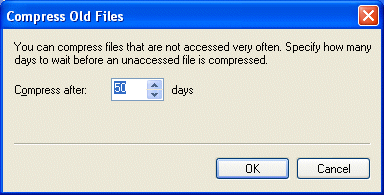
Compress

… to set a time limit for files to be compressed.

Check the boxes associated with the items you want to delete and click OK.
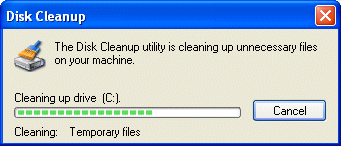
Cleaning

The utility cleans up the specified areas and files.

The More Options tab provides further scope for freeing up disk space.
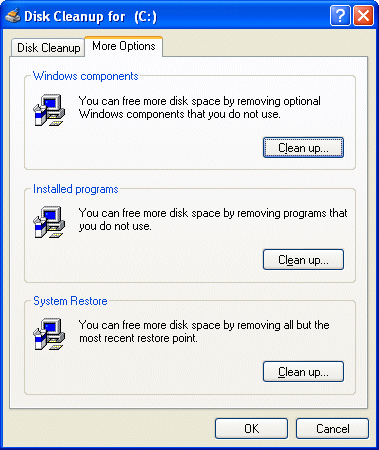
More

Microsoft Knowledge Base Article 253597 describes an alternative method for running the Disk Cleanup tool (Cleanmgr.exe), which allows the files you want to be addressed to be configured using command-line switches. Specified tasks can then be scheduled to run at a specific time via the Scheduled Tasks tool.

Relevant Microsoft Knowledge Base Articles

  • 310312: Description of the Disk Cleanup Tool in Windows XP
  • 315246: How to Automate the Disk Cleanup Tool in Windows XP
  • 253597: Automating Disk Cleanup Tool in Windows
  • 823302: The Disk Cleanup Tool Stops Responding
  • 812248: Disk Cleanup Tool Stops Responding While Compressing Old Files
  • 188099: Clicking View Files in Disk Cleanup Tool Does Not Display Files
  • 812248: Disk Cleanup Tool Stops Responding While Compressing Old Files
  • 188112: Free Disk Space Does Not Change After Running Disk Cleanup
  • 261897: Disk Cleanup Tool May Not Delete Temporary File
  • Hard Drive Maintenance Clean Up
  • Hard Disk Maintenance – Error Checking using Windows XP ScanDisk tools
  • Defragmenting the Hard Drive with Windows XP

Filed Under: How to Maintain Your Hard Disk Drive

Latest Articles

How to Lock Your Mac and Make it Secure

PC security is a topic that many of us do not think about. And, many Mac users believe that their PC is invincible when it comes to security. The truth is that if you do not properly lock your computer up when it is not in use then you are leaving your files open to people to do what they will with … [Read More...]

System Mechanic Pro Review

System Mechanic Pro Review

PROS: Windows software utility to keep the PC operating optimally. Additional products included to assist with maintaining performance include anti virus and spyware, Drive Scrubber 3, System Shield 4 and Search and Recover 5. Solid registry cleaning program. CONS: Comprehensive system tune up … [Read More...]

SCSI Internal Configuration

Before mounting the device, you'll need to configure it via the jumper switch located on the rear of the drive. SCSI ID setting: The three leftmost jumpers are used to configure the drive's SCSI ID number. This can be assigned a value of 0 through 7. Usually, 7 is reserved for the … [Read More...]

Comments

  1. maryooma says

    December 6, 2011 at 5:22 pm

    thanks very much

  2. maryooma says

    December 6, 2011 at 5:22 pm

    thanks very much

Why Internet Bundles Are the Next Battleground for Gamers

A weak internet connection can turn seamless gaming sessions into frustrating experiences filled with lag, buffering or sudden disconnects. For … [Read More...]

Importance of Inbound Marketing in the Digital Age

A couple of months ago, Zacks reported that Hubspot was starting to make some major changes to its inbound marketing strategy. They talk a lot about … [Read More...]

Damage Control Strategies for Resolving Online PR Crises

Last July, Astrologer faced a major crisis after its CEO went viral at a ColdPlay concert when having an affair. This was just one of the many times a … [Read More...]

AI is Not Killing Computer Jobs Like Doomers Projected

There is no denying the reality that AI technology has played a massive role in disrupting our lives. A growing number of people claim that AI … [Read More...]

Everything You Need to Know About Sourcing Circuit Boards From U.S. Suppliers

In This Article This article includes: Why Source PCBs From the United States?How to Get a Quote From a U.S.-Based PCB ManufacturerThe Top U.S. … [Read More...]

Top Taplio Alternatives in 2025 : Why MagicPost Leads for LinkedIn Posting ?

LinkedIn has become a strong platform for professionals, creators, and businesses to establish authority, grow networks, and elicit engagement. Simple … [Read More...]

Guides

  • Computer Communications
  • Mobile Computing
  • PC Components
  • PC Data Storage
  • PC Input-Output
  • PC Multimedia
  • Processors (CPUs)

Recent Posts

Hard Disk AV Capability

Audio-visual applications require different performance characteristics than are required of a hard disk drive used for … [Read More...]

Remove FunCustomCreations Toolbar

The FunCustomCreations is another toolbar that can cause problems on your PC and it should be removed as soon as you are aware of it being on the … [Read More...]

Top 4 Free Online Design Tools that Use Machine Learning

A few months ago, we told you about a series of free online image editing tools. In practice, these are simple alternatives to Adobe Photoshop that … [Read More...]

[footer_backtotop]

Copyright © 2026 About | Privacy | Contact Information | Wrtie For Us | Disclaimer | Copyright License | Authors