pctechguide.com

  • Home
  • Guides
  • Tutorials
  • Articles
  • Reviews
  • Glossary
  • Contact

Floppy Installation Connection

A floppy disk drive’s connectors are at the back of the unit.

Controller connector:
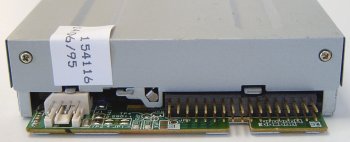
Floppy

The floppy drive connector looks similar to a 40-pin IDE connector, but is a little smaller with a pin count of 34.
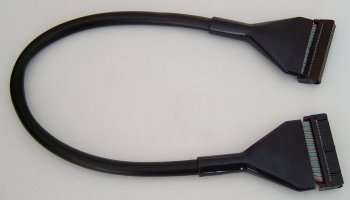
Round

However, as with an IDE cable, the convention is for Pin 1 on the connector to correspond with the red wire of the floppy drive ribbon.


This applies with rounded floppy cables – as we’re using here – as well as the more conventional floppy ribbon cable.
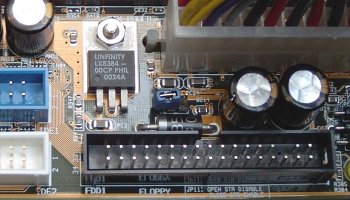
Motherboard

Connect the floppy drive ribbon between the drive and the the floppy drive connector on the motherboard – next to the pair of IDE controllers – making sure to similarly align the red line up with Pin 1 on the motherboard connector. These days both connectors and cables are keyed to prevent them being inserted the wrong way round.


A standard 5-connector floppy ribbon cable is a far more complex looking beast.
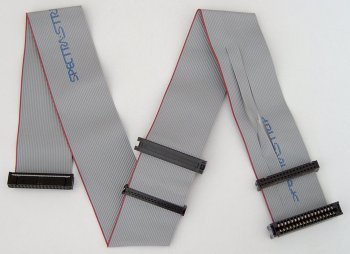
Floppy

At one end is a 34-pin header connector for connection to the motherboard floppy disk controller. In the middle and at the opposite end of the cable are two pairs of connector, each comprising a 34-pin header type connector for use with a modern day 3.5in floppy drive and a larger card edge connector – used in bygone days by older 5.25in floppy disk drives.


However, it is the twist in the cable that effectively reverses the signals sent by a group of seven of the cable’s wires, immediately before the end pair of connectors, that characterises a conventional floppy drive ribbon cable.

Historically, floppy drives used a drive select (DS) jumper to configure the drive as either the A: or B: drive in the system. These days floppy drives come preconfigured as :B drives and its the floppy cable itself that determines how the system sees the drive.

A drive connected to the middle connector will be seen as it’s been configured, namely as a :B drive. However, a drive connected to the end connector will effectively have it’s drive letter designation reversed by the twist in the cable, so that it’s recognised as an :A drive.

Power connector:

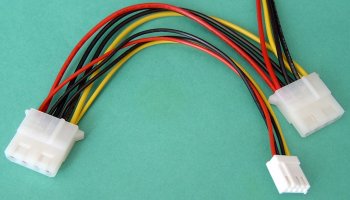
The small white connector to the left of the controller connector is the drive’s power connector.
Power

Connect this to a spare small female 4-pin white connector from the power supply.

Again, the connector and receptacle are keyed to prevent insertion the wrong way round.

  • Drive Installation Terminology
  • CD-RW Installation Intro
  • CD-RW Installation Configuration
  • CD-RW Installation Mounting
  • CD-RW Installation Connection
  • CD-RW Installation Bios Setup
  • CD-RW Burning Software
  • CD-RW Installation Optimization
  • Floppy Installation Intro
  • Floppy Installation Mounting
  • Floppy Installation Connection
  • Floppy Drive Installation BIOS Setup

Filed Under: How to Install a Front Loading Drive

Latest Articles

Guide to Intel’s Mobile Celeron CPU

Co-incident with the launch of Dixon, Intel also introduced its first Mobile Celeron CPUs, at clock speeds of 266MHz and 300MHz. Technically, these CPUs were distinguished from the Dixon range only by the fact that they had 128KB of on-die … [Read More...]

Perfect Data Solutions PST Repair Review

PROS: Quick and easy installation. CONS: You must register this product to use it. Otherwise, you just get a demo screen. OVERVIEW: Perfect Data Solutions PST Repair is easy to use and install. It is geared towards novice users, and is quite a bit cheaper than some of the other PST repairs out … [Read More...]

VXA Tape Storage technology

Streaming is the technique used to transfer data in linear and helical scan tape drives, which operate by reading an entire track thousands of bytes long in a single pass of a Read head at a fixed tape speed. In order for such drives to operate … [Read More...]

Why Internet Bundles Are the Next Battleground for Gamers

A weak internet connection can turn seamless gaming sessions into frustrating experiences filled with lag, buffering or sudden disconnects. For … [Read More...]

Importance of Inbound Marketing in the Digital Age

A couple of months ago, Zacks reported that Hubspot was starting to make some major changes to its inbound marketing strategy. They talk a lot about … [Read More...]

Damage Control Strategies for Resolving Online PR Crises

Last July, Astrologer faced a major crisis after its CEO went viral at a ColdPlay concert when having an affair. This was just one of the many times a … [Read More...]

AI is Not Killing Computer Jobs Like Doomers Projected

There is no denying the reality that AI technology has played a massive role in disrupting our lives. A growing number of people claim that AI … [Read More...]

Everything You Need to Know About Sourcing Circuit Boards From U.S. Suppliers

In This Article This article includes: Why Source PCBs From the United States?How to Get a Quote From a U.S.-Based PCB ManufacturerThe Top U.S. … [Read More...]

Top Taplio Alternatives in 2025 : Why MagicPost Leads for LinkedIn Posting ?

LinkedIn has become a strong platform for professionals, creators, and businesses to establish authority, grow networks, and elicit engagement. Simple … [Read More...]

Guides

  • Computer Communications
  • Mobile Computing
  • PC Components
  • PC Data Storage
  • PC Input-Output
  • PC Multimedia
  • Processors (CPUs)

Recent Posts

CD-ROM Burn Proof Technology

Buffer underrun is one of the biggest problems encountered in CD recording. This can happen when attempting to burn a CD whilst performing other … [Read More...]

Windows Antivirus Adviser

Windows Antivirus Adviser is a fake antivirus program.  This kind of virus is very common on the internet and they have been around for years under … [Read More...]

TCO Monitor Standards

In 1995, TCO modified the requirements for visual ergonomics and added a range of conditions to cover environmental … [Read More...]

[footer_backtotop]

Copyright © 2026 About | Privacy | Contact Information | Wrtie For Us | Disclaimer | Copyright License | Authors